web
You’re offline. This is a read only version of the page.
close
Skip to main content

Notifications

Announcements

No record found.

Community site session details

Community site session details

Session Id :
Microsoft Dynamics CRM (Archived)

How to customize activities display field.

(0) ShareShare
ReportReport
Posted on by 815

Hi,

I know we cannot customize activities entity such as appointment, phones, etc. So i have created custom activities entity.  

It is working fine but 1 issue we facing. On the Activities log which appear on the notes screen, it shows only subject field data but we want to add more fields to show on the activities log.

Pl find screenshot.
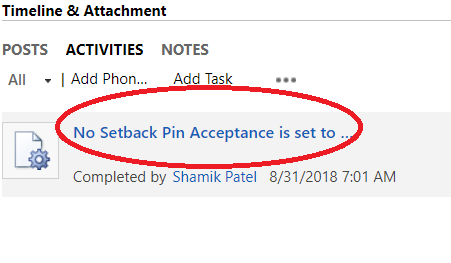
coment.png

How to add field on the custom entity ?

*This post is locked for comments

I have the same question (0)
  • Suggested answer
    Aric Levin - MVP Profile Picture
    30,190 Moderator on at

    Hi Syed, the activities timeline/custom control cannot be modified. What you see there is what what is OOB, and cannot be changed.

    Sorry. Hope this helps.

  • Suggested answer
    Arun Vinoth Profile Picture
    11,615 Moderator on at

    You should be able to customize the card form & the settings in Timeline.

    4331.act.png

  • Syed_Faisal Profile Picture
    815 on at

    Hi Arun,

    Where can i find this customize card form option ?

    Regards

    Faisal

  • Verified answer
    Alex Fun Wei Jie Profile Picture
    33,628 on at

    Hi Syed,

    Please note that the above customization is working for unified interface.

    coderscollection.wordpress.com/.../unified-interface-properties-for-activity-tab-activity-feed-timeline

  • Syed_Faisal Profile Picture
    815 on at

    Thanks alex, we accessing through web and i think need to install unified software to connect.

    and we using on-premise which doesn't have this feature

  • Suggested answer
    Arun Vinoth Profile Picture
    11,615 Moderator on at

    <applicable for UCI - latest version>

    I think we can change this behavior using a custom card form.

    I played around a bit & used this particular combination of "Default format" with a new custom "Card form" to achieve it

    3630.timeline.png

    The default card form uses Priority & Modified on by default. Instead of messing with that - I used a new card form. The header can have 2 fields max - I put a party field & scheduled end time there. Then 3 fields in body - I used subject, party & description. 

    Instead of default format - field labels may be used, and instead of card form - default fields can be used. But the combination of "Default format" + "Card form" works best.

  • The Hulk Profile Picture
    20 on at

    Where do  Ifind this settings?  

Under review

Thank you for your reply! To ensure a great experience for everyone, your content is awaiting approval by our Community Managers. Please check back later.

Helpful resources

Quick Links

Responsible AI policies

As AI tools become more common, we’re introducing a Responsible AI Use…

Neeraj Kumar – Community Spotlight

We are honored to recognize Neeraj Kumar as our Community Spotlight honoree for…

Leaderboard > 🔒一 Microsoft Dynamics CRM (Archived)

#1
SA-08121319-0 Profile Picture

SA-08121319-0 4

#1
Calum MacFarlane Profile Picture

Calum MacFarlane 4

#3
Alex Fun Wei Jie Profile Picture

Alex Fun Wei Jie 2

Last 30 days Overall leaderboard

Featured topics

Product updates

Dynamics 365 release plans
