web
You’re offline. This is a read only version of the page.
close
Skip to main content

Notifications

Announcements

No record found.

Community site session details

Community site session details

Session Id :
Finance | Project Operations, Human Resources, ...
Suggested Answer

D365 Finance and Operation Roles Security setup via AAD

(0) ShareShare
ReportReport
Posted on by 35

Hello!

Need your assistance again, I am not sure if I can explain this clearly but let me try.

We are using Azure Active Directory to control the security of D365 Finance and Operation. Groups will be created to AAD, then AD account will be under that group for us to access the system. 

This AD account will now be imported to D365 Finance and Operation for us to be able to access the D365 FinOps.


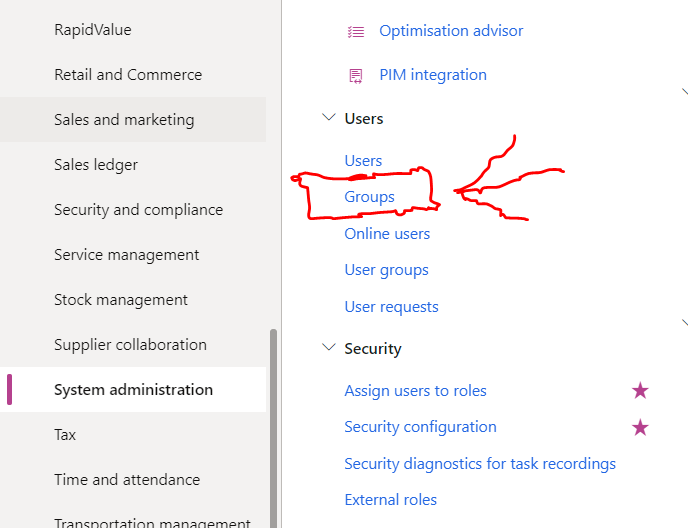
The thing is, roles are not assigned on the users. What we do is that, the groups from AAD are imported in D365 FinOps, then the role be assigned to this Group.

for example:

AD Group: Finance

AD Account: Mr. ABC (Mr ABC is a member of AD Group Finance in Azure Active Directory)

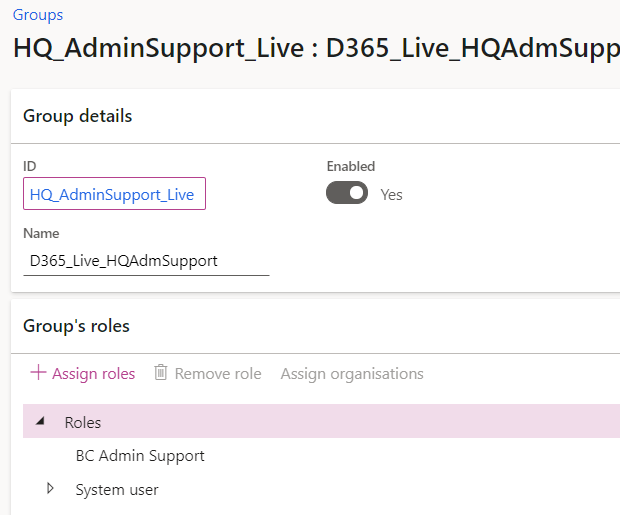
Going back in D365 FinOps, there is a role named HQFinance, and this role is assign to Group Finance in D365. See below as example.
pastedimage1625220194776v2.png

pastedimage1625220088332v1.png

Role is created in D365 FinOps, then will be assigned to Groups in D365 as well.

This Group is imported from AAD, there are no assigned role on the USERS in D365. all roles are assigned into the groups.

Then from D365 group to AAD group, it will be linked to the users via AAD group membership.

This works at most users, but here is my challenge (problem).

This HQFinance role, is assigned to AD Group Finance, the expectation is that, Mr. ABC will be able to access a certain functionality in D365, let's say to create Manual Payment Journal. But this functionality is disabled for M. ABC despite the fact that Priv and Duty is assigned to HQFinance role.

What I have tried is to assigned the HQFinance role direct to Mr. ABC user, and then the functionality is accessible. That is why I know that the right PRIV and DUTY is assigned to HQFinance role, since I am able to access it if the role is directly assigned to the USER itself. But if the I follow the supposed to be how the business wants it, Mr. ABC cannot access the functionality.

Need your insights, does anyone have same issue?

Take note:

- the functionality is not standard, it is under an ISV module

- MR. ABC is also member of other AD groups which is also finance related but might be for different purpose and access (does this affect the role access?)

- we are not allowed to put the roles directly to the USER account in D365

Please help. 

I have the same question (0)
  • NikolajSorensen Profile Picture
    1,792 on at

    Hi.

    The AAD security group relation into D365 and the inheritance of access from the roles assigned on the AAD groups to the user assigned to the groups is actually a standard feature and not an ISV solution.

    Standard however the feature is not enabled and it is not well documented.

    There are certain features that do not work with security assignments through AAD, but again it is not documented by Microsoft.

    With regards to the specific issue at hand are you certain that the user is a member of the relevant AAD group?

    In different areas of D365 there are possibilities to setup specific user roles which should have access to the specific areas. If this has been setup in the area you are looking at, then that might also be a reason.

    Can you share some more details about what exact functionality cannot be accessed with the AD group membership role?

  • Suggested answer
    André Arnaud de Calavon Profile Picture
    300,911 Super User 2025 Season 2 on at

    Hi Lhae,

    The behavior you noticed is by default and I wrote a blog about How to use Azure Active directory for managing users and security in Dynamics 365 for Finance and Operations. This is mentioning downsides of not having the roles directly assigned to a user. Your ISV solution is probably checking direct role, duty or privilege assignments which then has the same impact as the examples I mentioned in my blog.

    A few months ago, one customer reached out to my company (To-Increase) with this blog and asked for help as they also had the requirement to have no manual assignments in the application themselves. With help of our ISV solution (Security and Compliance Studio) and automatic role assignment, we were able to get their requirement fulfilled. Our solution is aware of the Azure AD group assignments. For this reason, we could use that information to setup rules to assign roles automatically and revoke when the group assignment has been revoked. 

    You can ask your ISV vendor if their functionality can be adjusted to their needs, check our solution or go for another solution for direct role assignments. 

  • Lhae Profile Picture
    35 on at

    Hi André,

    Thank you for this, is it possible to know that if the ISV functionality is checking a direct role?

    And can you please tell me how does your ISV can help on scenario like this?

    Thanks!

  • Lhae Profile Picture
    35 on at

    Hi NikolajSorensen,

    Yes I am certain, I have imported the group from AD, Mr. ABC is a member of that AD Group. Then the role is assigned to this AD Group.

    The functionality that I am checking is the Manual Payment, but not from standard module. It is from an ISV, Banking Module, on where adding manual payment is disabled on a Finance User.

    I have test the same role (that I have assigned on AD group) and assigned it direct to Mr ABC user, and the functionality is enabled. But when I assigned this to the AD Group (removed it from Mr ABC user), the functionality is disabled.

    Any more thoughts?

  • NikolajSorensen Profile Picture
    1,792 on at

    I would advice you to check if there is any way in the ISV to setup specific roles which can access the Manual payment functionality.

    This type of setup is used in different places in D365FO and could potentially be used by the ISV as well.

    This could be an explanation of why the functionality is not available unless the role is attached directly to a user. This would though require that someone has already done such a setup in your environment.

  • Suggested answer
    André Arnaud de Calavon Profile Picture
    300,911 Super User 2025 Season 2 on at

    Hi Lhae,

    You can contact the ISV vendor of the payment solution to ask how they currently check it and if it could be optimized to also support your scenario where you want to manage access via Azure AD.

    Our ISV solution is aware of the Azure AD group assignments. This information is stored in one of our added ISV tables. The purpose of the table was to provide more insights in access per person, and if the organization is compliant with the Dynamics 365 FinOps licenses. Besides the added insights, the same table can be used as information for automatic role assignments. In that way, the role is directly linked to the user which in fact solves all the downsides of features checking for linked roles, duties and privileges which I did mention in my blog.  

Under review

Thank you for your reply! To ensure a great experience for everyone, your content is awaiting approval by our Community Managers. Please check back later.

Helpful resources

Quick Links

Responsible AI policies

As AI tools become more common, we’re introducing a Responsible AI Use…

Neeraj Kumar – Community Spotlight

We are honored to recognize Neeraj Kumar as our Community Spotlight honoree for…

Leaderboard > Finance | Project Operations, Human Resources, AX, GP, SL

#1
Martin Dráb Profile Picture

Martin Dráb 664 Most Valuable Professional

#2
André Arnaud de Calavon Profile Picture

André Arnaud de Cal... 522 Super User 2025 Season 2

#3
Sohaib Cheema Profile Picture

Sohaib Cheema 303 User Group Leader

Last 30 days Overall leaderboard

Product updates

Dynamics 365 release plans