web
You’re offline. This is a read only version of the page.
close
Skip to main content

Announcements

No record found.

News and Announcements icon
Community site session details

Community site session details

Session Id :
Finance | Project Operations, Human Resources, ...
Answered

put a condition based on a field in the caller form selected record

(0) ShareShare
ReportReport
Posted on by 47

Dear All;

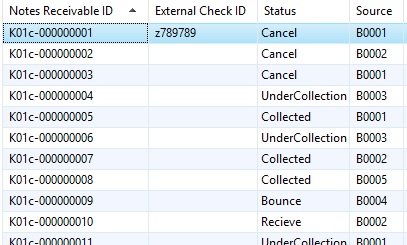
I have Form A which has the following grid

8686.jpg

and form B which is called by form A

7752.jpg

i want to filter form B based on status column whenever Form A record "steptype" field have different status

my code was 

    if (element.args().caller() && element.args().dataset() == tableNum(ADVChecksMultiPost))
    {
    if (element.args().refField(ADVChecksMultiPost.ADVCHKStepTypeNew) == ADVCHKStepType::UnderCollection)
    {
     this.query().dataSourceTable(tableNum(ADVChecks)).addRange(fieldNum(ADVChecks, ADVCHKStepType)).value(enum2str(ADVCHKStepType::Recieve));
    }
    }

the third line doesn't seem to be working

I have the same question (0)
  • André Arnaud de Calavon Profile Picture
    303,128 Super User 2026 Season 1 on at

    Hi m.saleh297,

    Can you explain what you mean with 'whenever'? Do you want to change the filter when you change a record on Form A and form B is still open? Have you also used the debugger to check what is actually being executed?

  • m.salah297 Profile Picture
    47 on at

    Hi Andre;

    no i want records to be changed be changer wherever i open form b based on the selected row from form B.

    and what i tried is to remove the step type condition in line 3 and then the filter is applied successfully.

  • Verified answer
    m.salah297 Profile Picture
    47 on at

    Thanks Andre I have changed the code to


    if (element.args().parmEnum(2))

    it works fine now

  • André Arnaud de Calavon Profile Picture
    303,128 Super User 2026 Season 1 on at

    Thanks for providing the solution to your own question. I have marked your answer as verified to get the status of this question changed to 'Answered'.

Under review

Thank you for your reply! To ensure a great experience for everyone, your content is awaiting approval by our Community Managers. Please check back later.

Helpful resources

Quick Links

Introducing the 2026 Season 1 community Super Users

Congratulations to our 2026 Super Stars!

Congratulations to our 2025 Community Spotlights

Thanks to all of our 2025 Community Spotlight stars!

Leaderboard > Finance | Project Operations, Human Resources, AX, GP, SL

#1
André Arnaud de Calavon Profile Picture

André Arnaud de Cal... 583 Super User 2026 Season 1

#2
Giorgio Bonacorsi Profile Picture

Giorgio Bonacorsi 378

#3
Diego Mancassola Profile Picture

Diego Mancassola 255

Last 30 days Overall leaderboard

Product updates

Dynamics 365 release plans