web
You’re offline. This is a read only version of the page.
close
Skip to main content

Notifications

Announcements

No record found.

Community site session details

Community site session details

Session Id :
Customer experience | Sales, Customer Insights,...
Answered

Section Elements Missing?

(0) ShareShare
ReportReport
Posted on by 110

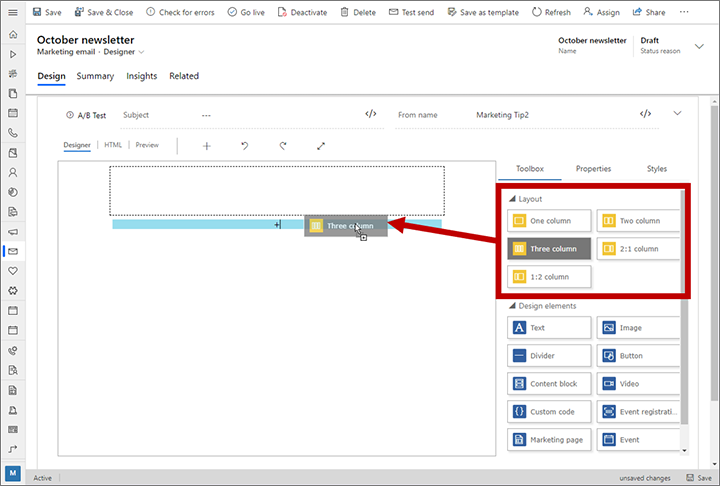
Hi i'm hoping someone can help with this one! We're quite new to Dynamics 365 Marketing and have noticed that when creating a Marketing Email, section elements are missing for some reason
email_2D00_layout_2D00_add.png

We didn't notice it was missing until we saw this documentation https://docs.microsoft.com/en-us/dynamics365/marketing/design-digital-content - We can only see the 'Design elements' section

I was wondering if it was a permissions issue, but i'm System Administrator and i don't see it either, so am now wondering if it's some kind of configuration we're missing. I've tried all the built-in templates available (even a blank one) and we still don't see it

Can anyone help with what else to try to get it to appear please?

Thanks

I have the same question (0)
  • Suggested answer
    d_radulova Profile Picture
    2 User Group Leader on at

    Hi @Paul McDonald,

    Let's check if you have the latest version or whether you are due an update.

    Steps:

    1. Go yo your instance picker

    https://port.crm11.dynamics.com/G/Instances/InstancePicker.aspx / https://port.crm4.dynamics.com/G/Instances/InstancePicker.aspx, etc

    pastedimage1571660118174v2.png

    2. Select your environment from the list 

    3. Click Applications

    pastedimage1571660177328v3.png

    4. Find your configured Marketing application and click Manage

    You will either see Your application is up to date. or Update available.

    pastedimage1571660363262v1.pngpastedimage1571660389398v2.png

    If you are due an upgrade, this might be the reason. 
    Thanks,
    -DD
  • Paul McDonald Profile Picture
    110 on at

    Hi thanks for replying - we do have an update available but from the sounds of it, this is something that hasn't been there all along, so not sure if this would be it but will give it a go

    If it still doesn't appear after the update, is there anything else you can think of?

    Thanks

  • Suggested answer
    d_radulova Profile Picture
    2 User Group Leader on at

    It will appear. :)

    The only other thing it could be is what region you are in. But let's cross that bridge when / if we need to.

    Let me know how you get on.

    Thanks,

    -DD

  • Paul McDonald Profile Picture
    110 on at

    Hi just an update on this one, i'm just performing the updates now so once it's complete i'll see if that fixes it and report back!

  • Paul McDonald Profile Picture
    110 on at

    The update has finished and the layout section has now appeared! Thanks for your help :)

  • Suggested answer
    d_radulova Profile Picture
    2 User Group Leader on at

    Anytime. Glad it worked.

    Now you have the latest platform version, don't forget to enable AI spam score and see the spam score of your pretty emails once you have crafted them  :)

    Thanks,

    -DD

Under review

Thank you for your reply! To ensure a great experience for everyone, your content is awaiting approval by our Community Managers. Please check back later.

Helpful resources

Quick Links

Responsible AI policies

As AI tools become more common, we’re introducing a Responsible AI Use…

Neeraj Kumar – Community Spotlight

We are honored to recognize Neeraj Kumar as our Community Spotlight honoree for…

Leaderboard > Customer experience | Sales, Customer Insights, CRM

#1
Tom_Gioielli Profile Picture

Tom_Gioielli 137 Super User 2025 Season 2

#2
#ManoVerse Profile Picture

#ManoVerse 57

#3
Jimmy Passeti Profile Picture

Jimmy Passeti 50 Most Valuable Professional

Last 30 days Overall leaderboard

Product updates

Dynamics 365 release plans
