web
You’re offline. This is a read only version of the page.
close
Skip to main content

Notifications

Announcements

No record found.

Community site session details

Community site session details

Session Id :
Microsoft Dynamics CRM (Archived)

CRM 2016 tabObj.getDisplayState() Returns Opposite of Expected Value

(0) ShareShare
ReportReport
Posted on by

I think there is a bug with the TabStateChange customization in CRM 2016.  I am posting this here so I can refer to it from the Dynamics CRM Connect forum.  The formatting is much better here!

Does anyone else have this issue?

Scenario:

I have this javascript

function tabStateChange(context) {
    var formTab = context.getEventSource();
    console.log("tabname: " + formTab.getName() + " DisplayState: " + formTab.getDisplayState());
}


Configured on this tab event
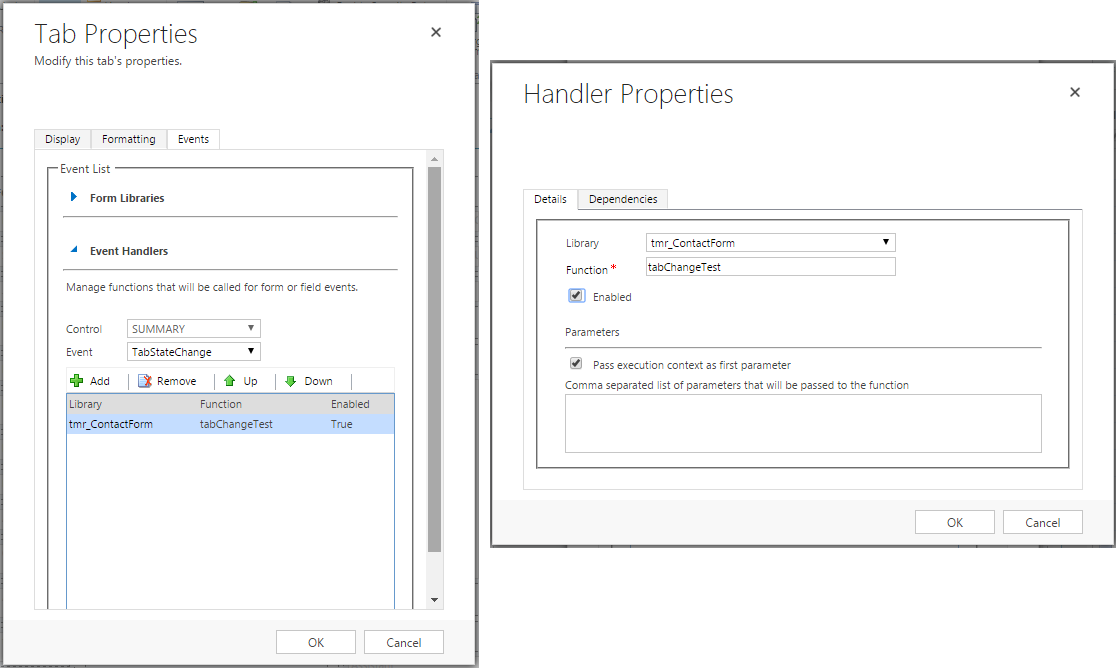
form_2D00_tab_2D00_event.png


Assume the tab is customized to be expanded by default.

In CRM 2011, I click the tab to collapse it, and I get a console log that says "tabname: SUMMARY DisplayState: collapsed" as expected.  I click again to expand it, the log text says expanded.  That is correct.

In CRM 2016, same code and same configuration as 2011, when I click to collapse the already expanded tab, the log text says "tabname: SUMMARY DisplayState: expanded".  I expect it to say collapsed.  When I click the collapsed tab, the event fires and the log text says collapsed instead of expanded.  This seems wrong.

It seems in CRM 2016, it seems the TabStateChange javascript does not get executed after the tab control state is updated.  I could just remember that formTab.GetDisplayState() called in the event actually means the opposite of what it returns, but that is wrong.

*This post is locked for comments

I have the same question (0)
  • Zakkk Profile Picture
    10 on at

    Hi gfritz,

    I can confirm this behavior.
    Does anyone have a workaround for this?

  • Inogic Profile Picture
    703 on at

    Hi Garth,

    It always gives the current state of the tabs. So if currently state of tab is expanded and you click on that then it returns current state i.e. “Expanded” and then it collapse it. So again if you click on tab then it return “Collapsed” state.

    Hope this helps!

    Thanks!
    Sam

  • gfritz Profile Picture
    on at

    Hi Sam,

    That makes sense and I guessed as much.  It's just weird that in 2011 (and presumably 2013 - I don't have a 2013 instance) the behavior was opposite of the 2016 behavior, and my opinion is it made more sense in 2011.  Maybe my thinking about tab onChange events is not correct anymore in 2016.

    It is easy enough to workaround though it feels like a regression in 2016.

    Still wanting the Microsoft opinion before closing this question.

  • Community Member Profile Picture
    on at

    I can see the reason of making getDisplayState() to return the old/current value, instead of the new/updated value. But I wish Microsoft would document this better on the online documentation.

  • Community Member Profile Picture
    on at

    Indeed this is reversed.

    So from CRM 2011 to CRM 2015. If you clicked on a closed tab to open it, the .GetDisplayState() function reported 'Expanded'. This makes sense as you are about to open it and presumably the code that you wanted to run is for the 'Expanded' state.

    In CRM 2016 this is now the opposite. On clicking a Tab. The Javascript function .GetDisplayState will now return 'Collapsed' so its going to be difficult to see where the tabs are at.

    For example. If I click a tab from collapsed to open I will now need to look for the 'Collapsed' value to run my code for an open tab. However if I did not just open the tab then I will be looking for the 'Expanded' value.

    I am guessing that Microsoft possibly moved this code firing from PostEvent to PreEvent?

    Would be interesting to get a Microsoft comment on this.

Under review

Thank you for your reply! To ensure a great experience for everyone, your content is awaiting approval by our Community Managers. Please check back later.

Helpful resources

Quick Links

Responsible AI policies

As AI tools become more common, we’re introducing a Responsible AI Use…

Neeraj Kumar – Community Spotlight

We are honored to recognize Neeraj Kumar as our Community Spotlight honoree for…

Leaderboard > 🔒一 Microsoft Dynamics CRM (Archived)

#1
SA-08121319-0 Profile Picture

SA-08121319-0 4

#1
Calum MacFarlane Profile Picture

Calum MacFarlane 4

#3
Alex Fun Wei Jie Profile Picture

Alex Fun Wei Jie 2

Last 30 days Overall leaderboard

Featured topics

Product updates

Dynamics 365 release plans



