web
You’re offline. This is a read only version of the page.
close
Skip to main content

Notifications

Announcements

No record found.

Community site session details

Community site session details

Session Id :
Finance | Project Operations, Human Resources, ...
Answered

Duplicate records with import Customers

(0) ShareShare
ReportReport
Posted on by 822

Hello,

i have used data entity Customers V3 to import customers with addresses.

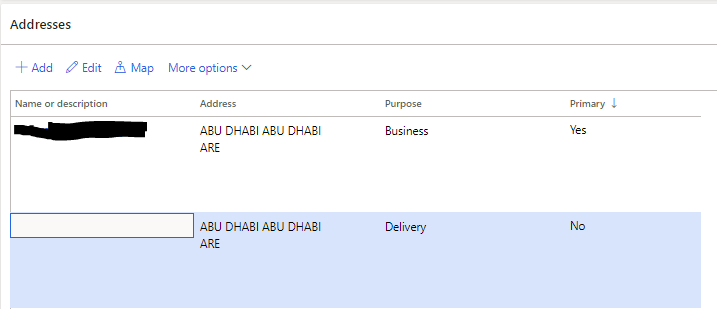
I realized that for every customer D365 has created two lines as per following screenshot:
pastedimage1586501234187v1.png

Notes:

1- Template has only one address for every customer: the first one.

2- Second address is created by system.

3- When i try to remove the second addess (with Name/description = blank) i got a message: this is a default address, do you want to remove?

is there any field to specify what is the default address to fix this? i have checked all fields of the template but didn't find.

kindly advice,

Regards,

David

I have the same question (0)
  • Suggested answer
    Rahul Mohta Profile Picture
    21,032 on at

    you might have created for delivery purpose as default and hence it is getting created

  • David Tailor Profile Picture
    822 on at

    Nope. AddressLocationRoles = Business only and every customer as one address line.

    Regards,

    David

  • qianwang Profile Picture
    7,168 on at

    Hi David Tailor,

    What version are you using and which fields are filled in your template?

    Regards,

    QianQW

  • Verified answer
    SouravDam Profile Picture
    11,730 on at

    Hello David Tailor,

    Can you check first if all these customers are already created in the same environment or not? If yes; then also check if you are trying to upload the same records with different purpose like "Business" or "Delivery"?

    I think you are using both "AddressCity", "AddressCountryRegionId" and "DefaultAddressCity", "DefaultAddressCountryRegionId" data entities while uploading the master data.

    Can you just try by using only these 2 data entities like AddressCity and AddressCountryRegionId. You can use this template and update us the status.

    CUSTOMER-MASTER-DATA.xlsx

    Best regards,
    Sourav Dam

    Kindly mark this thread 'Yes' if this is answered your query which may help other community members in this forum.

  • David Tailor Profile Picture
    822 on at

    find the following screenshot for fields used on Customers v3

    pastedimage1586521812350v2.png

    pastedimage1586521865706v3.png

    is it because of deliveryaddressid field?

    Regards,

    David

  • Suggested answer
    SouravDam Profile Picture
    11,730 on at

    Hello David Tailor,

    If the business address and delivery address are different for the customer, then you can use both.

    Else, you can just upload one address as business purpose.

    Better to check with the client to get to know if they want to maintain 2 separate addresses for the customers or only 1 address.

    Use the UAT system and upload a dummy customer by using only the "AddressCity" and "AddressCountryRegionId" columns and check if this is actually creating 2 separate addresses or not. Hopefully it will create only 1 address with purpose as 'Business'.

    Please check and update on this thread.

    Best regards,
    Sourav Dam

    Kindly mark this thread 'Yes' if this is answered your query which may help other community members in this forum.

  • David Tailor Profile Picture
    822 on at

    Hello Sourav,

    This is true what you said, either i have to choose AddressCity and AddressCountryRegionId with AddressLocationRoles to insert one record with defined purpose: Delivery, Business, ... or

    i have to choose DeliveryAddressCity and DeliveryAddressCountryRegionId with AddressLocationRoles = blank, in this case system will give purpose "Delivery" and insert one record also.

    In summary filling the above 5 fields (in bold) will insert 2 records in Address Fast Tab.

    Thanks for all.

    Regards,

    David

  • Suggested answer
    SouravDam Profile Picture
    11,730 on at

    Hello David Tailor,

    Good to know that your case is solved and you have come to a conclusion on this.

    Appreciate if you kindly mark this thread as 'Verified' if the discussion helps you to fix this issue which could be helpful for other members in this Forum too.

    Make a great day ahead...

    Best regards,
    Sourav Dam

    Kindly mark this thread 'Yes' if this is answered your query which may help other community members in this forum.

  • Suggested answer
    SouravDam Profile Picture
    11,730 on at

    Hello David Tailor,

    Is this sorted out? Could you kindly verify the suggestion on this thread.

    Best regards,
    Sourav Dam

    Kindly mark this thread 'Yes' if this is answered your query which may help other community members in this forum.

Under review

Thank you for your reply! To ensure a great experience for everyone, your content is awaiting approval by our Community Managers. Please check back later.

Helpful resources

Quick Links

Responsible AI policies

As AI tools become more common, we’re introducing a Responsible AI Use…

Neeraj Kumar – Community Spotlight

We are honored to recognize Neeraj Kumar as our Community Spotlight honoree for…

Leaderboard > Finance | Project Operations, Human Resources, AX, GP, SL

#1
André Arnaud de Calavon Profile Picture

André Arnaud de Cal... 456 Super User 2025 Season 2

#2
Martin Dráb Profile Picture

Martin Dráb 429 Most Valuable Professional

#3
BillurSamdancioglu Profile Picture

BillurSamdancioglu 239 Most Valuable Professional

Last 30 days Overall leaderboard

Product updates

Dynamics 365 release plans
