web
You’re offline. This is a read only version of the page.
close
Skip to main content

Notifications

Announcements

Community site session details

Community site session details

Session Id :
Customer experience | Sales, Customer Insights,...
Suggested Answer

View used in Dashboard

(1) ShareShare
ReportReport
Posted on by 10

Hi All,

I'm creating a view to use in dashboard to show distinct count. I'm using FetchXMl Builder in xrmtoolbox, the fetchxml able to show the result correctly. However, when try to view in the dashboard the following error shown. Note that the count is bassed on record in the linked entity.

pastedimage1596798622780v1.png

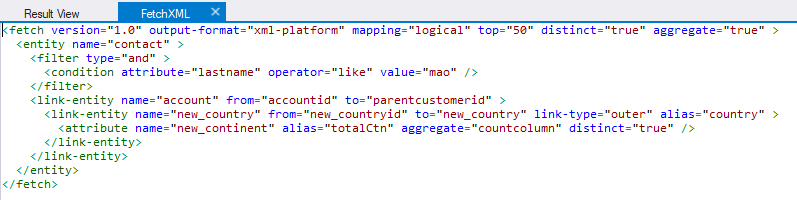
When I try to use advanced find to display the view, the same error occured. Following is my Fetchxml code


Any advice is much appreciated.

Thanks.

Regards,

Teh

I have the same question (0)
  • Suggested answer
    cloflyMao Profile Picture
    25,210 on at

    Hi Teh,

    Based on the information you provided, I created a custom entity "new_country" for testing, 

    and set the entity as a lookup field of Account entity. 

    As per my understanding, I used Contact entity to refer to your ads_keycontact entity, and new_country entity to "ads_country", thus the relationships of those three entities are contact <-> account (N:1), 

    account <-> new_country(N:1).

    Here is a demo dataset based on your query without aggregation and distinction, and the filter is changed to fullname contains 'Mao':

     contact fullname     company country    company region
     Clofly Mao   USA    NA
     Alex Mao   China    Asia
     Admin Mao   Japan     Asia
     Office Mao   Germany    Europe
     Solid Mao   USA    NA

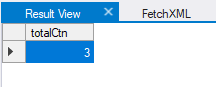
    So the expected of your original Fetchxml query is 3.
    pastedimage1597043863677v1.png

    If my test is correct, then the reason of your issue would be caused by returntotalrecordcount property.

    Having searched many web sites, it seems that the property was only supported in CRM2011, I'm not sure whether this property is still supported by Dynamics 365 for Marketing application.

    Because your fetchxml is able to work when I remove returntotalrecordcount. (However, if I keep it, the query still encountered same error in your posted picture even in FetchXMl Builder in xrmtoolbox)

    You could replace the original two rows

    with another row:

    From my test, the modification got the same expected total record as returntotalrecordcount.
    pastedimage1597043946765v2.png

    pastedimage1597043970143v3.png

    Regards,

    Clofly

  • Venedict Profile Picture
    1,235 on at

    Hi Clofly,

    Looking at the errors, it seem that the system always populate unique key into the view automatically when my fetchxml is not putting that attribute.

    In fact, my purpose is to display the distinct count in the tiles views. But it seem like the interactive dashboard doesn't support. Correct?

    Thanks.

    Regards,

    Teh

  • cloflyMao Profile Picture
    25,210 on at

    Hi NurNina01 and Teh,

    (Are you the same person? :) )

    I want to correct my answer, returntotalrecordcount attribute is always supported by Dynamics.

    The actual reason to cause the issue might be that a fetchXml query with returntotalrecordcount attribute enable will return an extra property: @odata.count, 

    hence dashboard is not able to read the result.

    To test, I ran two different fetchxml:

    result when returntotalrecordcount is enabled 

    0804.JPG

    result without the attribute(@odata.count is not available)

    0247.JPG

    In a word, you could add a HTML web resource with fetchxml query to dashboard to show distinct count by yourself.

    Regards,

    Clofly

  • Venedict Profile Picture
    1,235 on at

    Hi Clofly,

    Not sure why my post is using NurNina which is my colleague name.

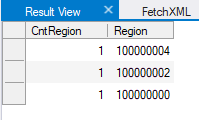
    Anyway, do you have the sample html web resource code to fetch the result? I managed to fix the view to display the distinct value. However, when come to the interactive dashboard, the view is showing differently.

    region.jpg

    It looks to me this is due to the card form in the entity itself. The region is an option set value in my country entity, that's why the count is showing based on country, not the region as per my view.

    Regards,
    Teh

Under review

Thank you for your reply! To ensure a great experience for everyone, your content is awaiting approval by our Community Managers. Please check back later.

Helpful resources

News and Announcements

Season of Giving Solutions is Here!

Quick Links

Responsible AI policies

As AI tools become more common, we’re introducing a Responsible AI Use…

Neeraj Kumar – Community Spotlight

We are honored to recognize Neeraj Kumar as our Community Spotlight honoree for…

Leaderboard > Customer experience | Sales, Customer Insights, CRM

#1
Pallavi Phade Profile Picture

Pallavi Phade 101

#2
Tom_Gioielli Profile Picture

Tom_Gioielli 72 Super User 2025 Season 2

#3
TAHER Mehdi Profile Picture

TAHER Mehdi 58

Last 30 days Overall leaderboard

Product updates

Dynamics 365 release plans