web
You’re offline. This is a read only version of the page.
close
Skip to main content

Notifications

Announcements

No record found.

Community site session details

Community site session details

Session Id :
Microsoft Dynamics CRM (Archived)

MS Dynamics 365 On-Premise Installation Issue: Microsoft.Crm.Setup.Server.GrantConfigDBDatabaseAccessAction failed. Windows NT user or group 'MYDOMAIN\SQLAccessGroup' not found. Check the name again.

(0) ShareShare
ReportReport
Posted on by

Hello, 

While installing the Dynamics 2016 server on-premise, I faced the issue "

"Microsoft.Crm.Setup.Server.GrantConfigDBDatabaseAccessAction failed. Windows NT user or group 'MYDOMAIN\SQLAccessGroup' not found. Check the name again."
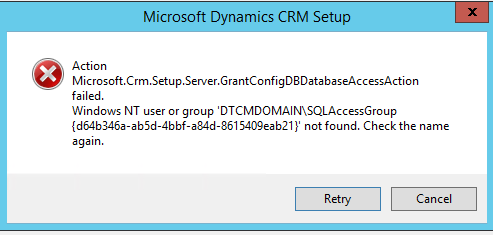
CRM-installation-Issue-2.png

[CAUSE]

There were two reasons for the issue:

  1. There was a remote session of the Database server (Server running SQL incessant) opened with the same user account that we were using to run the CRM Setup. 
  2. SQL Management Studio was opened and logged in with the same user account running the CRM Setup. 

[SOLUTION]

Close all the remote sessions. If not all, then at least the one from the same user account that is running the CRM Setup. 

Close the SQL Server Management Studio sessions (If not all, then at least the one from the same user account that is running the CRM Setup).

Once the sessions are closed, click on Retry on the error dialog and it should work fine!

Hope this will help other as well.

:) Cheers! 

*This post is locked for comments

I have the same question (0)
  • Verified answer
    Community Member Profile Picture
    on at

    Marking as resolved to avoid further hassle

  • Verified answer
    Community Member Profile Picture
    on at

    A worthy mention and acknowledgment:

    weblogs.asp.net/.../microsoft-crm-setup-server-grantconfigdbdatabaseaccessaction-failed-windows-nt-user-or-group-mydomain-sqlaccessgroup-not-found-check-the-name-again

    The only difference is the post is for CRM 2011, and that in my case the SQL server was being used by multiple developers and for many projects, so I couldn't close all RDP connections. Closing the connections of the user running the CRM Setup solved by issue.

Under review

Thank you for your reply! To ensure a great experience for everyone, your content is awaiting approval by our Community Managers. Please check back later.

Helpful resources

Quick Links

Responsible AI policies

As AI tools become more common, we’re introducing a Responsible AI Use…

Neeraj Kumar – Community Spotlight

We are honored to recognize Neeraj Kumar as our Community Spotlight honoree for…

Leaderboard > 🔒一 Microsoft Dynamics CRM (Archived)

#1
SA-08121319-0 Profile Picture

SA-08121319-0 4

#1
Calum MacFarlane Profile Picture

Calum MacFarlane 4

#3
Alex Fun Wei Jie Profile Picture

Alex Fun Wei Jie 2

Last 30 days Overall leaderboard

Featured topics

Product updates

Dynamics 365 release plans



