web
You’re offline. This is a read only version of the page.
close
Skip to main content

Announcements

No record found.

News and Announcements icon
Community site session details

Community site session details

Session Id :
Customer experience | Sales, Customer Insights,...
Suggested Answer

Navigation and Views in Unified Interface

(0) ShareShare
ReportReport
Posted on by 155

Hi,

As much as I like the UCI in Dynamics 365, there are a couple of things that keeps me thinking "why the hell is it like this?".

The first one is the left hand side navigation. It's far too narrow and it doesn't look like there's a way to increase it. I'm not saying that it should be limitless, but at least let me increase the width by 50% if needed! Entity names are not going to be long and will easily fit, but entries under Recent and Pinned will for most parts not fit. 
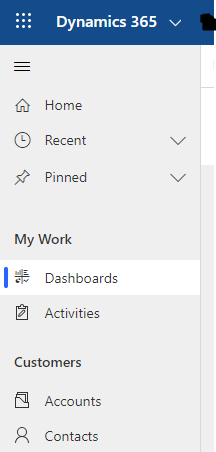
Navigation-Pane.PNG

If the first one is something that you can live with, the second one is something that every single one of my test users have complained about: The size of the dropdown for the View Selector.
Again, it's too narrow. Even some of the system views shipped with the product don't fit in the dropdown! 

Am I missing something here? Is there a straight forward way of making the above adjustments or is this just something we have to put up with?

I have the same question (0)
  • Suggested answer
    ashish12 Profile Picture
    3,079 on at

    Hi,

    You can build your own Model Driven App or use the OOB ones: Here are few tips to use UCI App:

    docs.microsoft.com/.../about-unified-interface

    Thanks

  • LuHao Profile Picture
    40,892 on at

    Hi partner,

    Unfortunately, there is currently no way to increase the size of these things.

    I would recommend you share this idea to Microsoft: experience.dynamics.com/ideas

  • Suggested answer
    AJ-22040756-0 Profile Picture
    Microsoft Employee on at

    Hi Partner,

    As suggested, Unfortunately there's no way to increase the left side navigation and the size of the dropdown for view selector.  You can try by making your model driven apps if that helps.

    Else you can surely post this design changes on experience.dynamics.com/ideas  

Under review

Thank you for your reply! To ensure a great experience for everyone, your content is awaiting approval by our Community Managers. Please check back later.

Helpful resources

Quick Links

Introducing the 2026 Season 1 community Super Users

Congratulations to our 2026 Super Stars!

Meet the Microsoft Dynamics 365 Contact Center Champions

We are thrilled to have these Champions in our Community!

Congratulations to the April Top 10 Community Leaders

These are the community rock stars!

Leaderboard > Customer experience | Sales, Customer Insights, CRM

#1
ManoVerse Profile Picture

ManoVerse 128 Super User 2026 Season 1

#2
11manish Profile Picture

11manish 97

#3
Muhammad Shahzad Shafique Profile Picture

Muhammad Shahzad Sh... 69 Most Valuable Professional

Last 30 days Overall leaderboard

Product updates

Dynamics 365 release plans
