web
You’re offline. This is a read only version of the page.
close
Skip to main content

Notifications

Announcements

No record found.

Community site session details

Community site session details

Session Id :
Small and medium business | Business Central, N...
Suggested Answer

Unable to get CGST, SGST and IGST values in the sales invoice report

(0) ShareShare
ReportReport
Posted on by 76

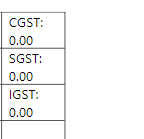
I have created CGST, SGST and IGST fields in "Sales Line" through table extension. I wrote code for CGST, SGST and IGST using OnPostReport trigger in report extension . If i run the extension, i'm unable to get values for CGST, SGST and IGST fields. its shows only 0.00 in my sales invoice report. where i.m doing mistake? why i'm not getting the values for the same. I have included my code here.

tableextension 50127 requiredfieldstableext extends "Sales Line"

{

   fields

   {     

       field(50003; "CGST"; Decimal)

       {

           Caption = 'CGST';

           DataClassification = CustomerContent;

       }

       field(50004; "SGST"; Decimal)

       {

           Caption = 'SGST';

           DataClassification = CustomerContent;

       }

       field(50013; "IGST"; Decimal)

       {

           Caption = 'IGST';

           DataClassification = CustomerContent;

       }       

   }    

}

reportextension 50127 requirefieldsext extends "Standard Sales - Draft Invoice"

{

   WordLayout = './StandardSalesDraftInvoice.docx';

   dataset

   {       

       add(Line)

       {           

           column(CGST; "CGST")

           {

           }

           column(SGST; "SGST")

           {

           }

           column(IGST; "IGST")

           {

           }           

       }

   }

var

        recDetailedGstLedgEnt: Record "Detailed GST Ledger Entry";

        SalesLine: Record "Sales Line";

        gIgstPer: Decimal;

        gCgstPer: Decimal;

        gSgstPer: Decimal;


    Trigger OnPostReport()

    Begin

        recDetailedGstLedgEnt.RESET;

        recDetailedGstLedgEnt.SetCurrentKey("GST Component Code");

        recDetailedGstLedgEnt.SETRANGE("Document No.", recDetailedGstLedgEnt."Document No.");

        //recDetailedGstLedgEnt.SETRANGE("Document Line No.", "Line No.");


        IF recDetailedGstLedgEnt.FINDSET THEN

            IF recDetailedGstLedgEnt."GST Component Code" = 'IGST' THEN BEGIN

                SalesLine.IGST := ABS(recDetailedGstLedgEnt."GST Amount");

                gIgstPer := recDetailedGstLedgEnt."GST %";

                /*Rec.GST := "GST Component Code" on recDetailedGstLedgEnt."GST %";*/

            END ELSE


                IF recDetailedGstLedgEnt."GST Component Code" = 'CGST' THEN BEGIN

                    SalesLine.CGST := ABS(recDetailedGstLedgEnt."GST Amount");

                    gCgstPer := recDetailedGstLedgEnt."GST %";

                    /*Rec.GST := "GST Component Code" on recDetailedGstLedgEnt."GST %";*/

                END ELSE


                    IF recDetailedGstLedgEnt."GST Component Code" = 'SGST' THEN BEGIN

                        SalesLine.SGST := ABS(recDetailedGstLedgEnt."GST Amount");

                        gSgstPer := recDetailedGstLedgEnt."GST %";

                        /*Rec.GST := "GST Component Code" on recDetailedGstLedgEnt."GST %";*/

                    END;


    End;


}

 My report showing as: pastedimage1661757163318v1.png
I have the same question (0)
  • Suggested answer
    Nitin Verma Profile Picture
    21,708 Moderator on at

    Hi

    use Salesline.modify after assigning the values in custom fields.

    Thanks.

  • Revathi.T Profile Picture
    76 on at

    I used salesline.modify() like this: But still i.m getting only 0.00 in my report.

    IF recDetailedGstLedgEnt.FINDSET THEN

               IF recDetailedGstLedgEnt."GST Component Code" = 'IGST' THEN BEGIN

                   SalesLine.IGST := ABS(recDetailedGstLedgEnt."GST Amount");

                   gIgstPer := recDetailedGstLedgEnt."GST %";

                   SalesLine.Modify();

                   /*Rec.GST := "GST Component Code" on recDetailedGstLedgEnt."GST %";*/

               END ELSE

                   IF recDetailedGstLedgEnt."GST Component Code" = 'CGST' THEN BEGIN

                       SalesLine.CGST := ABS(recDetailedGstLedgEnt."GST Amount");

                       gCgstPer := recDetailedGstLedgEnt."GST %";

                       SalesLine.Modify();

                       /*Rec.GST := "GST Component Code" on recDetailedGstLedgEnt."GST %";*/

                   END ELSE

                       IF recDetailedGstLedgEnt."GST Component Code" = 'SGST' THEN BEGIN

                           SalesLine.SGST := ABS(recDetailedGstLedgEnt."GST Amount");

                           gSgstPer := recDetailedGstLedgEnt."GST %";

                           SalesLine.Modify();

                           /*Rec.GST := "GST Component Code" on recDetailedGstLedgEnt."GST %";*/

                       END;

  • Suggested answer
    Amit Baru Profile Picture
    3,037 on at

    Hi,

    Pls write this code onAftergetrecord of Sales Line in Report for values. And I think there is no need to create fields in Sales Line for displaying values in Report. You display values in report by using varibales.

    Regards

    Amit Sharma

    www.erpconsultors.com

    https://www.linkedin.com/in/amit-sharma-94542440/

    Press Yes if info is useful. 

  • Revathi.T Profile Picture
    76 on at

    Hi, i have used OnAfterGetRecord trigger in the report extension. But Still i'm getting zero values only in report. I created fields in the sales line to get CGST,SGST and IGST as dataset in the XML Panel. so that i use that field in my reort to get values. But how variables can be used in the report to get value? can you please explain?

    addlast(Line)

           {

               dataitem("Sales Line"; "Sales Line")

               {

                   trigger OnAfterGetRecord()

                   var

                       recDetailedGstLedgEnt: Record "Detailed GST Ledger Entry";

                       SalesLine: Record "Sales Line";

                       gIgstAmt: Decimal;

                       gCgstAmt: Decimal;

                       gSgstAmt: Decimal;

                       gIgstPer: Decimal;

                       gCgstPer: Decimal;

                       gSgstPer: Decimal;

                   Begin

                       recDetailedGstLedgEnt.RESET;

                       recDetailedGstLedgEnt.SetCurrentKey("GST Component Code");

                       recDetailedGstLedgEnt.SETRANGE("Document No.", recDetailedGstLedgEnt."Document No.");

                       //recDetailedGstLedgEnt.SETRANGE("Document Line No.", "Line No.");

                       IF recDetailedGstLedgEnt.FINDSET THEN

                           IF recDetailedGstLedgEnt."GST Component Code" = 'IGST' THEN BEGIN

                               SalesLine.IGST := ABS(recDetailedGstLedgEnt."GST Amount");

                               gIgstPer := recDetailedGstLedgEnt."GST %";

                               SalesLine.Modify();

                           END ELSE

                               IF recDetailedGstLedgEnt."GST Component Code" = 'CGST' THEN BEGIN

                                   SalesLine.CGST := ABS(recDetailedGstLedgEnt."GST Amount");

                                   gCgstPer := recDetailedGstLedgEnt."GST %";

                                   SalesLine.Modify();

                               END ELSE

                                   IF recDetailedGstLedgEnt."GST Component Code" = 'SGST' THEN BEGIN

                                       SalesLine.SGST := ABS(recDetailedGstLedgEnt."GST Amount");

                                       gSgstPer := recDetailedGstLedgEnt."GST %";

                                       SalesLine.Modify();

                                   END;

                   End;

               }

  • Suggested answer
    Nitin Verma Profile Picture
    21,708 Moderator on at

    Hi,

    Please update below code

    addlast(Line)

           {

               dataitem("Sales Line"; "Sales Line")

               {

                   trigger OnAfterGetRecord()

                   var

                       recDetailedGstLedgEnt: Record "Detailed GST Ledger Entry";

                       SalesLine: Record "Sales Line";

                       gIgstAmt: Decimal;

                       gCgstAmt: Decimal;

                       gSgstAmt: Decimal;

                       gIgstPer: Decimal;

                       gCgstPer: Decimal;

                       gSgstPer: Decimal;

                   Begin

                       recDetailedGstLedgEnt.RESET;

                       recDetailedGstLedgEnt.SetCurrentKey("GST Component Code");

                       recDetailedGstLedgEnt.SETRANGE("Document No.", "Sales Line"."Document No.");

                       //recDetailedGstLedgEnt.SETRANGE("Document Line No.", "Sales Line"."Line No.");

                       IF recDetailedGstLedgEnt.FINDSET THEN

                           IF recDetailedGstLedgEnt."GST Component Code" = 'IGST' THEN BEGIN

                               SalesLine.IGST := ABS(recDetailedGstLedgEnt."GST Amount");

                               gIgstPer := recDetailedGstLedgEnt."GST %";

                               SalesLine.Modify();

                           END ELSE

                               IF recDetailedGstLedgEnt."GST Component Code" = 'CGST' THEN BEGIN

                                   SalesLine.CGST := ABS(recDetailedGstLedgEnt."GST Amount");

                                   gCgstPer := recDetailedGstLedgEnt."GST %";

                                   SalesLine.Modify();

                               END ELSE

                                   IF recDetailedGstLedgEnt."GST Component Code" = 'SGST' THEN BEGIN

                                       SalesLine.SGST := ABS(recDetailedGstLedgEnt."GST Amount");

                                       gSgstPer := recDetailedGstLedgEnt."GST %";

                                       SalesLine.Modify();

                                   END;

                   End;

               }

  • Revathi.T Profile Picture
    76 on at

    Hi, I have updated like this.

    recDetailedGstLedgEnt.SETRANGE("Document No.", recDetailedGstLedgEnt."Document No.");

                       recDetailedGstLedgEnt.SETRANGE("Document Line No.", "Line No.");

    what shall i do now further?

  • Suggested answer
    Nitin Verma Profile Picture
    21,708 Moderator on at

    Please correct as per below, take "Sales Line"."Document No." while filtering.

    recDetailedGstLedgEnt.SETRANGE("Document No.", "Sales Line"."Document No.");

                      recDetailedGstLedgEnt.SETRANGE("Document Line No.", "Line No.");

  • Revathi.T Profile Picture
    76 on at

    I corrected the same

    recDetailedGstLedgEnt.SETRANGE("Document No.", "Sales Line"."Document No.");

                       recDetailedGstLedgEnt.SETRANGE("Document Line No.", "Line No.");

    After running the program, i export word document from BC. I use CGST, SGST and IGST fields in the report from the XML pane. but Still couldn't get the value in report.

  • Suggested answer
    Nitin Verma Profile Picture
    21,708 Moderator on at

    Hi,

    Try to use the RDLC report. and check if the value is coming there.

  • Revathi.T Profile Picture
    76 on at

    I'll try it in RDLC report and let u know.

Under review

Thank you for your reply! To ensure a great experience for everyone, your content is awaiting approval by our Community Managers. Please check back later.

Helpful resources

Quick Links

Responsible AI policies

As AI tools become more common, we’re introducing a Responsible AI Use…

Neeraj Kumar – Community Spotlight

We are honored to recognize Neeraj Kumar as our Community Spotlight honoree for…

Leaderboard > Small and medium business | Business Central, NAV, RMS

#1
OussamaSabbouh Profile Picture

OussamaSabbouh 2,664

#2
YUN ZHU Profile Picture

YUN ZHU 960 Super User 2025 Season 2

#3
Jainam M. Kothari Profile Picture

Jainam M. Kothari 773 Super User 2025 Season 2

Last 30 days Overall leaderboard

Featured topics

Product updates

Dynamics 365 release plans
