web
You’re offline. This is a read only version of the page.
close
Skip to main content

Announcements

No record found.

News and Announcements icon
Community site session details

Community site session details

Session Id :
Small and medium business | Business Central, N...
Suggested Answer

Search is showing page extension name

(0) ShareShare
ReportReport
Posted on by 10

Hello friends,

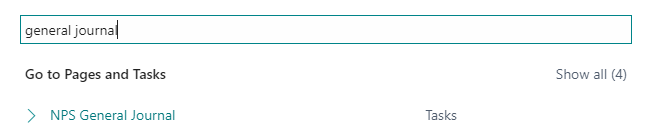
I noticed new thing at BC with release 2022 wave 1: when you search for pages (reports etc.), BC showing the name of the extension object, and not the original caption. I know that i can add caption property to extension object and copy the caption text from the extended object , but that's not so nice solution as we have a lot of extension objects, also the changes in the name of extended object can happen so we would need to track for every extension we have. I'm surprised that Microsoft allows such a freedom in changing of standard objects.

pastedimage1650355912691v2.png

pastedimage1650355872271v1.png

Is this some kind of Microsoft bug, or it happened only to us? Maybe we missed some setting? On internet i can't find anyone to talk about this.

I have the same question (0)
  • Suggested answer
    YUN ZHU Profile Picture
    98,421 Super User 2026 Season 1 on at

    Hi, I did the test again and didn't find this problem in BC20.
    Are there changes to "General Journal" in your translation file?

    pastedimage1650419316124v1.png

    pastedimage1650419382472v2.png

    PS: My test version

    Version: W1 20.0 (Platform 20.0.37114.39096 + Application 20.0.37253.38055)

    pastedimage1650419496548v3.png

    Hope this helps.

    Thanks.

    ZHU

  • TeaYana Profile Picture
    10 on at

    Hello,

    Thank you for helping me. 

    Everything with translation is fine as usual. The version is the same. I've just tested the way you did. Opened new project from the start and it's fine, like your case. But i noticed, when add next settings: 

    pastedimage1650442229468v1.png

    pastedimage1650442289341v2.png

    The result is the same as i had before:

    pastedimage1650442395864v3.png

    pastedimage1650442415400v4.png

  • Suggested answer
    YUN ZHU Profile Picture
    98,421 Super User 2026 Season 1 on at

    Hi, Thanks for the info, I did the same test and it looked fine, maybe the problem is related to other reasons.

    [View:/cfs-file/__key/communityserver-discussions-components-files/758/4213.Test.mp4:988:741]

  • Suggested answer
    Avinash B Profile Picture
    1,455 on at

    Hi

    I also tried on version 20, but did not find anything like this. It looks really strange. Check if any other extension has caption changes.

    Thanks,

  • Suggested answer
    TeaYana Profile Picture
    10 on at

    Resolved!

    I founded the property that cause this behavior. Its in app.json features property:

    pastedimage1650450702730v1.png

    When i remove GenerateCaptions it good again.

    Thank you on help friends!

  • Suggested answer
    YUN ZHU Profile Picture
    98,421 Super User 2026 Season 1 on at

    Very interesting, I will test it again tomorrow. Thanks for sharing.

  • Avinash B Profile Picture
    1,455 on at

    Nice observation. very useful. Thanks for sharing us.

    Thanks,

    Avinash B

Under review

Thank you for your reply! To ensure a great experience for everyone, your content is awaiting approval by our Community Managers. Please check back later.

Helpful resources

Quick Links

Introducing the 2026 Season 1 community Super Users

Congratulations to our 2026 Super Stars!

Congratulations to our 2025 Community Spotlights

Thanks to all of our 2025 Community Spotlight stars!

Leaderboard > Small and medium business | Business Central, NAV, RMS

#1
OussamaSabbouh Profile Picture

OussamaSabbouh 1,958 Super User 2026 Season 1

#2
YUN ZHU Profile Picture

YUN ZHU 1,101 Super User 2026 Season 1

#3
Dhiren Nagar Profile Picture

Dhiren Nagar 959 Super User 2026 Season 1

Last 30 days Overall leaderboard

Featured topics

Product updates

Dynamics 365 release plans



