web
You’re offline. This is a read only version of the page.
close
Skip to main content

Notifications

Announcements

No record found.

Community site session details

Community site session details

Session Id :
Microsoft Dynamics CRM (Archived)

where is Customization tab?

(0) ShareShare
ReportReport
Posted on by

when clicked Settings it shows only

Business and Systems where is Customization tab and its options?

Also Business shows Mobile Offline

and Systems shows Security only where are rest of the options?

I am very new to CRM Dynamics Online and trying to learn it by myself and taking help from online materials and youtube.
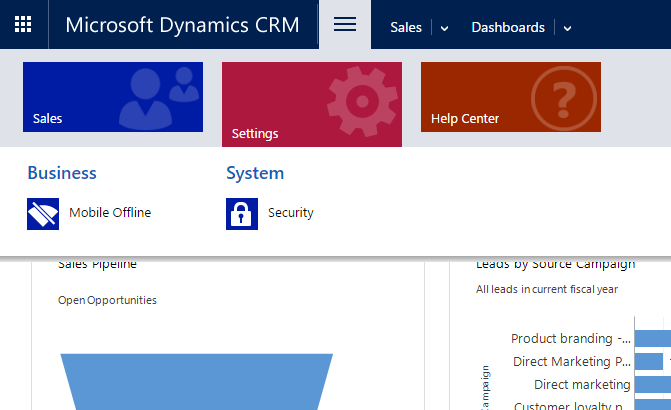
1565.screenshot.png

thank you.

*This post is locked for comments

I have the same question (0)
  • Suggested answer
    PS Profile Picture
    23,577 on at

    It seems a 'security role' issue. Are you aware what security role you are having?

    For e.g. if you are having a 'Salesperson role', you will see, what you are currently having and if you have a 'system admin or CEO/Business Manager' role, you will be able to see rest of the components of settings.

    To check what roles you have, Go to >>any record where you are the owner>> click on your name>>user form/card will pop up>>on the top there will be a button called 'Manage roles'>>click & see what roles you have.

    If you have less permissions, ask your system admin to provide you a better role in order to see more components.

    let me know, if it still remains unresolved.

  • Verified answer
    Joe Gill Profile Picture
    on at

    Hi,

    It looks like you created a trial instance of Dynamics CRM and selected the "Sales" option in which case it hides some options

    Joe

  • Suggested answer
    JohnAnonymous Profile Picture
    5,241 on at

    If you created a demo and checked CRM as a trial, you need to give yourself a license. If you don't it will show the screen above.

  • Suggested answer
    Tushar2016CRM Profile Picture
    1,130 on at

    HI ,

    You must have a System Admin or Customiser role so that you can do any customizations .

    Once you have that priviledge you can navigate to Setting-->Customisations

    thanks !

  • Community Member Profile Picture
    on at

    I have Admin role.

  • Community Member Profile Picture
    on at

    Under user information:

    Administration

    Client Access License (CAL) Information

    Access Mode: Read-Write

  • Community Member Profile Picture
    on at

    how can I change it ?

  • Community Member Profile Picture
    on at

    Admin center -> Users -> Active usres -> username -> Roles:

    Global administrator

  • Verified answer
    JohnAnonymous Profile Picture
    5,241 on at

    If you need to give yourself a license, you need to go to the Office365 admin portal, users and assign a license to yourself.

  • Verified answer
    Community Member Profile Picture
    on at

    I have license for :

    Office 365 Enterprise E3  , Microsoft Dynamics CRM Online Professional

    AND Admin role but was unable to customize.

    -- It think it is due to maybe Sales option I selected at the very beginning when I was setting up first time, but still don't know how to change that!

    Well, to move forward, I created a new user with Customized administrator role and

    Office 365 Enterprise E3  AND Microsoft Dynamics CRM Online Professional license.   Now new user has all the options and tabs I needed including Customization etc....

    thanks for help!

Under review

Thank you for your reply! To ensure a great experience for everyone, your content is awaiting approval by our Community Managers. Please check back later.

Helpful resources

Quick Links

Responsible AI policies

As AI tools become more common, we’re introducing a Responsible AI Use…

Neeraj Kumar – Community Spotlight

We are honored to recognize Neeraj Kumar as our Community Spotlight honoree for…

Leaderboard > 🔒一 Microsoft Dynamics CRM (Archived)

#1
SA-08121319-0 Profile Picture

SA-08121319-0 4

#1
Calum MacFarlane Profile Picture

Calum MacFarlane 4

#3
Alex Fun Wei Jie Profile Picture

Alex Fun Wei Jie 2

Last 30 days Overall leaderboard

Featured topics

Product updates

Dynamics 365 release plans



