web
You’re offline. This is a read only version of the page.
close
Skip to main content

Notifications

Announcements

No record found.

Community site session details

Community site session details

Session Id :
Microsoft Dynamics AX (Archived)

Vendor invoice entry - not all items i may add

(0) ShareShare
ReportReport
Posted on by

Hi,

I wish to enter vendor invoice without creating purchase order. On initial AX workspace i noticed "Vendor invoice entry" so i go there and clicked New vendor invoice:
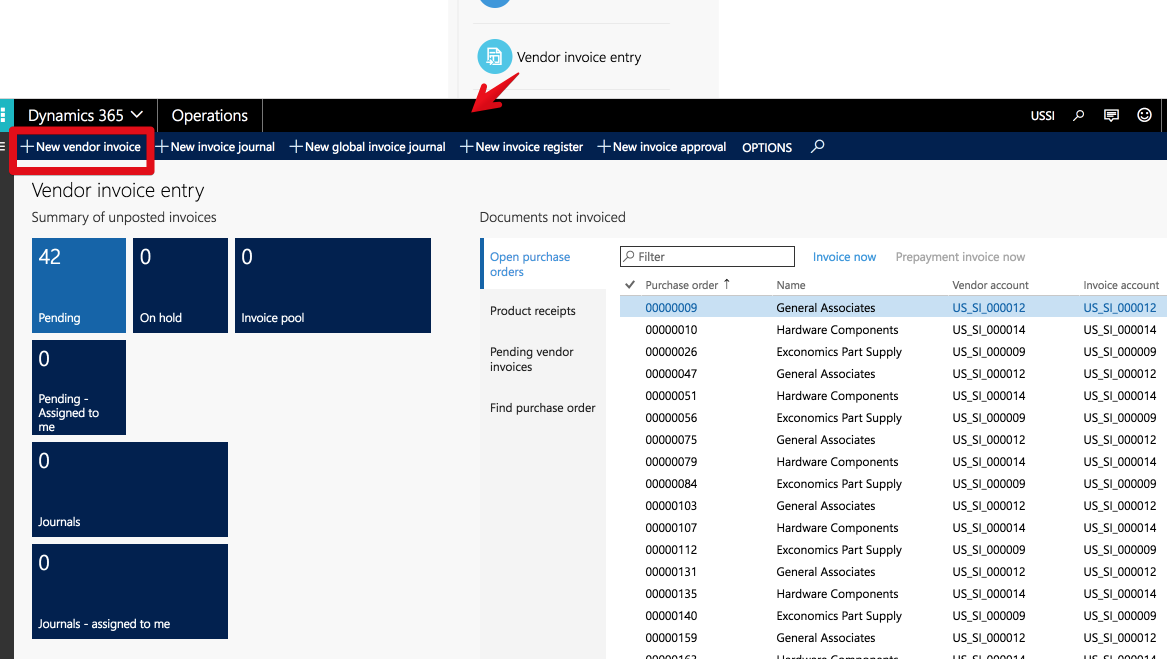
Dashboard-_2D002D00_-Operations-2017_2D00_06_2D00_28-11_2D00_58_2D00_21.png

In new invoice form i choose vendor and then click Add line and here i notice what i can't see all items
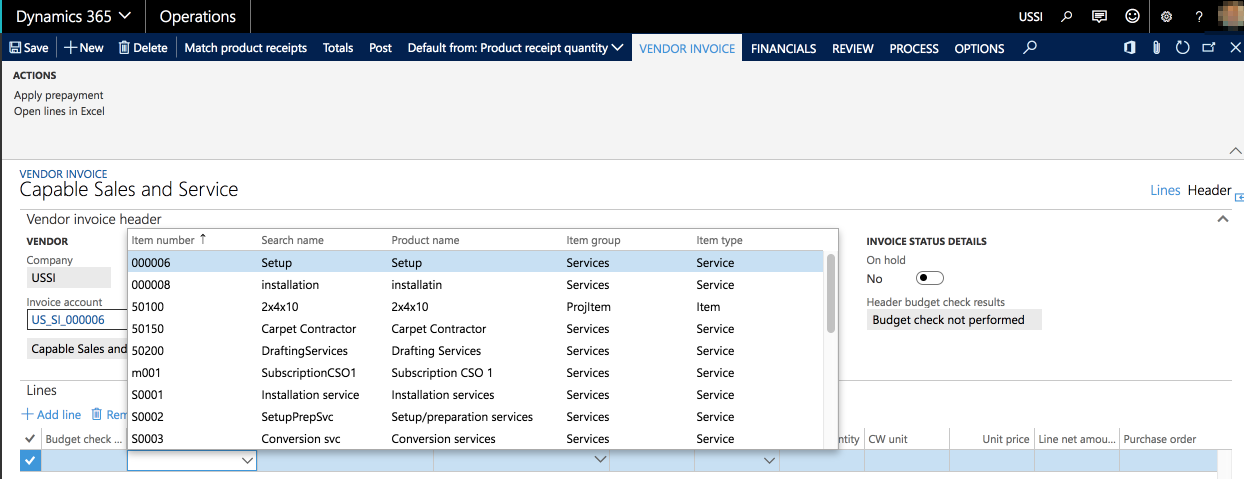
Vendor-invoice-_2D002D00_-Operations-2017_2D00_06_2D00_28-11_2D00_51_2D00_34.png

i my see items with item type = service and items with item group = ProjItem, so i can't see items of other groups.

When i enter purchase order - i may see all items. Where is no any development in the system its' demo machine.

How can i see all items in invoice entry lines?

*This post is locked for comments

I have the same question (0)
  • Ludwig Reinhard Profile Picture
    Microsoft Employee on at

    Hi Maxim_msk,

    What do you expect AX to do if you select the item in the invoice form and post this invoice?

    (Provided that you have no PO behind)

    Best regards,

    Ludwig

  • Maxim_msk Profile Picture
    on at

    Hi Ludwig,

    i see, i probably may use Service item to enter invoice and later match it with invoice.

    What i wish to do is to create something to create payment proposal on this and later after payment create PO.

  • Ludwig Reinhard Profile Picture
    Microsoft Employee on at

    Hi Maxim_msk,

    A payment proposal typically requires an invoice.

    If the invoice is paid why do you need to PO?

    I don't understand your process.

    Can you possibly provide some additional details on your process?

    Many thanks and best regards,

    Ludwig

  • Maxim_msk Profile Picture
    on at

    i'll try to clarify.

    How it goes:

    1. We send to vendor purchase request with items list.

    2. Vendor send us back invoice (for example invoice number INV001) - list of items with prices. Vendor will send us items or will start to produce them for us after we will pay 50% of total amount as an advance.

    3. We pay.

    4. Vendor ships us items.

    5-6. We get items and pay rest 50%.

    at point (3) i wish to see in the system what i paid INV001.

    How i may handle all this?

  • Verified answer
    Ludwig Reinhard Profile Picture
    Microsoft Employee on at

    Hi Maxim_msk,

    Step 1 Can be handled either by a using a purchase requisition or by directly setting up a purchase order

    Step 2 Can be handled by the PO prepayment functionality. You have to Setup the prepayment (50%), then create and post the prepayment invoice.

    Step 3 Can be handled by paying the prepayment invoice

    Step 4 Post the PO receipt list + packing slip

    Step 5 Post the final PO invoice and apply the prepayment made.

    Please check the following website for details: technet.microsoft.com/.../hh242104.aspx

    Best regards,

    Ludwig

  • Maxim_msk Profile Picture
    on at

    Hi Ludwig,

    i look on technet link block "Post and settle payments against a prepayment" and i see what i don't have button Functions - Settlement in payment journal line - it's difference of AX 2012 and 365 or some setting missed in my 365?

  • Suggested answer
    ax Financial Profile Picture
    744 on at

    Hi Maxim_msk,

    you Can create direct invoice only on service,not with the item wise.

    If you want to create a itme invoice first you need to create Po.

    With Regards,

    AX Financial

  • Verified answer
    Nagendra Varma K Profile Picture
    on at

    Hi Maxim,

    It is the same in 365 also, Please refer below.

    5483.Capture.PNG

    Thanks

    Nagendra Varma K

Under review

Thank you for your reply! To ensure a great experience for everyone, your content is awaiting approval by our Community Managers. Please check back later.

Helpful resources

Quick Links

Responsible AI policies

As AI tools become more common, we’re introducing a Responsible AI Use…

Neeraj Kumar – Community Spotlight

We are honored to recognize Neeraj Kumar as our Community Spotlight honoree for…

Leaderboard > 🔒一 Microsoft Dynamics AX (Archived)

#1
Martin Dráb Profile Picture

Martin Dráb 4 Most Valuable Professional

#1
Priya_K Profile Picture

Priya_K 4

#3
MyDynamicsNAV Profile Picture

MyDynamicsNAV 2

Last 30 days Overall leaderboard

Featured topics

Product updates

Dynamics 365 release plans
