web
You’re offline. This is a read only version of the page.
close
Skip to main content

Notifications

Announcements

No record found.

Community site session details

Community site session details

Session Id :
Customer experience | Sales, Customer Insights,...
Answered

Marketing Form Field is not updated / working correctly

(0) ShareShare
ReportReport
Posted on by 35

Hello, 

i have the following problem with a marketing form field. 

I have a entitie with different values. "Land"  it´s supposed to show the list of available Countrys and match them to the contact. 

pastedimage1620986072852v1.png

If i dont put a value in the system says to put in a valid value from the list. 

pastedimage1620986175873v2.png
But the marketing form does not show the list of available values. 

I already added the entitie to the relevance search configuration and there are also values already there. 

pastedimage1620986432754v3.png

All i found in the documentation is this: 

https://docs.microsoft.com/en-us/dynamics365/marketing/marketing-fields#adding-lookup-fields-and-troubleshooting

I followed  all the steps and its still not working. 

Does anybody else had that problem? 

Thank you for you help. 

I have the same question (0)
  • Suggested answer
    Kenneth Ariel Chaves Herrera Profile Picture
    on at

    Hi Thomas86 I hope you are doing well.

    The problem seems to be on the side of the form and not dynamics as an application. The problem may be that the changes are not being saved. Can you make sure everything is saved and published in the marketing form?

    Here some info that can help:

    Set up and manage marketing forms for use in marketing pages (Dynamics 365 Marketing) | Microsoft Docs

    If this answers your question, check it as verified.

    Thanks.

  • Thomas86 Profile Picture
    35 on at

    Hello Kenneth,

    thank you for your reply. I tested the form with different fields and the changes are beeing saved. It has something to do with the type of field as all the other fields are working properly.

    If i select the field "Land" it´s working for a milisecond but then does nothing. 

    pastedimage1621231965434v1.png

    I can see in the form settings that the field should work as i can set up a standard value. 

    pastedimage1621232091911v2.png

  • Verified answer
    Community Member Profile Picture
    on at

    Hey Thomas,

    The lookup for country is a custom field. You are likely not seeing the values in the form itself, because the marketing service user does not have access to the entity (crm user do, which is why you can see it in the form designer). 

    The marketing service user security role should have full access for this entity: 

    pastedimage1621241465411v1.png

    (also relevance search needs to turned on for that entity)

    However, I wouldn't recommend on using this country field in your customer facings forms. We've used it for a while and it wasn't ideal for our conversions. The fact that we can use lookup fields is very cool, but it is just not very intuitive for users, it sometimes takes a while to load (makes users think it is not working) and it crashes the form if people are using autofill options in browsers. If I autofill "Deutschland" in my browser, I will get an error saying 'enter a valid country', but users don't know this has to do with the fact that you typing "deutschland' does not associate the GUID of that record. 

    So in the end we stopped using this lookup. We still wanted to capture countries however, which is why we went for a country option set in the form. This is very common in webdesign, works fast in all browsers and is intuitive. 
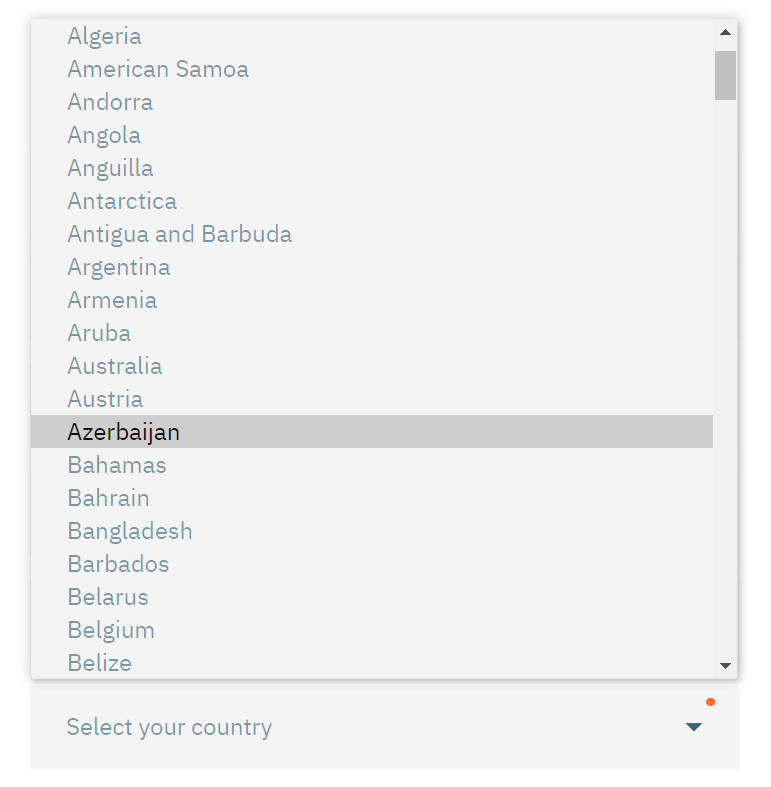
    pastedimage1621241529897v2.png

    The lookup is still the preferred option in CRM which is why we match the submitted option set value to the country record in our country entity. So we still end up with a valid country lookup in the lead/contact records, but we don't annoy our users with the badly performing lookup form on our website. Our option set has the same ISO code country names as the custom country entity and we match this to the contacts/leads with 2 seperate flows: 
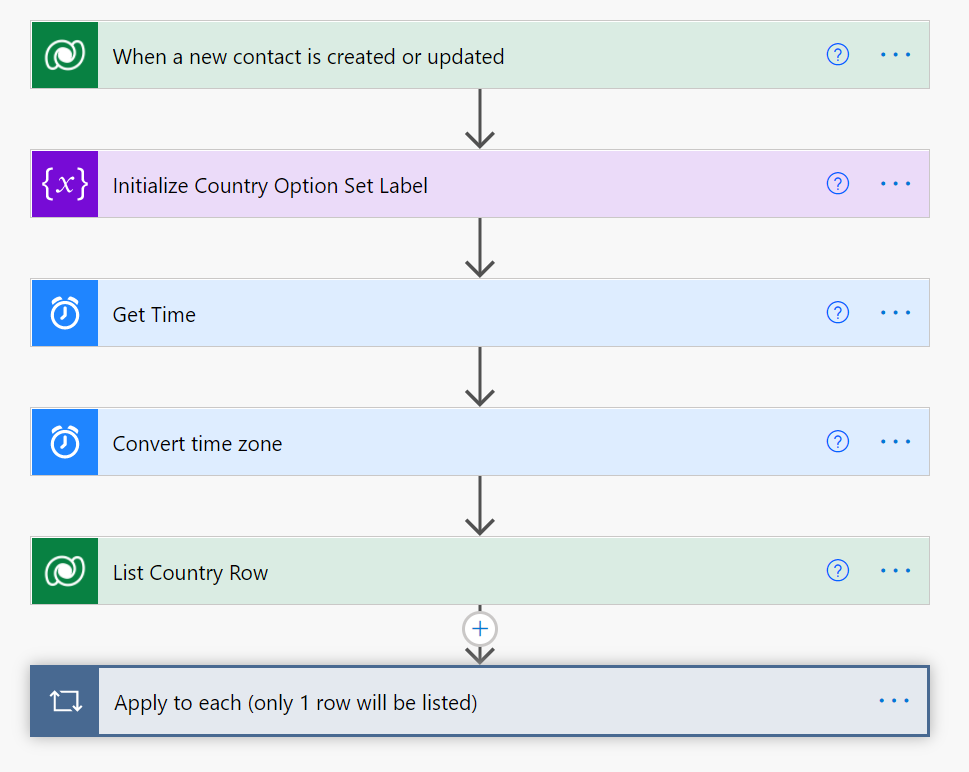
    pastedimage1621241961454v3.png

Under review

Thank you for your reply! To ensure a great experience for everyone, your content is awaiting approval by our Community Managers. Please check back later.

Helpful resources

Quick Links

Responsible AI policies

As AI tools become more common, we’re introducing a Responsible AI Use…

Neeraj Kumar – Community Spotlight

We are honored to recognize Neeraj Kumar as our Community Spotlight honoree for…

Leaderboard > Customer experience | Sales, Customer Insights, CRM

#1
Tom_Gioielli Profile Picture

Tom_Gioielli 137 Super User 2025 Season 2

#2
#ManoVerse Profile Picture

#ManoVerse 57

#3
Jimmy Passeti Profile Picture

Jimmy Passeti 50 Most Valuable Professional

Last 30 days Overall leaderboard

Product updates

Dynamics 365 release plans
