web
You’re offline. This is a read only version of the page.
close
Skip to main content

Announcements

No record found.

News and Announcements icon
Community site session details

Community site session details

Session Id :
Supply chain | Supply Chain Management, Commerce
Suggested Answer

Changes to the document are only allowed in state Draft, because change management is activated.

(2) ShareShare
ReportReport
Posted on by 12

Hi Experts!

I'm currently experiencing this kind of error. 

Changes to the document are only allowed in state Draft, because change management is activated.

PO was already "Approved" and when we click confirm this error appear. 

Do you have any idea on how to fix this issue?
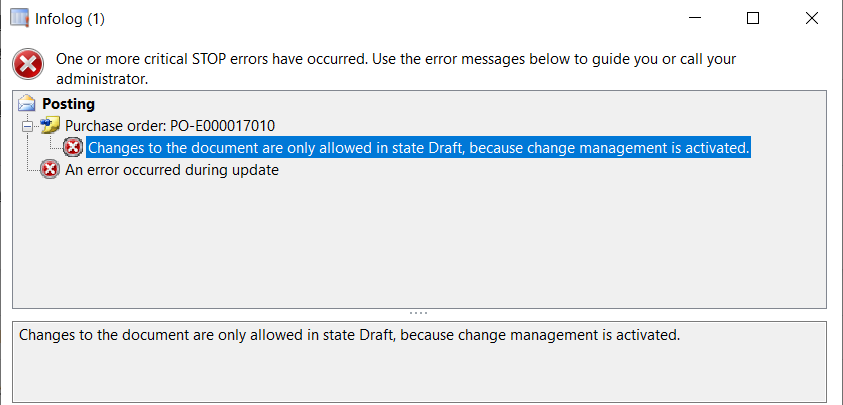
pastedimage1645410117478v1.png

I have the same question (0)
  • Suggested answer
    saurabh bharti Profile Picture
    15,039 Moderator on at

    This common one, do you have any customization on confirmation report of somewhere in tis area? It must be calling data from PO line which is causing this

  • Daniel Mark Bautista Profile Picture
    12 on at

    As per checking, there's no customization was made on confirmation report.

    I will check the Item details if there is something issue that may cause this error.

  • Suggested answer
    Danny Bilodeau Profile Picture
    4,934 Super User 2026 Season 1 on at

    Hello Daniel,

    Sounds like you have Change Management activated for your PO. You can confirm that by looking at the PO header under the FastTab "Setup". If <Activate Change Management> is yes, then any changes on that PO will require re-approval  

    pastedimage1645479021572v1.png

    To allow edition of the PO, you will need to click on the Request Change button in the ribbon (in my case greyed out because PO is not Change management enabled); this will bring the PO status to "Draft". After changes are complete, you will need to submit the PO to the approval workflow as per usual (unless approval workflow has reapproval rule to bypass approval process).

    pastedimage1645479279726v2.png

    Regards,

    Danny

  • Ramon L Profile Picture
    159 on at

    Hi there

    I had a similar issue with the PO workflow giving me the same error when trying to receive it . I found that changes were made to the Vendor earlier in the month. I reset the PO back to Draft by selecting the request change option and then re-ran the workflow for approval and the PO posted successfully. Try that

  • SP-06020615-0 Profile Picture
    Microsoft Employee on at
     
    I Have the same issue and have large number of POs so reseting all their status to draft is not feasible can you suggest me if there are any other approaches for the same.
  • Suggested answer
    Mallesh Deshapaga Profile Picture
    1,326 on at
    It appears that someone may have modified data on the Purchase Order, or there may still be an open workflow.
    Could you please check the workflow history and double-check the status?
    Because of this, the system is detecting a version conflict during posting, that is why the error message is thrown.
  • Suggested answer
    Paolo Cecchelli Profile Picture
    423 on at
    Hi,
     
    in AX2012 the issue is usually resolved by: recalling the workflow --> Click on "Total" button on the PO and then resending the PO to the workflow. It happened to me recently on a old AX 2012 installation and I found this thread where the solution above was mentioned and it worked in my case:
     

Under review

Thank you for your reply! To ensure a great experience for everyone, your content is awaiting approval by our Community Managers. Please check back later.

Helpful resources

Quick Links

Introducing the 2026 Season 1 community Super Users

Congratulations to our 2026 Super Stars!

Congratulations to our 2025 Community Spotlights

Thanks to all of our 2025 Community Spotlight stars!

Leaderboard > Supply chain | Supply Chain Management, Commerce

#1
Mallesh Deshapaga Profile Picture

Mallesh Deshapaga 1,072

#2
Laurens vd Tang Profile Picture

Laurens vd Tang 208 Super User 2026 Season 1

#3
André Arnaud de Calavon Profile Picture

André Arnaud de Cal... 135 Super User 2026 Season 1

Last 30 days Overall leaderboard

Product updates

Dynamics 365 release plans
