web
You’re offline. This is a read only version of the page.
close
Skip to main content

Announcements

News and Announcements icon
Community site session details

Community site session details

Session Id :
Small and medium business | Business Central, N...
Suggested Answer

Edit in Excel fields not showing Online

(0) ShareShare
ReportReport
Posted on by 175

Hello everyone,

We use EDIT in EXCEL to update information in our BC.

On the Vendor Ledger Entries page it doesnt seem to work although I receive an ok message.

For example: 

I have those entries:

pastedimage1611832329788v2.png

I Edit in Excel and fill in the DOCUMENT STATUS

pastedimage1611832382080v3.png

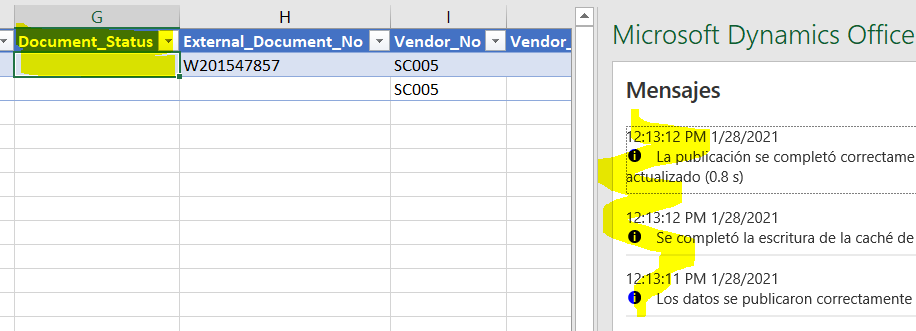
I then publish and I receive the message that the info is published ok.

However the field is now empty
pastedimage1611832419408v4.png

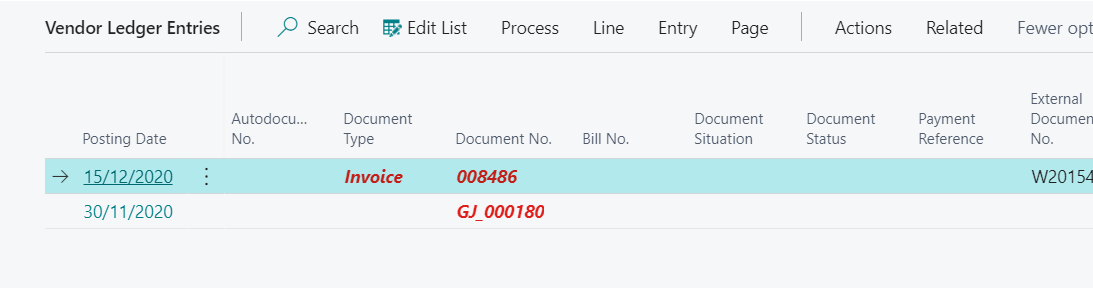
When I go back online I cannot see the changes
pastedimage1611832440493v5.png

Anyone can help?

Thanks!

I have the same question (0)
  • Suggested answer
    Marco Mels Profile Picture
    Microsoft Employee on at

    Hello,

    What is the release you are using, v14, v15, v16 or v17 or is this a release that is hosted in the cloud / SaaS release?

    Thanks.

  • Elofly Profile Picture
    175 on at

    I am using V17

    Thanks

  • user201023 Profile Picture
    5 on at

    I had the same issue when we first migrated into Microsoft Dynamics from Salesforce.  I was told by our Microsoft consultant that it only works with our "Open" opportunities in our case. I'm not sure we have a special case since we have locked fields once our opportunities are "closed" now and the "Open in Excel Online" Edit is supposed to work even with Read-only records. I would like to know of an in-house, easy function to edit en-masse like Salesforce does.  There are outside apps that help, but I'm not too keen on using third party apps to run normal functions in the database...then the functionality and security are after-thoughts.

  • Suggested answer
    Marco Mels Profile Picture
    Microsoft Employee on at

    Hello,

    These fields seems to be customized as I do not have them or is this some sort of localization?

    pastedimage1613230733890v1.png

    Thanks.

Under review

Thank you for your reply! To ensure a great experience for everyone, your content is awaiting approval by our Community Managers. Please check back later.

Helpful resources

Quick Links

Season of Sharing Community Challenge Winners!

Congratulations to our community stars!

Women in Power Builds Momentum

Expanding mentorship, skilling, and AI innovation

Congratulations to the July Top 10 Community Leaders

These are the community rock stars!

Leaderboard > Small and medium business | Business Central, NAV, RMS

#1
OussamaSabbouh Profile Picture

OussamaSabbouh 595 Super User 2026 Season 2

#2
YUN ZHU Profile Picture

YUN ZHU 364 Super User 2026 Season 2

#3
Grigorios Mavrogeorgis Profile Picture

Grigorios Mavrogeorgis 331 Super User 2026 Season 2

Last 30 days Overall leaderboard

Featured topics

Microsoft Training Manuals

Product updates

Dynamics 365 release plans
