web
You’re offline. This is a read only version of the page.
close
Skip to main content

Announcements

No record found.

News and Announcements icon
Community site session details

Community site session details

Session Id :
Microsoft Dynamics AX (Archived)

How to Create Acquisition Proposal Through X++

(0) ShareShare
ReportReport
Posted on by 202

dear all,

i'm a Junior Developer of Microsoft Dynamics AX 2012 R3.

currently, i am working on a task, the task is to make a function that can upload fixed asset from CSV.

i have found the way to upload the fixed asset. but, i have some difficulties to make the journal acquisition automatically.

there is two way if we make the journal acquisition manually through form.

1. the first way is to use create fixed asset proposal in the periodic section
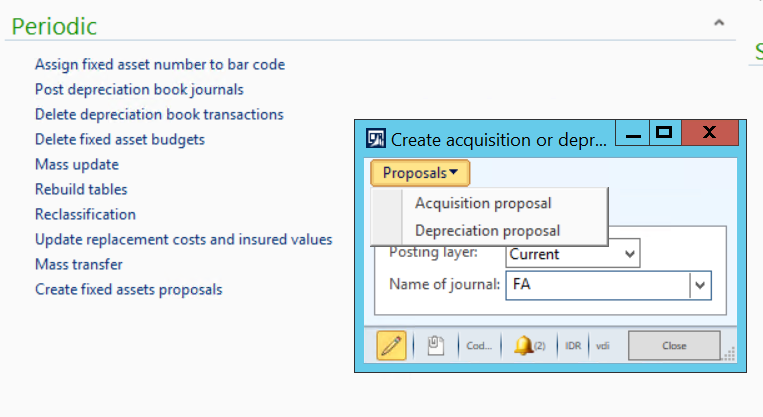
Fixed-Asset-Acquisition-Proposal-Dialog.PNG

2. the second way is to use the function inside fixed asset journal
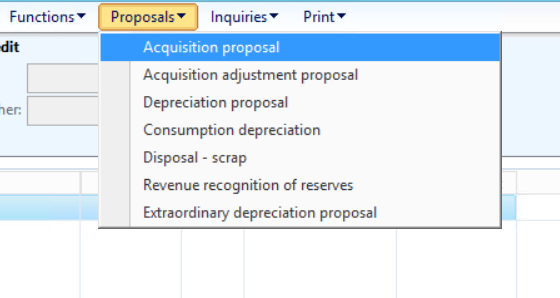
Fixed-Asset-Acquisition-Proposal-Dialog-2.PNG

i want to ask, how to create acquisition proposal through X++, what class can i use to make it easier?

i appreciate all kind of answer.

Thanks,

*This post is locked for comments

I have the same question (0)
  • Verified answer
    MbokJamu Profile Picture
    140 on at

    Hi ali,

    I have job to create journal fix asset (Acquisition, Acquisition adjustment, Depreciation, Depreciation adjustment) from excel file. You can post journal manually after journal created.

    static void AdrImportObalFA(Args _args)
    {
        //excel var
        SysExcelApplication application;
        SysExcelWorkbooks workbooks;
        SysExcelWorkbook workbook;
        SysExcelWorksheets worksheets;
        SysExcelWorksheet worksheet;
        SysExcelCells cells;
        COMVariantType type;
        int row=1;
        FileName filename;
        Dialog                                  dialog;
        DialogField                             dfFileName;
        //GL var
        AxLedgerJournalTable journalTable;
        AxLedgerJournalTrans journalTrans;
        LedgerJournalTrans_Asset LedgerJournalTrans_Asset;
        container            accEntryPattern;
        container            offSetEntryPattern;
        CurrencyCode vCurrCode;
        Amount vDebit, vCredit;
        str vTrans, vDesc, vBookId;
        AssetId vAsset;
        TransDate vDue;
        ;
    
        dialog = new Dialog('Pick the file');
        dfFileName = dialog.addField(extendedTypeStr(FileNameOpen));
        dialog.filenameLookupFilter(['ExcelFile', '*.xls']);
    
        if (dialog.run())
           filename =  dfFileName.value();
    
        application = SysExcelApplication::construct();
        workbooks = application.workbooks();
        //specify the file path that you want to read
        try
        {
            workbooks.open(filename);
        }
        catch (Exception::Error)
        {
            throw error("File cannot be opened.");
        }
    
        journalTable = new AxLedgerJournalTable();
    
        //Journal Name
        journalTable.parmJournalName("FA-OBAL");
        journalTable.parmJournalType(LedgerJournalType::Assets);
        journalTable.parmName('Obal Fix Asset');
        journalTable.save();
    
        workbook = workbooks.item(1);
        worksheets = workbook.worksheets();
        worksheet = worksheets.itemFromNum(1);
        cells = worksheet.cells();
        do
        {
            journalTrans = new AxLedgerJournalTrans();
    
            row++;
            vAsset = cells.item(row, 1).value().bStr();
            vTrans = cells.item(row, 2).value().bStr();
            vBookId = cells.item(row, 3).value().bStr();
            vDesc = cells.item(row, 4).value().bStr();
            vDebit = any2real(cells.item(row, 5).value().bStr());
            vCredit = any2real(cells.item(row, 6).value().bstr());
            //info(strfmt('%1 / %2 / %3 / %4', vMainAcc, vCurrCode, vDebit, vCredit));
    
            journalTrans.parmJournalNum(journalTable.ledgerJournalTable().JournalNum);
            journalTrans.parmTransDate(mkDate(31,12,2017));
            journalTrans.parmAccountType(LedgerJournalACType::FixedAssets);
    
            //LedgerDimension
            journalTrans.parmLedgerDimension(DimensionStorage::getDynamicAccount(vAsset, LedgerJournalACType::FixedAssets));
            journalTrans.parmTxt(vDesc);
            journalTrans.parmCurrencyCode('IDR');
            journalTrans.parmAmountCurDebit(vDebit);
            journalTrans.parmAmountCurCredit(vCredit);
            if (subStr(vBookId,1,2)=='TX')
                journalTrans.parmTaxItemGroup('PPN');
    
            //offset
            offSetEntryPattern = ["999", "999", 0];
            journalTrans.parmOffsetAccountType(LedgerJournalACType:: Ledger );
            journalTrans.parmOffsetLedgerDimension(AxdDimensionUtil::getLedgerAccountId(offSetEntryPattern));
    
            journalTrans.save();
    
            //asset
            LedgerJournalTrans_Asset.AssetId = vAsset;
            LedgerJournalTrans_Asset.BookId = vBookId;
            LedgerJournalTrans_Asset.Company = 'ARK';
            LedgerJournalTrans_Asset.RefRecId = journalTrans.ledgerJournalTrans().RecId;
            if(vTrans == 'Acquisition')
                LedgerJournalTrans_Asset.TransType = AssetTransTypeJournal::Acquisition;
            else if(vTrans == 'Acquisition adjustment')
                LedgerJournalTrans_Asset.TransType = AssetTransTypeJournal::AcquisitionAdj;
            else if(vTrans == 'Depreciation')
                LedgerJournalTrans_Asset.TransType = AssetTransTypeJournal::Depreciation;
            else if(vTrans == 'Depreciation adjustment')
                LedgerJournalTrans_Asset.TransType = AssetTransTypeJournal::DepreciationAdj;
    
            LedgerJournalTrans_Asset.insert();
    
            type = cells.item(row+1, 1).value().variantType();
        }
        while (type != COMVariantType::VT_EMPTY);
        application.quit();
    
        info(strFmt("Journal %1 created", journalTable.ledgerJournalTable().JournalNum));
    }


  • Jie G Profile Picture
    Microsoft Employee on at

    You can try to right click the form and select "Personalize" to view the system name of the button to get the corresponding class information. Then you can check the class to get yourself to be familiar with the API.

    AcqProposal
    Action/AssetMultiJournalAcqProposal  - > Class/AssetProposal

    You can find the useful information under Class and Menu Items\Actions in AOT.

    Thanks,

    Ada

  • Chaidir Ali Assegaf Profile Picture
    202 on at

    Hi Dudik,

    i have tried your code and it works,

    thanks for your help.

  • Community Member Profile Picture
    on at

    Please share the excel sheet

Under review

Thank you for your reply! To ensure a great experience for everyone, your content is awaiting approval by our Community Managers. Please check back later.

Helpful resources

Quick Links

Introducing the 2026 Season 1 community Super Users

Congratulations to our 2026 Super Stars!

Meet the Microsoft Dynamics 365 Contact Center Champions

We are thrilled to have these Champions in our Community!

Congratulations to the March Top 10 Community Leaders

These are the community rock stars!

Leaderboard > 🔒一 Microsoft Dynamics AX (Archived)

#1
Joris dG Profile Picture

Joris dG 5

#2
Alexey Lekanov Profile Picture

Alexey Lekanov 2

#2
Henrik Nordlöf Profile Picture

Henrik Nordlöf 2 User Group Leader

Last 30 days Overall leaderboard

Featured topics

Product updates

Dynamics 365 release plans
