web
You’re offline. This is a read only version of the page.
close
Skip to main content

Announcements

News and Announcements icon
Community site session details

Community site session details

Session Id :
Supply chain | Supply Chain Management, Commerce
Suggested Answer

Hello, In my case, I have two separate questions : I'm searching about the reason that when I create a purchase order then receive it then invoice it, I can't add any lines to the same PO ("Add line", "Add lines", "Add pr

(0) ShareShare
ReportReport
Posted on by

Hello,

In my case, I have two separate questions :

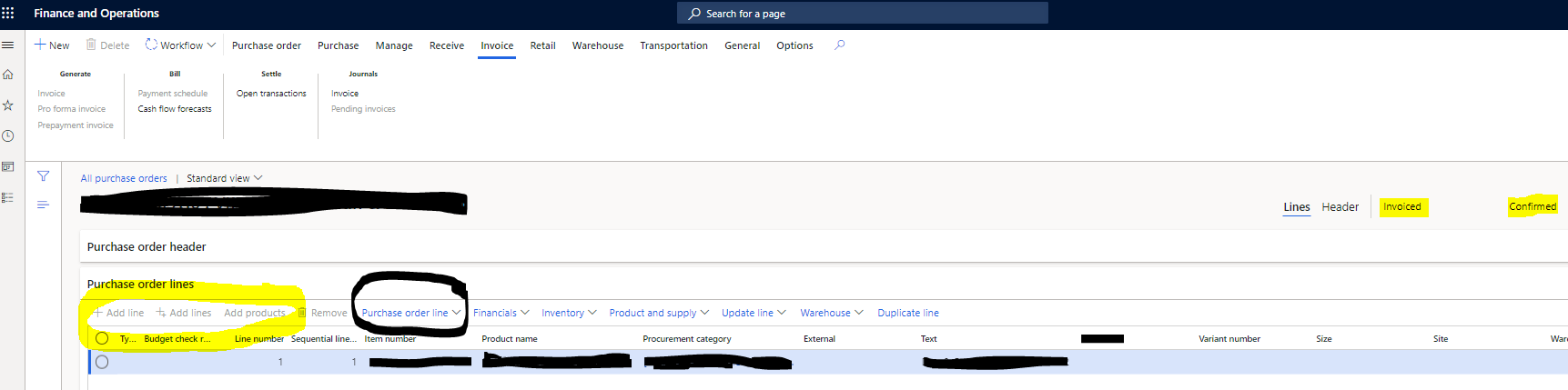
  • I'm searching about the reason that when I create a purchase order then receive it then invoice it, I can't add any lines to the same PO ("Add line", "Add lines", "Add products" became desabled after invoicing the PO, even "copy from" I can't use it), and here is a screen shot to better explanation. Is there any settings that i've missed?
Image

  • I want to see the product receipt number (that I've entered it before while the reception of a purchase order) from the invoice journal related to that receipt. Is that possible? if so how can I do that?

Please, Could you help me with this?

Thank you in advance,

I have the same question (0)
  • BillurSamdancioglu Profile Picture
    21,121 Most Valuable Professional on at

    Hi,

    For the first question, there is a parameter on parameters for to prevent users to edit orders that are invoiced.

  • Suggested answer
    Prem Kumar Bachu Profile Picture
    3,422 on at

    Hi,

    1) Add line: This might be due to purchase order workflow. You have purchase order workflow activated(change management) so you will not be able to add lines for approved purchase orders.

    2) There is no standard single report where you will get PO-Product receipt number-Invoice number. But there are reports in AP, product receipt journal report for product receipt number and invoice journal report for invoice number, both the reports has PO number reference. So you can use this reports and  make a report out side of D365 in excel. Or else you might need to build a customized report.

Under review

Thank you for your reply! To ensure a great experience for everyone, your content is awaiting approval by our Community Managers. Please check back later.

Helpful resources

Quick Links

Season of Sharing Community Challenge Launch!

Jump in, show your community spirit, and win prizes!

Women in Power Builds Momentum

Expanding mentorship, skilling, and AI innovation

Congratulations to the April Top 10 Community Leaders

These are the community rock stars!

Leaderboard > Supply chain | Supply Chain Management, Commerce

#1
André Arnaud de Calavon Profile Picture

André Arnaud de Cal... 142 Super User 2026 Season 1

#2
Abhilash Warrier Profile Picture

Abhilash Warrier 102 Super User 2026 Season 1

#3
Laurens vd Tang Profile Picture

Laurens vd Tang 101 Super User 2026 Season 1

Last 30 days Overall leaderboard

Product updates

Dynamics 365 release plans



