web
You’re offline. This is a read only version of the page.
close
Skip to main content

Announcements

No record found.

News and Announcements icon
Community site session details

Community site session details

Session Id :
Customer experience | Sales, Customer Insights,...
Suggested Answer

Form Capture Not Working for Number Fields

(0) ShareShare
ReportReport
Posted on by 45

When I try to do a form capture on a form with number fields, the number fields do not show up to be mapped?? Every other field works. Anyone else find this, workaround?

I have the same question (0)
  • cloflyMao Profile Picture
    25,210 on at

    Hi Mongstone,

    Thanks for your feedback, I reproduced your issue in two different environments, it seems that it was a bug.

    Workaround:

    If the field you want to map is phone number, you could change type to "tel".

    Or set type to text, and run a custom javascript function for your field to only allow number input.

    Here is my validation function, it will insert an error message text after the field, and the string value will be cleared after 1 seconds.

    If the input value is number, then remove the error text.
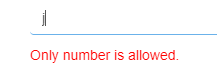
    pastedimage1598593991141v1.png

    You could assign an id to the field that you want to only allow number, replace the "phone" with that id to test whether it could work for you.

    document.getElementById("phone").addEventListener("focusout", validate);
    
    function validate() {
        if (this.value !== "") {
            if (/^\d $/.test(this.value) === false) {
              createErrorMsg(this.id, "Only number is allowed.")
            } else {
              eraseErrorMsg(this.id);
            }
        }
    }
    
    function createErrorMsg(id, msg) {
        eraseErrorMsg(id);
        var error = document.createElement("p");
        error.setAttribute("id", id   "-error");
        error.style.color = "red";
        error.innerText = msg;
        document.getElementById(id).parentNode.appendChild(error);
        setTimeout(function () {
            document.getElementById(id).value = "";
        }, 1000);
    }
    
    function eraseErrorMsg(id) {
       var error = document.getElementById(id   "-error");
       if (error) {
         error.remove();
       }
    }

    Regards,

    Clofly

  • cloflyMao Profile Picture
    25,210 on at

    Hi Mongstone,

    Could the code work for you?

    Regards,

    Clofly

  • Suggested answer
    Defne Ayanoglu Profile Picture
    Microsoft Employee on at

    Hi, 

    Thank you for your question.
    This isn
    t an expected behavior. Please file a support ticket to ensure we can assist in a timely manner.

    Thanks,
    Defne

Under review

Thank you for your reply! To ensure a great experience for everyone, your content is awaiting approval by our Community Managers. Please check back later.

Helpful resources

Quick Links

Introducing the 2026 Season 1 community Super Users

Congratulations to our 2026 Super Stars!

Congratulations to our 2025 Community Spotlights

Thanks to all of our 2025 Community Spotlight stars!

Leaderboard > Customer experience | Sales, Customer Insights, CRM

#1
ManoVerse Profile Picture

ManoVerse 202 Super User 2026 Season 1

#2
CU11031447-0 Profile Picture

CU11031447-0 100

#3
NeerajPawar Profile Picture

NeerajPawar 70

Last 30 days Overall leaderboard

Product updates

Dynamics 365 release plans
