Hi,
I am thinking of customizing the Email Template for my Purchase Orders, to notify the user by email upon successful approval of the Purchase Order.
Till now, the email is a static and generic one and is working correctly. However, I wish to made it a bit more dynamic, by mentioning the corresponding PurchaseId in the email being sent. I searched the net and came out with the following HTML text (Organization administration > Setup > Email template);
<P>Kindly note that a Purchase Order %Purchase orders.PurchId% has been created requiring your approval.</P> <P>Click <A href="dynamics://%LinkToBusinessData%/">here</A> to go to the purchase requisition.</P>
I was thinking that the parameters must be set before-hand and I tried setting it on Procurement and sourcing > Setup > Procurement and sourcing workflows as below, that is by inserting the Placeholders in the submission instructions, but in vain.
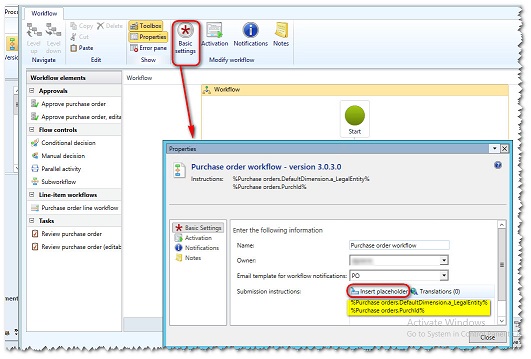
Any idea how I can render the email more dynamic by precising the PurchaseId and a link to redirect to the record if possible.
Many thanks in anticipation,
Nadeem K


