web
You’re offline. This is a read only version of the page.
close
Skip to main content

Announcements

News and Announcements icon
Community site session details

Community site session details

Session Id :
Small and medium business | Business Central, N...
Suggested Answer

Shopify Connector variants not mapping when imported

(4) ShareShare
ReportReport
Posted on by 32
Hello,
 
I have a customer that are useing the standard Shopify Connector, 
 
We are synching from shopify.
 
Some items works perfect, it finds a match in Shopify products in Business central
like this Product, it matchens an item number directly when imported, and also matches a variant line with the same item number
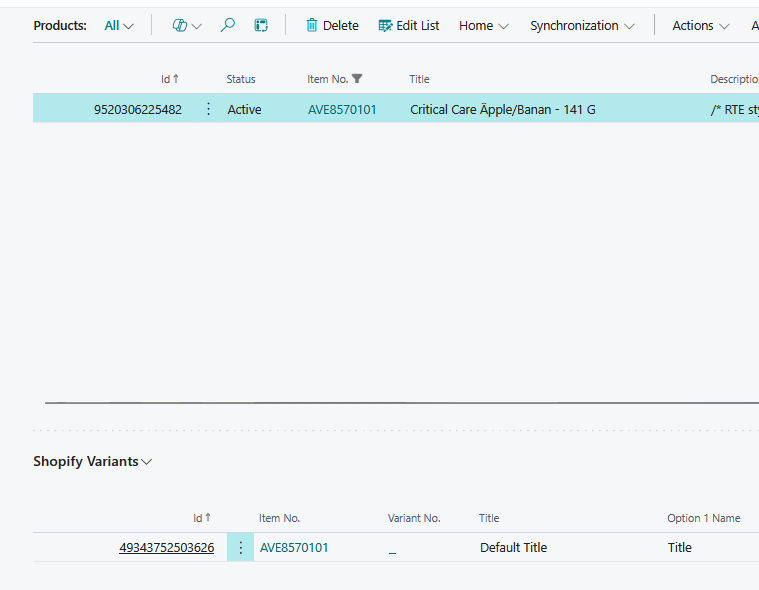
 
But then we have products that only like this one that match an item for the product but not for the variant
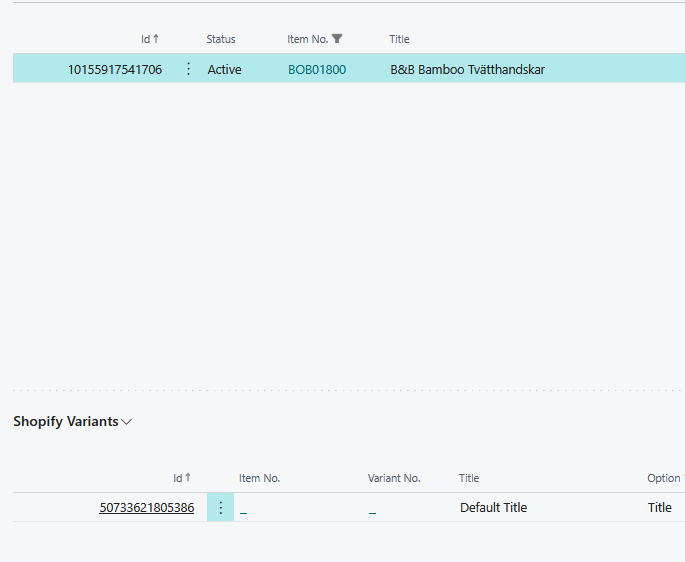
 
and for what i have concluded, its need to be a match for item for shopify variant, otherwise price list seems not to work.

The customer has alot of products so mapping manually will take alot of time.

Sku in Shopify is the same as item no in Business central as is barcode that is the same as the items GTIN,
 
 
Is there a way to mapp automaticly?
Is there any reason why this is happening on some items but not all
 
I have the same question (0)
  • Suggested answer
    OussamaSabbouh Profile Picture
    18,486 Super User 2026 Season 1 on at
    Hello,
    Yes, this should be possible automatically, but it depends on the SKU Mapping setup in the Shopify Shop card/settings. When products are imported from Shopify, BC first imports into Shopify Products and Shopify Variants, then tries to map them to BC items/variants based on the selected SKU mapping logic. If your Shopify SKU is exactly the BC Item No., use SKU Mapping = Item No.; if the SKU contains item + variant code, use Item No. + Variant Code with the correct separator; if you rely on GTIN/barcode, check the barcode/item reference setup as well. The reason it works for some products and not others is usually data inconsistency: SKU has spaces, hidden characters, different casing, duplicate SKUs, missing SKU on the variant, barcode stored differently, or the BC item/variant does not exist in the expected place. I would first compare one working and one failing Shopify Variant line field-by-field, then correct the Shopify SKU/barcode data and rerun synchronization; manual mapping should only be the fallback.
    Regards,
    Oussama Sabbouh
  • RA-20121008-0 Profile Picture
    32 on at
    What i can se on product in shopify, it has an exact match with SKU and also Barcode, with BC item and GTIN.


    I cant find anything that is diffrent on one that works and one that does not work.
     
    Is there only in first import to BC that it can mapp automaticly?
    I also tried deleteing the product in bc, then synced again, it did not import anything, if i changed the description in shopify, and then i imported again, this time it looks correct an variant is also mapped.
     
     
    Another question, am i right in saying that if its not match with an item on shopify variant, price changes in BC does not work? it seems that stock is working even if item no field is _
     
     
  • Gerardo Rentería García Profile Picture
    27,545 Most Valuable Professional on at

Under review

Thank you for your reply! To ensure a great experience for everyone, your content is awaiting approval by our Community Managers. Please check back later.

Helpful resources

Quick Links

Season of Sharing Community Challenge Winners!

Congratulations to our community stars!

Women in Power Builds Momentum

Expanding mentorship, skilling, and AI innovation

Congratulations to the June Top 10 Community Leaders

These are the community rock stars!

Leaderboard > Small and medium business | Business Central, NAV, RMS

#1
OussamaSabbouh Profile Picture

OussamaSabbouh 580 Super User 2026 Season 1

#2
YUN ZHU Profile Picture

YUN ZHU 462 Super User 2026 Season 1

#3
Grigorios Mavrogeorgis Profile Picture

Grigorios Mavrogeorgis 272 Super User 2026 Season 1

Last 30 days Overall leaderboard

Featured topics

Microsoft Training Manuals

Product updates

Dynamics 365 release plans
