web
You’re offline. This is a read only version of the page.
close
Skip to main content

Announcements

No record found.

News and Announcements icon
Community site session details

Community site session details

Session Id :
Finance | Project Operations, Human Resources, ...
Suggested Answer

Missing data entity in Document templates

(0) ShareShare
ReportReport
Posted on by

Hello, 

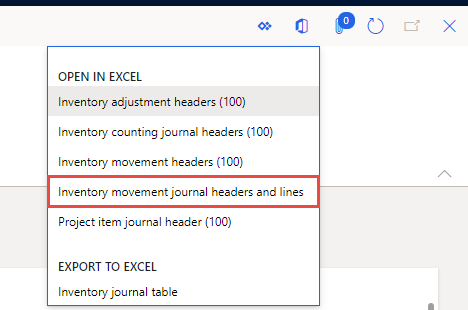
I have an issue with data entity: InventoryMovementJournalEntry (Inventory movement journal headers and lines) which is a standard MS entity, not customized in my case. 

My customer is using it through Excel add-in functionality and it works fine, but there is a need some columns to be added in the template and to be visible by default. That's why I need to modify the system document template. 

It is loaded from the lines form of the Movement journals. 
0523.pastedimage1609752040268v1.png

The problem is that I do not find the related to this entity template in menu Common --> Common --> Document templates. It's just missing. 

I have tried to create the template that I want based on the data root entity but in this case it is not visualized in the export options. 

Does someone have an idea why this entity has such behaviour and what can I do?

Any help will be appreciated. 

Thanks

I have the same question (0)
  • Suggested answer
    Michal Krejza Profile Picture
    Microsoft Employee on at

    Hello Vasilena,

    I would recommend to check following resources where you might find the answer:

  • André Arnaud de Calavon Profile Picture
    304,713 Super User 2026 Season 1 on at

    Hi Vasilena,

    Not every data entity is supported with a template. If there is no template, it will use some default fields from the data entity directly. You can add a template yourself to have all your required columns visible. The links provided by Michal should help you; especially the last link.

Under review

Thank you for your reply! To ensure a great experience for everyone, your content is awaiting approval by our Community Managers. Please check back later.

Helpful resources

Quick Links

Introducing the 2026 Season 1 community Super Users

Congratulations to our 2026 Super Stars!

Meet the Microsoft Dynamics 365 Contact Center Champions

We are thrilled to have these Champions in our Community!

Congratulations to the April Top 10 Community Leaders

These are the community rock stars!

Leaderboard > Finance | Project Operations, Human Resources, AX, GP, SL

#1
Giorgio Bonacorsi Profile Picture

Giorgio Bonacorsi 608

#2
André Arnaud de Calavon Profile Picture

André Arnaud de Cal... 591 Super User 2026 Season 1

#3
CP04-islander Profile Picture

CP04-islander 430

Last 30 days Overall leaderboard

Product updates

Dynamics 365 release plans
