web
You’re offline. This is a read only version of the page.
close
Skip to main content

Announcements

No record found.

News and Announcements icon
Community site session details

Community site session details

Session Id :
Microsoft Dynamics AX (Archived)

Fixed asset acquisition after depreciation

(0) ShareShare
ReportReport
Posted on by 3,254

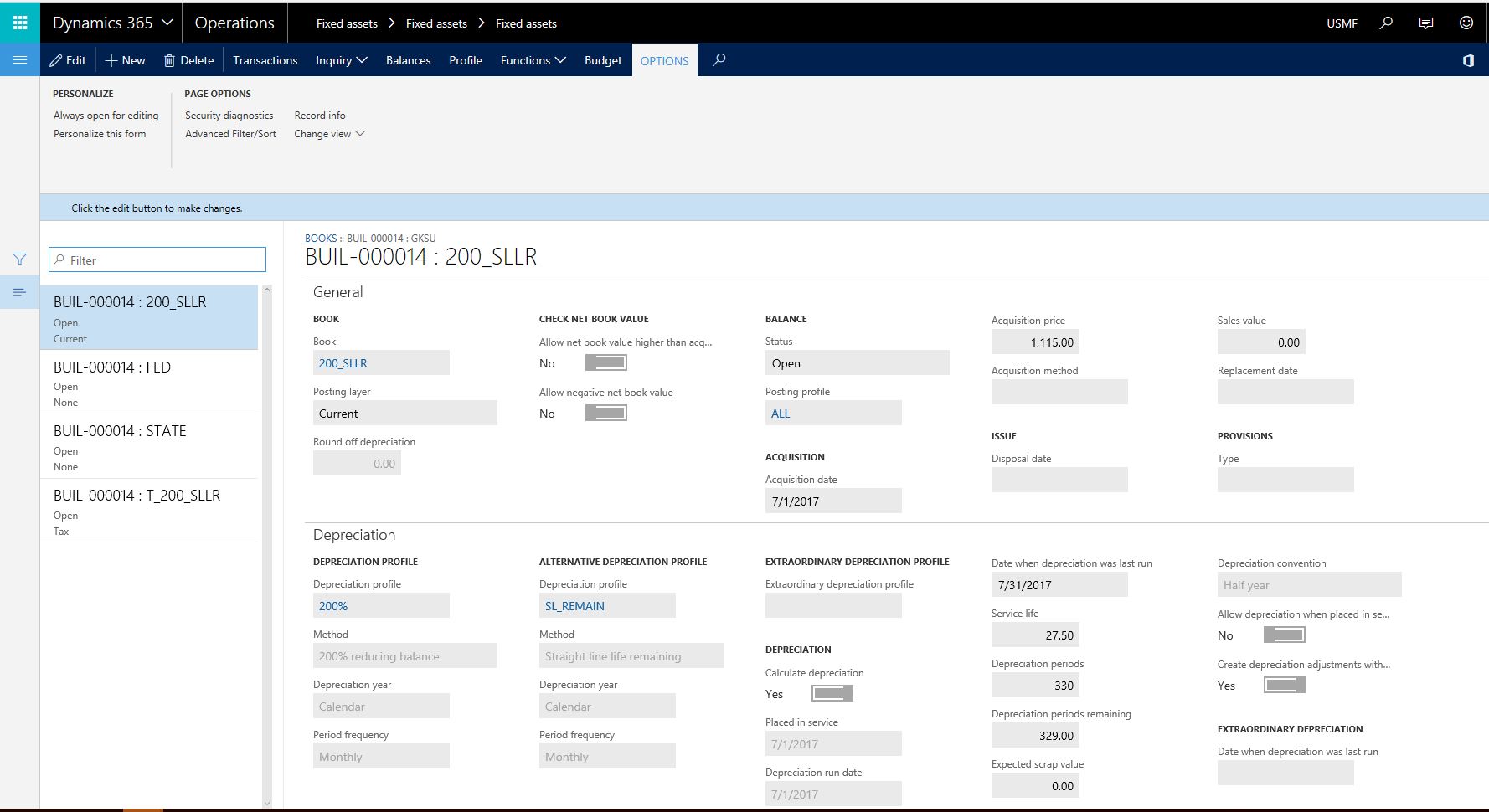
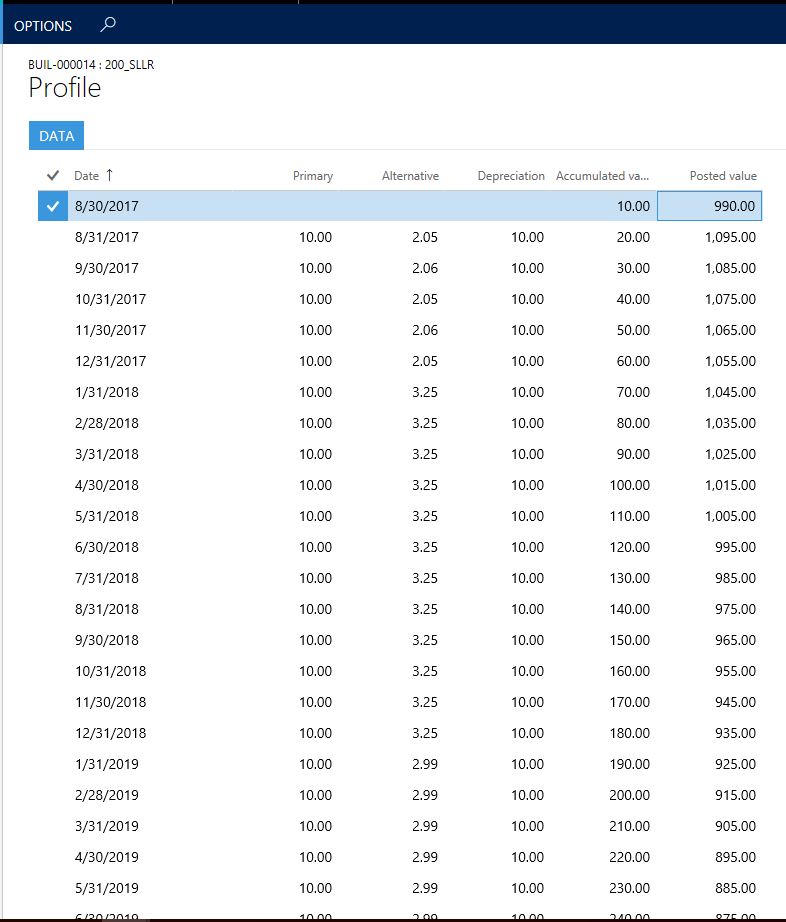
After the fixed asset is acquired and depreciation started few months back when I add additional acquisition cost to the asset I noticed that system during depreciation proposal ignores the new acquisition amount and calculates based on the old acquisition amount. how can I fix this?

  1. The fixed asset acquired July 1st
  2. first depreciation ran July 31st 
  3. 2 additional acquisition added via investment project Aug 31st by two elimination
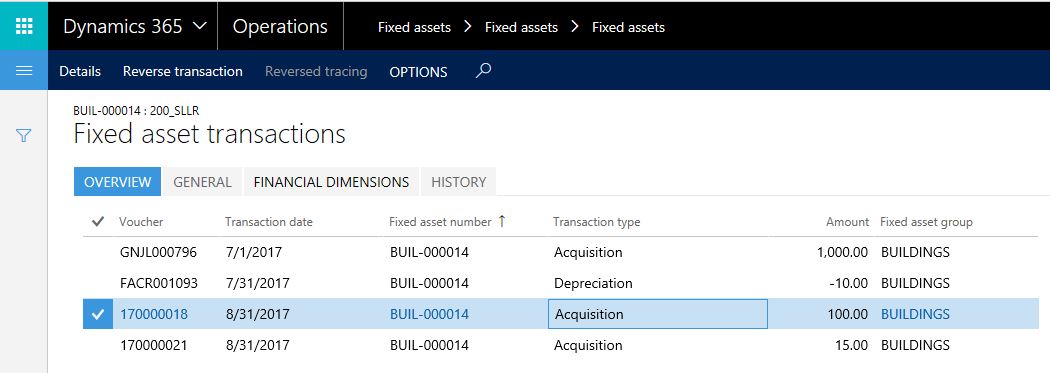
transcations.JPGBooks.JPGfuture.JPG

*This post is locked for comments

I have the same question (0)
  • Community Member Profile Picture
    on at

    Hi George,

    Can you provide details as to how you added the additional costs to the fixed asset? Did you use a fixed asset journal to add the additional cost to the asset?

    Thanks,

    Fahad

  • Ludwig Reinhard Profile Picture
    Microsoft Employee on at

    Hi Georgek,

    In addition to what FAD1 already mentioned, can you share your setups for that fixed asset, especially the value model settings that are made in the different tabs.

    Many thanks,

    Ludwig

  • Gilbert Khayat Profile Picture
    3,254 on at

    I am using project accounting to add additional cost. Using the 200_sllr book from demo. USMF

  • Ludwig Reinhard Profile Picture
    Microsoft Employee on at

    Hello Georgek,

    Thank you for that information.

    In addition, we need to know things such as

    - when the orginal acquisition was posted

    - when depreciations were run

    - what postings have been created so far

    - when the transfer from the project to the fixed asset occured

    It would be great if you could share some screenprints.

    This would make things easier to identify.

    Many thanks,

    Ludwig

  • Suggested answer
    Frank Hamelly | MVP, MCP, CSA Profile Picture
    46,627 Moderator on at

    Is the flag 'Create depreciation adjustments with basis adjustments' on in your value model?

  • Gilbert Khayat Profile Picture
    3,254 on at

    I added additional information hope this is sufficient. thank you all for your help

  • Gilbert Khayat Profile Picture
    3,254 on at

    Hi Frank, would it be possible to shed more light on this flag? thank you

  • Frank Hamelly | MVP, MCP, CSA Profile Picture
    46,627 Moderator on at

    Hi George, I see in your second screenshot that the flag is set to yes under the Depreciation tab.  There's a flag in the Value model (or Book, depending on your version) that defaults this value to all assets if it's switched on.  It's designed to automatically calculate depreciation on the new asset value after an adjustment to acquisition price is posted.

  • Gilbert Khayat Profile Picture
    3,254 on at

    It does calculate automatically when running a proposal however the proposal amount is based on the original  acquisition amount and ignores the additional acquisition amounts.

  • Suggested answer
    Ludwig Reinhard Profile Picture
    Microsoft Employee on at

    Hi Georgek,

    Can you create a depreciation proposal for 31 August?

    This proposal should include your additional acquisition costs recorded.

    Alternatively, you can also check the profile (button) in your book, which gives you a preview of the net book value and depreciations that will occur in the future.

    Best regards,

    Ludwig

Under review

Thank you for your reply! To ensure a great experience for everyone, your content is awaiting approval by our Community Managers. Please check back later.

Helpful resources

Quick Links

Introducing the 2026 Season 1 community Super Users

Congratulations to our 2026 Super Stars!

Meet the Microsoft Dynamics 365 Contact Center Champions

We are thrilled to have these Champions in our Community!

Congratulations to the March Top 10 Community Leaders

These are the community rock stars!

Leaderboard > 🔒一 Microsoft Dynamics AX (Archived)

#1
Joris dG Profile Picture

Joris dG 5

#2
Andrew Jones a1x Profile Picture

Andrew Jones a1x 2

#3
Basit Profile Picture

Basit 1

Last 30 days Overall leaderboard

Featured topics

Product updates

Dynamics 365 release plans