web
You’re offline. This is a read only version of the page.
close
Skip to main content

Notifications

Announcements

No record found.

Community site session details

Community site session details

Session Id :
Small and medium business | Business Central, N...
Answered

Report Language xlf

(0) ShareShare
ReportReport
Posted on by

Hello, create some reports and implement the corresponding xlf so that, depending on the client's language, it will be displayed with its language. My default language is 'es-ES' and but when it comes up blank or in 'ESP' it always gets the English translation. It works correctly when I put another language.
Do you know the reason?

I have the same question (0)
  • Suggested answer
    Amit Profile Picture
    2,559 on at
  • Verified answer
    YUN ZHU Profile Picture
    95,597 Super User 2025 Season 2 on at

    Hi, What is the target language in your translation file? And the default Language should be en-US, not en-ES.

    pastedimage1668129030015v1.png

    You can open the standard translation package in the On-Pre installation and take a look at its header section.

    C:\Temp\Dynamics.365.BC.48638.W1.DVD 21.1\Applications\BaseApp\Source

    pastedimage1668129140352v2.png

    pastedimage1668129160208v3.png

    pastedimage1668129184799v4.png

    More details about translation: 

    https://yzhums.com/2684/

    Hope this helps.

    Thanks.
    ZHU

  • Community Member Profile Picture
    on at

    Hello,
    I leave some screenshots of how I have it and what the error is.
    First the project configuration is in SAAS.

    pastedimage1668156104813v1.png

    The French translation file is as follows. And when putting the client's language in Fr, the invoice is displayed correctly.

    pastedimage1668156193088v2.png

    pastedimage1668156371402v6.png

    The file in English is the following and all the clients that have Spanish, English or blank show it in English.

    pastedimage1668156342349v4.png

    pastedimage1668156358368v5.png

    a greeting.

    Jorge Ramos

  • Verified answer
    Govinda Kumar Profile Picture
    2,304 Moderator on at

    Hi Jorge Ramos,

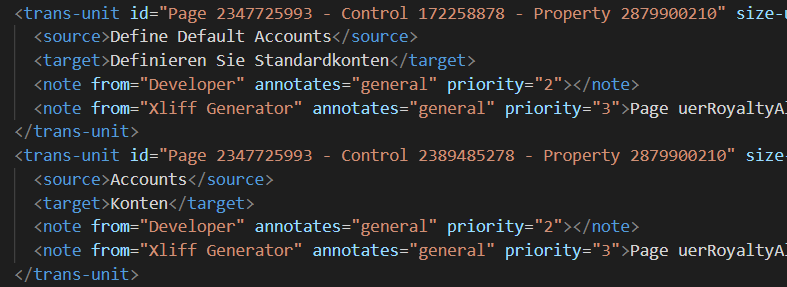
    You have to make sure you're using the correct translated caption in the target tag just below the source tag.

    pastedimage1668161506011v1.png

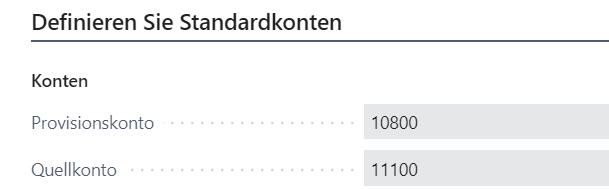
    Here I'm translating to german.

    pastedimage1668161750393v4.png

    pastedimage1668161777419v5.png

    The default language is English which is the language of the Base Application.. when you add the translated file to the project the source and target language are the same as the default language.

    You can translate to any language only from the default source language in your translation file.

    Also, see the language code for both the source and target.

    Just add the translated version, to see the translated version change the language.

    Regards.

  • Community Member Profile Picture
    on at

    Hello, I still have the problem, I can translate into Portuguese and French from the default language. The XLFs are created correctly, but when creating the one for es-ES it does not show it to me.

    I leave as it is the XLF of Spanish and also the one of French.

    ESP

    pastedimage1669288084812v1.png

    pastedimage1669288207855v4.png

    FR

    pastedimage1669288112333v2.png

    pastedimage1669288170957v3.png

    When I print the report it translates it into French and Portuguese according to the client's language, but when the client's language is ESP it is not translated and comes out in English.

    Client in French

    pastedimage1669288345783v5.png

    Client in Spanish 

    pastedimage1669288446441v6.png

    My configuration is the following

    pastedimage1669288496316v7.png

    Regards

  • Community Member Profile Picture
    on at

    After a lot of research I solved it in a very simple way but I think it was under a dynamics bug.

    To be able to translate into Spanish you must use the international Spanish language, since the traditional one does not translate it for you.

    I add this post for future people who have the same problem.

    Cheers

Under review

Thank you for your reply! To ensure a great experience for everyone, your content is awaiting approval by our Community Managers. Please check back later.

Helpful resources

Quick Links

Responsible AI policies

As AI tools become more common, we’re introducing a Responsible AI Use…

Neeraj Kumar – Community Spotlight

We are honored to recognize Neeraj Kumar as our Community Spotlight honoree for…

Leaderboard > Small and medium business | Business Central, NAV, RMS

#1
OussamaSabbouh Profile Picture

OussamaSabbouh 2,917

#2
Jainam M. Kothari Profile Picture

Jainam M. Kothari 1,161 Super User 2025 Season 2

#3
YUN ZHU Profile Picture

YUN ZHU 1,025 Super User 2025 Season 2

Last 30 days Overall leaderboard

Featured topics

Product updates

Dynamics 365 release plans