web
You’re offline. This is a read only version of the page.
close
Skip to main content

Notifications

Announcements

No record found.

Community site session details

Community site session details

Session Id :
Microsoft Dynamics AX (Archived)

Update 12 Data Import Issues

(0) ShareShare
ReportReport
Posted on by

040666.1.png

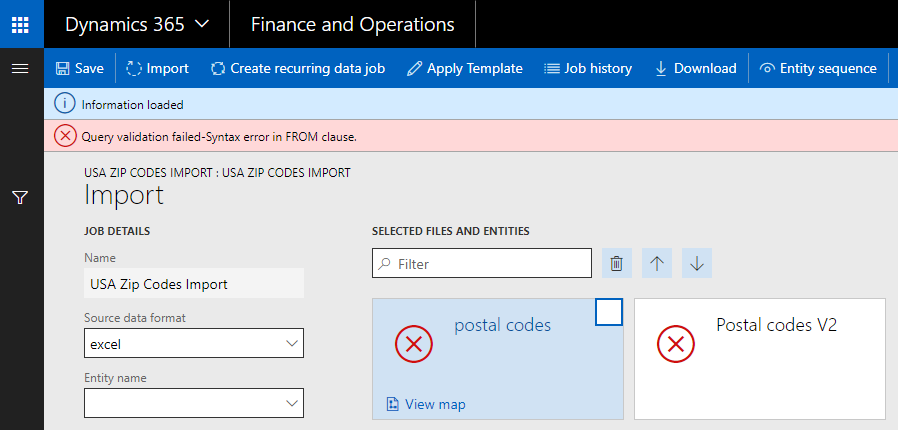
When trying to import data, there is now a toggle button for "sample file". If you mark it as "no", you cannot import a file. If you mark it as "yes", the import doesn't always work now. I am getting an error stating "Query validation failed-syntax error in FROM clause". Any ideas?

*This post is locked for comments

I have the same question (0)
  • Suggested answer
    Faisal Fareed Profile Picture
    10,796 User Group Leader on at

    That's not the issue with PU12 rather its an issue with your file name or the sheet name is the excel file, please make sure you dont have any special character in sheet name. these characters include but not limited to space " " and dot "." if you have these remove it and try again.

  • Community Member Profile Picture
    on at

    Hello Faisal,

    Thanks for the answer.  I encountered same issue as Bobbi_Jo and found that my import excel file sheet name had a 'space' in it's name.  Removed it and worked.  

  • howalker Profile Picture
    1,212 on at

    I don't have any spaces or special characters in the file name or any of the tabs.  365 keeps throwing this error and will not display my tabs.  I encountered this error last week in a different file, and I resolved it by eliminating the spaces in the tab names.  I've done that with today's file, yet 365 still keeps giving me this error.  

  • howalker Profile Picture
    1,212 on at

    I've discovered a "feature" of Platform Update 12 is a requirement that an Excel spreadsheet tab name MUST being with an alpha character and not a number.  When my tab name began with a number, Data Management would not display the tab to me when attempting to upload.  When I inserted a letter at the beginning of the tab name, Data Management would display that tab to me.  Unbelievable.    

  • Community Member Profile Picture
    on at

    I can confirm the worksheet name mustn't have spaces either. Infuriating.

Under review

Thank you for your reply! To ensure a great experience for everyone, your content is awaiting approval by our Community Managers. Please check back later.

Helpful resources

Quick Links

Responsible AI policies

As AI tools become more common, we’re introducing a Responsible AI Use…

Neeraj Kumar – Community Spotlight

We are honored to recognize Neeraj Kumar as our Community Spotlight honoree for…

Leaderboard > 🔒一 Microsoft Dynamics AX (Archived)

#1
Martin Dráb Profile Picture

Martin Dráb 4 Most Valuable Professional

#1
Priya_K Profile Picture

Priya_K 4

#3
MyDynamicsNAV Profile Picture

MyDynamicsNAV 2

Last 30 days Overall leaderboard

Featured topics

Product updates

Dynamics 365 release plans
