web
You’re offline. This is a read only version of the page.
close
Skip to main content

Notifications

Announcements

No record found.

Community site session details

Community site session details

Session Id :
Customer experience | Sales, Customer Insights,...
Suggested Answer

Calculated field with condition

(0) ShareShare
ReportReport
Posted on by

Hi 

I am creating a total calculated field to sum up the revenue fields 1-10, the conditions is set if field 1 contains data, or field 2 contains date, so on so forth to avoid input "0" into each field. However, the formula doesn't seem working and total is blank. A screenshot is provided below, does anyone know what's causing the error? 
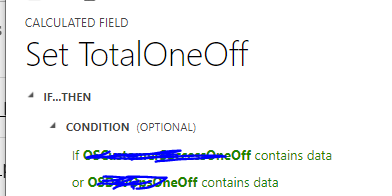
pastedimage1603945590901v1.png

pastedimage1603945636805v2.png

I have the same question (0)
  • Suggested answer
    Bipin D365 Profile Picture
    28,983 Moderator on at

    Hi,

    I have tested in My Environment. If any one of the field value is null then sum of all fields would show blank.

    Since you are using OR condition in your calculated field expression which means if any one or more fields does not contains data also your Action will be executed.

    You should build you condition in such a way that field where value is null should not be considered while calculating the sum.

    You should add multiple IF/ELSE condition. Or you can use plugin/custom workflow code to calculated total.

    Please mark my answer verified if i were helpful

  • LuHao Profile Picture
    40,892 on at

    Hi Lusio,

    I would recommend you change the condition to If field 1 is great than 0, or field 2 is great than 0.

  • LC-29040809-0 Profile Picture
    on at

    Hi Lu,

    Thanks for your reply. When the opportunity is first created, the fields are blank. We are input the data onto the revenue fields where applicable and the total can be calculated even though other fields are blank. If we were to set the field as value greater than 0, we will have to fill in all other fields zero everytime, which is time consuming. And there will be revenue coems in as negative  as well. Any other way to tackle this?

    Thank you.

Under review

Thank you for your reply! To ensure a great experience for everyone, your content is awaiting approval by our Community Managers. Please check back later.

Helpful resources

Quick Links

Responsible AI policies

As AI tools become more common, we’re introducing a Responsible AI Use…

Neeraj Kumar – Community Spotlight

We are honored to recognize Neeraj Kumar as our Community Spotlight honoree for…

Leaderboard > Customer experience | Sales, Customer Insights, CRM

#1
Tom_Gioielli Profile Picture

Tom_Gioielli 73 Super User 2025 Season 2

#2
Gerardo Rentería García Profile Picture

Gerardo Rentería Ga... 43 Most Valuable Professional

#3
Daniyal Khaleel Profile Picture

Daniyal Khaleel 32 Most Valuable Professional

Last 30 days Overall leaderboard

Product updates

Dynamics 365 release plans

