web
You’re offline. This is a read only version of the page.
close
Skip to main content

Announcements

No record found.

News and Announcements icon
Community site session details

Community site session details

Session Id :
Microsoft Dynamics NAV (Archived)

Add default sales line when creating Sales order

(0) ShareShare
ReportReport
Posted on by

Hi,

When creating a new sales order i want to to be dafault set on type G/L Account and No. to 1011 (Sales Line).

I have trouble with VALIDATE("No.", '1011); (Sales Line)

Because at the time I VALIDATE i dont have the Sales Header created and I get into this with the debugger running.
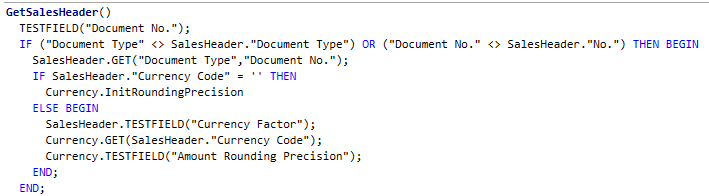
8637.Udklip2.PNG

I have tried to set the trigger code various places such as, Page 46 Sales Order Subform - OnNewRecord, Sales Line, Sales Header.

Where is the correct place to have the validate for No. (Sales Line).

Thanks In advance.

*This post is locked for comments

I have the same question (0)
  • Suggested answer
    Rajasekhar@MS Profile Picture
    5,569 on at

    Hi

    You can write code OnInsert Trigger of Sales Header Table.

  • Suggested answer
    Yogesh Kulkarni_ Profile Picture
    1,762 on at

    As per your description, you can write your code on OnInsert trigger of Sales Header Table.

    But, do you mean to say that you want to set Type as G/L Account and No. as 1011 for every Sales Order?


    -Yogesh Kulkarni
    Please verify, if you find answer helpful.

  • Suggested answer
    Maneesha Profile Picture
    5,891 on at

    hi

    as other members suggest its full fill your requirement using  OnInsert Trigger

  • Suggested answer
    Amol Salvi Profile Picture
    18,698 on at

    OnInsert is best trigger to insert default values

  • Suggested answer
    Suresh Kulla Profile Picture
    50,269 Super User 2026 Season 1 on at

    You cannot create a new sales line by using the OnInsert trigger of the sales header, since the record is not in the database yet the validation of sales line no. will get error as you mentioned above, the best place for you to add the code is on Page 42 Sales Order on the SellToCustomerNoAfterValidate function but before adding the code of salelines insert you need to add

    the following statements to commit the salesheader.

     CurrPage.SAVERECORD;

     COMMIT;

    Then add the Sales Line Insert Code.

  • Suggested answer
    dkatson Profile Picture
    2,263 on at

    I would suggest you not to modify this standard code, but to use sales quote for that, and create sales orders from there.

    Or to create sales order (as template) and copy it to you new sales orders

Under review

Thank you for your reply! To ensure a great experience for everyone, your content is awaiting approval by our Community Managers. Please check back later.

Helpful resources

Quick Links

Introducing the 2026 Season 1 community Super Users

Congratulations to our 2026 Super Stars!

Congratulations to our 2025 Community Spotlights

Thanks to all of our 2025 Community Spotlight stars!

Leaderboard > 🔒一 Microsoft Dynamics NAV (Archived)

Last 30 days Overall leaderboard

Featured topics

Product updates

Dynamics 365 release plans
