web
You’re offline. This is a read only version of the page.
close
Skip to main content

Notifications

Announcements

No record found.

Community site session details

Community site session details

Session Id :
Microsoft Dynamics CRM (Archived)

How to tell what kind of License your users have?

(0) ShareShare
ReportReport
Posted on by 1,800

My organization does not have an Office 365 Admin portal so I cannot tell what license my users have (Essential, Basic, Professional). We have been on MSDYNCRM since the introduction of 2011 and were just upgraded from 2011 to 2013 on 11/17/2013. 

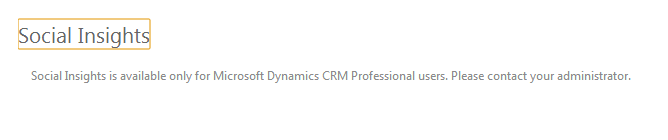
I was told that if you had existing users and were upgraded then you were upgraded to the Professional license, however, when I tried to install Inside View I received the following image when searching in Accounts, Contacts, etc. 
*This post is locked for comments

I have the same question (0)
  • houstonbrooke Profile Picture
    on at

    I'm curious about this too. How did you even get to the point where you were able to install it? I can't even figure that out. The press release and their website says nothing about how to try and enable it.

  • Caleb Buscher Profile Picture
    1,800 on at

    I used this link to download the zip file and then import it into the solution area of CRM 2013. I am using CRM 2013 Online, not On-Premise.

    www.insideview.com/.../install

  • houstonbrooke Profile Picture
    on at

    Ah thanks!

    I got as far as the screen that says this -

    In order to use Social Insights with this account, an administrator at Smartbridge, LLC will need to grant permission to Social Insights to access Smartbridge, LLC's identity data in Windows Azure Active Directory.

    If you'd like an email to be sent to your administrator to ask them to configure this access, please click the button below.

    I'm on 2013 Online too.

  • Caleb Buscher Profile Picture
    1,800 on at

    Yea, I am stumped for the time being because I thought my organization was upgraded to Professional Licenses but apparently something isn't working correctly and I am not sure how to check what licenses are associated with the users.

  • AaronRic Profile Picture
    10,035 on at

    This might be an issue with Social Insights from Inside View. Have you tried contacting their support?

  • Sindre Wetting Profile Picture
    on at

    I think that unless you had a different license than Full (or whatever it was called) in CRM 2011, you have the Professional license now. You can do a advanced find in CRM on the systemuser entity, there is an attribute name 'caltype' which should give you the answer (if MS has done it right).

    Another thing, I haven't used Social Insights myself, but have you given yourself access to it using the seucrity role provided by the solution. It might be that Social Insights is looking for that security role. Having System Administrator security role might not be enough - even though it gives you full access to everything in CRM.

  • houstonbrooke Profile Picture
    on at

    Hi Flowjob, thanks for your post.

    I just checked in the security roles and don't see any new ones added by Social Insights fwiw. But good point if I have issues with any other plugins in the future, because I noticed another plugin I added did create 3 new security roles.

  • Wendi Grinnell Profile Picture
    80 on at

    I've been able to install Social Insights but cannot get the Sync button to work  yet.  I had some initial hurdles when installing and had to use my 365 login rather than just my dynamics login to get it connected.  We are a MS Partner and managed customers 365 environments and have a few of us set up in the portal, but as an organization we do not use it.  We're also at the same time going through the transition from the current platform to the online billing services platform by merging with this 365 portal we have open.  That's a lot of information to come to the assumption that perhaps we need to be on the new online billing services platform (365) in order for this to work properly.  It's maybe not enough just to be upgraded to CRM 2013.  Have you guys gone through either the automated or assisted transition to the new billing portal?

  • Wendi Grinnell Profile Picture
    80 on at

    Just wanted to circle back from my post yesterday.  This morning, our online billing services transition was completed and I went in to attempt this again and it completed the set-up and sync in seconds and is working beautifully.    My assumption is that in order to have Social Insights working in CRM, you not only have to have CRM 2013 online version, but also be upgraded to the new billing platform.  Hope that helps!

Under review

Thank you for your reply! To ensure a great experience for everyone, your content is awaiting approval by our Community Managers. Please check back later.

Helpful resources

Quick Links

Responsible AI policies

As AI tools become more common, we’re introducing a Responsible AI Use…

Neeraj Kumar – Community Spotlight

We are honored to recognize Neeraj Kumar as our Community Spotlight honoree for…

Leaderboard > 🔒一 Microsoft Dynamics CRM (Archived)

#1
SA-08121319-0 Profile Picture

SA-08121319-0 4

#1
Calum MacFarlane Profile Picture

Calum MacFarlane 4

#3
Alex Fun Wei Jie Profile Picture

Alex Fun Wei Jie 2

Last 30 days Overall leaderboard

Featured topics

Product updates

Dynamics 365 release plans
