web
You’re offline. This is a read only version of the page.
close
Skip to main content

Notifications

Announcements

No record found.

Community site session details

Community site session details

Session Id :
Microsoft Dynamics AX (Archived)

Cannot debug code in D365

(0) ShareShare
ReportReport
Posted on by

Dear All,

I need to debug in D365. I followed the below link:

https://docs.microsoft.com/en-us/dynamics365/unified-operations/dev-itpro/dev-tools/debug-xpp

I kept breakpoint & had set a form as startup object & clicked Start Debugging from Debug menu. But it throws me an pop as below. I am running VS as administrator only.
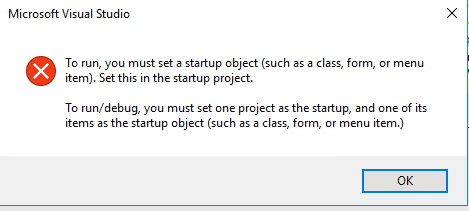
16367.Capture.PNG

I also tried to follow the way provided in the below link:

https://community.dynamics.com/ax/b/daxseed/archive/2016/11/25/debugging-in-ax-7-using-vs2015-when-symbols-are-not-loaded

But When go into Attach process from Debug menu, I don't find W3WP.exe there. 

Please help me to sort out this problem!!!

Thanks in advance!!!

*This post is locked for comments

I have the same question (0)
  • Suggested answer
    Community Member Profile Picture
    on at

    Jaya Rajan,

    If you want to debug your code, either you need to write a runable class in your solution that will be set as startup project, class will have a main method. In that case you can simply click on start button on Visual Studio.

    Or you need to create a menu item of your form, and set it as startup object. And in this case you will go to Debug -> Attach to Process. Check the option saying "Show processes from all users" and attach your code with w3wp.exe.

    And after checking option "Show processes from all users", if you still are not able to locate w3wp.exe, make sure you already have opened Ax in IE.

    Regards

  • Community Member Profile Picture
    on at

    Hafiz,

    Thanks for your prompt reply!!! "Show processes from all users" checkbox is already checked. But no luck!!!

  • Suggested answer
    Community Member Profile Picture
    on at

    Jaya Rajan,

    Did you check this?

    And after checking option "Show processes from all users", if you still are not able to locate w3wp.exe, make sure you already have opened IE (Internet Explorer) running on your machine.

    Regards

  • Verified answer
    Chris R Tilley Profile Picture
    339 on at

    Hi,

    Are you on platform 12?

    You will find you cannot debug as you used to, you'll need to attach to IIS Express I believe.  This is because of changes where you cannot access local administrator on a lot of the machines.  When you start up DevTools normal iis is stopped and IIS Express starts.

    https://community.dynamics.com/ax/b/newdynamicsax/archive/2018/01/06/restricted-admin-access-on-development-vms-with-platform-update-12-what-you-need-to-know

    Chris

  • Verified answer
    Nishant2408 Profile Picture
    705 on at

    It depends on the Plateform updates also you are working on. Before PU 12 W3WP.exe was the process to attach for debugging but in the current version it is IISExpress.exe.

    Please verify the version of your application as well.

    Thanks!

    Nishant Srivastava

  • Community Member Profile Picture
    on at

    Yes I am using Platform 12. First time I attached the IIS express in Attach process & after I stopped debugging and during second time, I am not able to find that service. Can you help me on that??

  • Suggested answer
    Nishant2408 Profile Picture
    705 on at

    Probably your service is stopped. To restart it, you can simply open a table browser which will initiate the service restart. You can select any table and browse it.

  • Verified answer
    Community Member Profile Picture
    on at

    I closed & reopened VS & tried and IIS express.exe appeared. Thanks all!!!

Under review

Thank you for your reply! To ensure a great experience for everyone, your content is awaiting approval by our Community Managers. Please check back later.

Helpful resources

Quick Links

Responsible AI policies

As AI tools become more common, we’re introducing a Responsible AI Use…

Neeraj Kumar – Community Spotlight

We are honored to recognize Neeraj Kumar as our Community Spotlight honoree for…

Leaderboard > 🔒一 Microsoft Dynamics AX (Archived)

#1
Martin Dráb Profile Picture

Martin Dráb 4 Most Valuable Professional

#1
Priya_K Profile Picture

Priya_K 4

#3
MyDynamicsNAV Profile Picture

MyDynamicsNAV 2

Last 30 days Overall leaderboard

Featured topics

Product updates

Dynamics 365 release plans
