web
You’re offline. This is a read only version of the page.
close
Skip to main content

Notifications

Announcements

No record found.

Community site session details

Community site session details

Session Id :
Customer experience | Sales, Customer Insights,...
Suggested Answer

Multiple entities in a business process flow

(0) ShareShare
ReportReport
Posted on by 30

My business process flow has only one entity. The dropdown for selecting a an entity is not working,  it only allows me to select the entity based on which i created this flow (see attached screenshot).
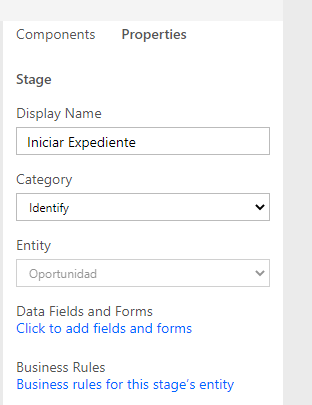
pastedimage1615194895234v1.png


I check the other entity  and I see that the Business process flows (fields will be created) option set in the entity definition is not active. I try change it, but this option set is not available (see attached screenshot).
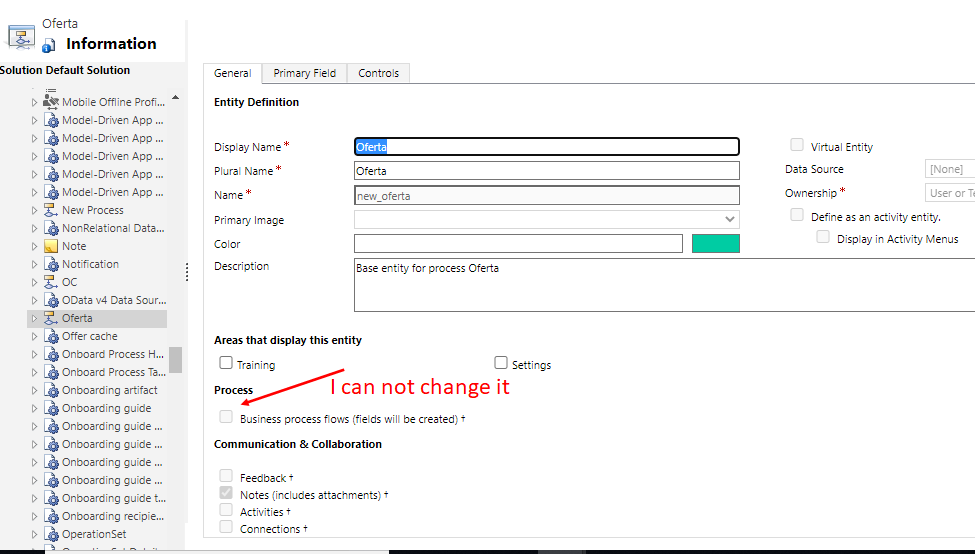
pastedimage1615195213640v2.png

So, I create a new Business process flow, but always is created with this set option deactivated. I have 3 or 4 business process flows and they all have the option disabled. I have this problem and I can not see multiple entities.

Please, How can I create a Business process flow with the active option "Business process flows (fields will be created) "?? 

I have the same question (0)
  • Suggested answer
    Inogic Profile Picture
    713 on at
    Hi Sandra,
    When you create a Business Process Flow, the initial stage is based on the entity that was selected while creating the Business Process Flow. It’s Microsoft’s behavior that we cannot change the entity of the initial stage.
    If you want to add multiple entity stages in your Business Process Flow then you can change the entity as shown in the image below for any stage except the first stage.
    image008.jpg
    Hope this helps!
    Thanks!
  • Suggested answer
    Charles Abi Khirs Profile Picture
    3,569 on at

    Hello,

    You are selecting the bpf entity created and not the entity itself, that's why you cannot check this checkbox.

    If you select the right entity, you will see that this checkbox is already selected.

  • Sandra Profile Picture
    30 on at

    Roohi and Charles, I have found the problem, but now I have other.

    I select the second stage and I continue with one entity (see scream)

    pastedimage1615380624780v1.png

    The problem is that this business process flow called "Oferta" was created with the table "no enveloping business process" (see image). If I select other table, I have multiple entities. It is a surprise!

    pastedimage1615380689040v2.png

    Then, I create a new flow, but I try to select my flow Oferta or oportunity and they are not appear

    pastedimage1615381027987v3.png

    Why? I check and my flow is as table , How can I include my BPF in the list of tables? 

    pastedimage1615381088134v4.png

    Thank by your help

Under review

Thank you for your reply! To ensure a great experience for everyone, your content is awaiting approval by our Community Managers. Please check back later.

Helpful resources

Quick Links

Responsible AI policies

As AI tools become more common, we’re introducing a Responsible AI Use…

Neeraj Kumar – Community Spotlight

We are honored to recognize Neeraj Kumar as our Community Spotlight honoree for…

Leaderboard > Customer experience | Sales, Customer Insights, CRM

#1
Tom_Gioielli Profile Picture

Tom_Gioielli 70 Super User 2025 Season 2

#2
Gerardo Rentería García Profile Picture

Gerardo Rentería Ga... 43 Most Valuable Professional

#3
Daniyal Khaleel Profile Picture

Daniyal Khaleel 32 Most Valuable Professional

Last 30 days Overall leaderboard

Product updates

Dynamics 365 release plans
