web
You’re offline. This is a read only version of the page.
close
Skip to main content

Notifications

Announcements

No record found.

Community site session details

Community site session details

Session Id :
Microsoft Dynamics CRM (Archived)

Portals: Status Reason field read-only on Entity Form.

(0) ShareShare
ReportReport
Posted on by

Hello community,

I have surfaced an Entity Form on my portal. On this form I have some fields that need to be editable by the Portal User, other fields to remain read-only.

The Status Reason field on the Portal for some reason is read-only even though on my CRM form it is defined as editable. When I test the CRM form the field is editable however on the portal it remains read-only. I want my Portal Users to have the ability to update the Status Reason on the Portal.

There are no scripts on the CRM or Entity Form. It is a plain form with very little config.

Fields A & B are editable.

Field C is read-only.
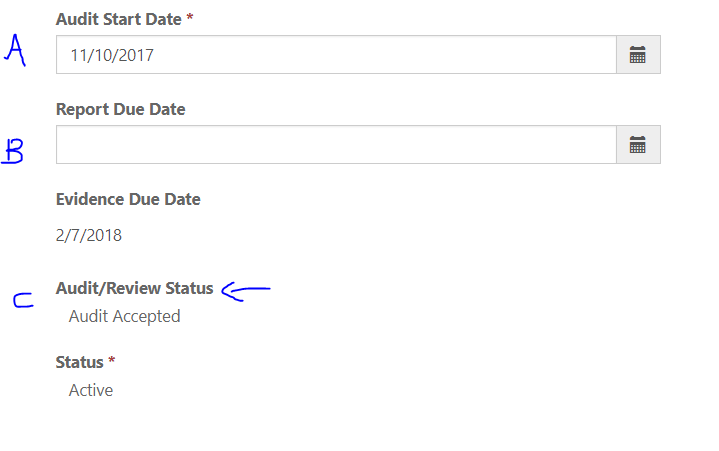
read_2D00_only.PNG

I went on further to test with another Entity Form and when I place the Status Reason field it is also read-only on the Portal.


Any ideas?


Cheers,

*This post is locked for comments

I have the same question (0)
  • Verified answer
    MSCRM Guru Profile Picture
    600 on at

    Hi,

    There are things to look at:

    1. Portal User Permission - The permissions for portal users is seperate from permissions of internal CRM users, so you may need to set up permissions differently.

    2. Status Reason is a special field - Several CRM versions ago updating the Status Reason required a special API request (SetState) and couldnt be done directly with Update, which may be the thing here.  A way to work around it is to add a new OptionSet to the Entity with the same values as teh status reason.  Make that OptionSet availble on the portal, and have a workflow set the Status Reason accordingly within CRM.

    Good luck!

  • VVG1303 Profile Picture
    on at

    Thanks for the info, yes I am Sys Admin on both the Portal and CRM so would have assumed that I dont need to configure specific permissions.

    Idea 2 is the workaround  that I have which works OK but ideally Portal users modify the original Status Reason field.

  • Suggested answer
    Arpit Shrivastava Profile Picture
    7,518 User Group Leader on at

    Hi,

    As per my knowledge, earlier CRM OOB status field was not supported neither in Adxstudio not in CRM portal. It used to shows blank value in readonly format.

    I dont think this is still supported. Only enhancement Is, now you can atleast see the value of status but you cannot update it.

    We are managing it by keeping one custom field by copying the same value of OOB Status field.

    Hope MS will take this into consideration in upcoming release.

    Please mark this an answer. If you find your anwser.

    Cheers

    Arpit

Under review

Thank you for your reply! To ensure a great experience for everyone, your content is awaiting approval by our Community Managers. Please check back later.

Helpful resources

Quick Links

Responsible AI policies

As AI tools become more common, we’re introducing a Responsible AI Use…

Neeraj Kumar – Community Spotlight

We are honored to recognize Neeraj Kumar as our Community Spotlight honoree for…

Leaderboard > 🔒一 Microsoft Dynamics CRM (Archived)

#1
SA-08121319-0 Profile Picture

SA-08121319-0 4

#1
Calum MacFarlane Profile Picture

Calum MacFarlane 4

#3
Alex Fun Wei Jie Profile Picture

Alex Fun Wei Jie 2

Last 30 days Overall leaderboard

Featured topics

Product updates

Dynamics 365 release plans
