web
You’re offline. This is a read only version of the page.
close
Skip to main content

Notifications

Announcements

Community site session details

Community site session details

Session Id :
Small and medium business | Business Central, N...
Suggested Answer

The name "FieldCaption" does not exist in the current context

(0) ShareShare
ReportReport
Posted on by 73

I'm doing the Custom Functions Functions Exercise via Microsoft's Development learning path for manipulating data using code. HEre is the link if you want to visit the page...

Exercise - Custom functions - Training | Microsoft Learn

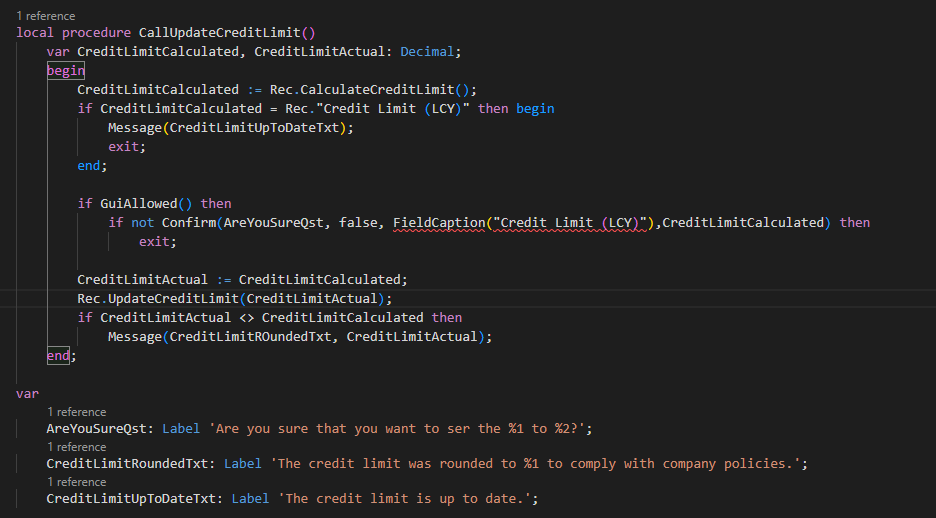
There is a direction to copy some code and paste in here, but that code creates an error that is difficult to understand. "The name FieldCaption/Credit Limit (LCY) does not exist in the current context."
pastedimage1676655492726v2.png

I have symbols downloaded, but there doesn't seem to be any direct info from Microsoft on how to solve this issue.

I have the same question (0)
  • Suggested answer
    tonyab Profile Picture
    55 on at

    Try doing Rec.FieldCaption("Credit Limit (LCY)")
    You need to have the table in front of the FieldCaption (which in this case would be the Rec variable to indicate the record you are working with). 

  • Suggested answer
    YUN ZHU Profile Picture
    96,157 Super User 2025 Season 2 on at

    Hi, just adding some info.

    If this code is from MS Learn, maybe they forgot to update the program.

    https://learn.microsoft.com/en-us/dynamics365/business-central/dev-itpro/developer/devenv-deprecating-with-statements-overview

    Thanks

    ZHU

  • Suggested answer
    Nitin Verma Profile Picture
    21,708 Moderator on at

    Hi,

    You can try as per below

    CreditLimitCalculated := Rec.CalculateCreditLimit();

    if CreditLimitCalculated = Rec."Credit Limit (LCY)" then begin

    Message(CreditLimitUpToDateTxt);

    exit; end; if GuiAllowed() then

    if not Confirm(AreYouSureQst, false, Rec.FieldCaption("Credit Limit (LCY)"),CreditLimitCalculated) then exit;

    CreditLimitActual := CreditLimitCalculated;

    Rec.UpdateCreditLimit(CreditLimitActual);

    if CreditLimitActual <> CreditLimitCalculated then

    Message(CreditLimitROundedTxt, CreditLimitActual);

Under review

Thank you for your reply! To ensure a great experience for everyone, your content is awaiting approval by our Community Managers. Please check back later.

Helpful resources

News and Announcements

Season of Giving Solutions is Here!

Quick Links

Responsible AI policies

As AI tools become more common, we’re introducing a Responsible AI Use…

Neeraj Kumar – Community Spotlight

We are honored to recognize Neeraj Kumar as our Community Spotlight honoree for…

Leaderboard > Small and medium business | Business Central, NAV, RMS

#1
OussamaSabbouh Profile Picture

OussamaSabbouh 1,630

#2
Khushbu Rajvi. Profile Picture

Khushbu Rajvi. 800 Super User 2025 Season 2

#3
YUN ZHU Profile Picture

YUN ZHU 789 Super User 2025 Season 2

Last 30 days Overall leaderboard

Featured topics

Product updates

Dynamics 365 release plans
