Hi Kokulan,
unfortunately removing and adding back again the field, in the context of the same Patch Solution, is not enough.
Below, you can see the Form status in my STAGING environment, after have applied the Patch Solution 1.1.3.0:

Based on the same Base Solution in DEV, I've prepared the Patch Solution 1.1.4.0, where I have removed the field "Address Phone" with label "Address Phone_Patch 1.1.3.0" and then added back the field, this time with label "Address Phone_Patch 1.1.4.0":

Then, I have exported the Patch Solution 1.1.4.0 as managed and imported in my STAGING environment.
As you can see, the field "Address Phone" has been duplicated, because removing and reinserting it into the Form has caused the creation of a new element with a new ID, if you observe the XML equivalent block:
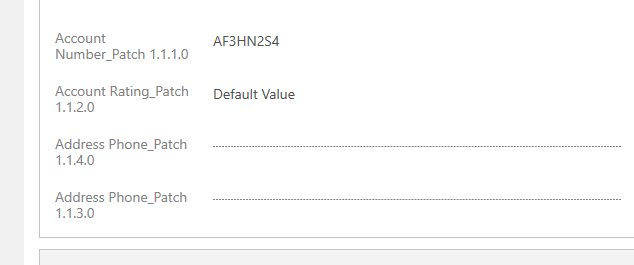
This is the fragment associated to the field as specified by the Patch Solution 1.1.3.0:

This is the fragment associated to the field as specified by the Patch Solution 1.1.4.0:

In order to resolve this extra issue, I decided to try performing a double patching: with the first Patch Solution I wanted to remove the field, and with another Patch Solution I wanted to inserting back the field with a new label. It didn't work neither at first stage, because even though with Patch Solution 1.1.4.0 I had removed the field, this was continuing to appear into the form:

The last tried, that finally worked, has been consolidating all the patches into a Clone Solution. In this way, a major solution release is created, and the finally form design was as expected:
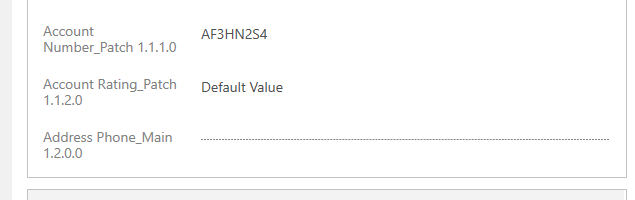
As a final consideration, I would say that if you want only to add new fields into forms, you can adopt the Patching Solution strategy. But if you are planning to perform changes to fields already available into the forms, then the Cloning Solution strategy should be the preferred way.
Regards,
Marco







