web
You’re offline. This is a read only version of the page.
close
Skip to main content

Announcements

No record found.

News and Announcements icon
Community site session details

Community site session details

Session Id :
Microsoft Dynamics AX (Archived)

How to disable reservations for items

(0) ShareShare
ReportReport
Posted on by 104

Hello Everyone,

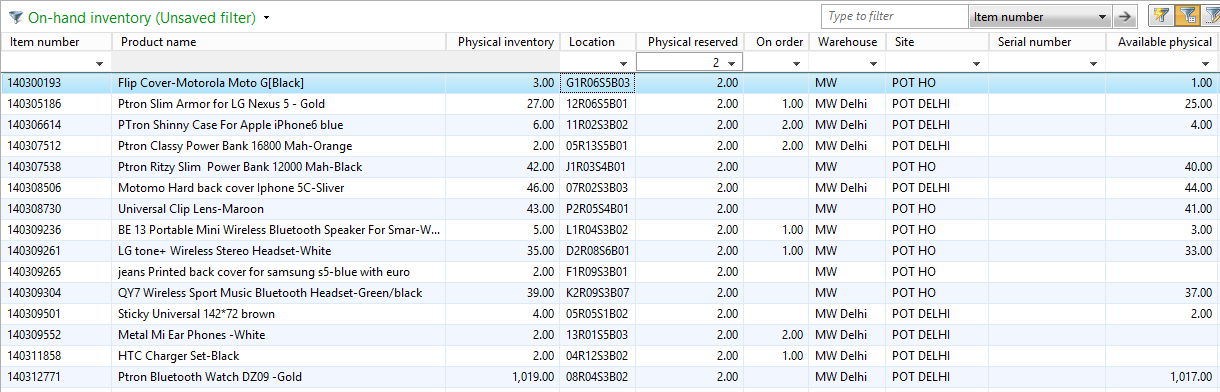
Unserve.png

We are unable to transfer and adjust inventory because of physically reserved. Please check attachment.

 Could you please suggest us how to do this, we don't any thing first-in & first-out for sale orders processing.

Example:

Item Id: 14030001

This item has 13 pieces in Ax. And we got 3 orders on this item. Its getting reserved after generating picking list.

Now i have decided to transfer 13 pieces from one location to another. Its not allowing me to transfer 13 pieces.

I can transfer only 10 pieces. That's not my requirement. It takes Available Physical always for transfer and Inventory Adjustment.

Please guide me how to disable this feature.

*This post is locked for comments

I have the same question (0)
  • André Arnaud de Calavon Profile Picture
    304,711 Super User 2026 Season 1 on at

    Hi g.sathish,

    You have not mentioned if you are using warehouse management features or not. This will be dependent on what you can do for override the reservations or not.

    Beside this, to me, I think when there is a pick list created it has no use to create a transfer for the same products. So in this way the system behavior seems to be correct.

    What if a person will be directed to location "B" according to the pick list/mobile device and someone just transferred them to "Y"? That is not logic at all.

  • Community Member Profile Picture
    on at

    Andre is correct. In this case it would seem you need to unpick these and cancel that pick list to clear the reservations. This is standard AX functionality. It will not allow you to transfer something that is already designated in a pick list.

    Ron

Under review

Thank you for your reply! To ensure a great experience for everyone, your content is awaiting approval by our Community Managers. Please check back later.

Helpful resources

Quick Links

Introducing the 2026 Season 1 community Super Users

Congratulations to our 2026 Super Stars!

Meet the Microsoft Dynamics 365 Contact Center Champions

We are thrilled to have these Champions in our Community!

Congratulations to the April Top 10 Community Leaders

These are the community rock stars!

Leaderboard > 🔒一 Microsoft Dynamics AX (Archived)

#1
CP04-islander Profile Picture

CP04-islander 39

#2
Michel ROY Profile Picture

Michel ROY 14

#3
imran ul haq Profile Picture

imran ul haq 8

Last 30 days Overall leaderboard

Featured topics

Product updates

Dynamics 365 release plans
