web
You’re offline. This is a read only version of the page.
close
Skip to main content

Announcements

No record found.

News and Announcements icon
Community site session details

Community site session details

Session Id :
Finance | Project Operations, Human Resources, ...
Answered

Understanding rating details

(0) ShareShare
ReportReport
Posted on by 212 User Group Leader

Hey everyone, 

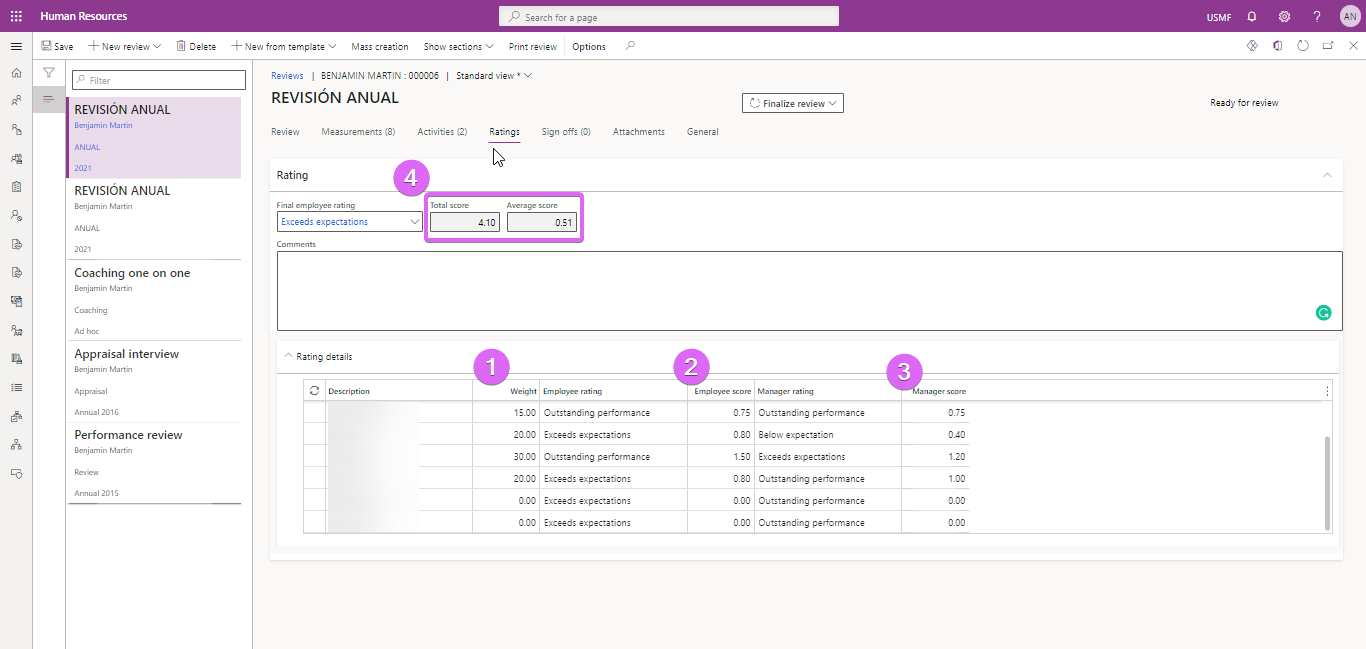
I want to understand how the following concepts work in the system from a functional side, I couldn't find any official or community documentation. 
pastedimage1642673498891v1.png

1. Weight: Linked with the goals from the review template

2. Employee score: how does the system calculate this score? Based on what?

3. Manager score: how does the system calculate this score? Based on what?

4. Total score and Average Score: I think I understand the total score as the sum of the Manager Score and the Average score as the sum of all scores divided by the number of goals. How do these ratings work? What's the maximum for the total score and for the average score?

Thank you everyone!

I have the same question (0)
  • Suggested answer
    Mphazima_ka_Langa Profile Picture
    130 on at

    Hi Ana, 

    I think the system calculate those score based on KPI and Action plan based in MBO.

    So Ana tells me, about the final employee rating did you select the final employee rating on the box or did it select itself (or auto-selected itself ) using the total score and average score you get once the manager score the employee? Can you please help me on that one because I'm stuck there?

    Regards

    Mphazima_ka_Langa

  • naneurrutia Profile Picture
    212 User Group Leader on at

    Can you elaborate on this, please?

    I think the system calculate those score based on KPI and Action plan based in MBO.

    I find your answer a bit confusing, if you can elaborate I'll appreciate, thanks. 

  • Verified answer
    EjazK Profile Picture
    287 on at

    HI Ana, the scores are just an calculation between the weight and the rating amount, see example below, weight = 100, score = 2.00. The rating of 'Below expectation' has a value of 2.00. So the weight is indicating the % of the score. In this example 100% of 2.00 is 2.00.

    In the next row you can see the same, 50% x 3.00 = 1.50, the rating 'Average performance' has a value of 3.00

    Weight: 100.00 ; Employee rating = 'Below expectations' ; Employee score = 2.00

    Weight: 50.00 ; Employee rating = 'Average performance' ; Employee score = 150

  • Verified answer
    EjazK Profile Picture
    287 on at

    Also, all the weightings have to sum to 100, otherwise you cannot submit the form. So in the above example I gave, you'd have to give both ratings a weight of 50

  • naneurrutia Profile Picture
    212 User Group Leader on at

    Thanks a lot! Now it's clear.

Under review

Thank you for your reply! To ensure a great experience for everyone, your content is awaiting approval by our Community Managers. Please check back later.

Helpful resources

Quick Links

Introducing the 2026 Season 1 community Super Users

Congratulations to our 2026 Super Stars!

Meet the Microsoft Dynamics 365 Contact Center Champions

We are thrilled to have these Champions in our Community!

Congratulations to the March Top 10 Community Leaders

These are the community rock stars!

Leaderboard > Finance | Project Operations, Human Resources, AX, GP, SL

#1
Giorgio Bonacorsi Profile Picture

Giorgio Bonacorsi 616

#2
André Arnaud de Calavon Profile Picture

André Arnaud de Cal... 460 Super User 2026 Season 1

#3
Syed Haris Shah Profile Picture

Syed Haris Shah 331 Super User 2026 Season 1

Last 30 days Overall leaderboard

Product updates

Dynamics 365 release plans
