web
You’re offline. This is a read only version of the page.
close
Skip to main content

Notifications

Announcements

No record found.

Community site session details

Community site session details

Session Id :
Microsoft Dynamics GP (Archived)

Error on unposted SOP invoice

(0) ShareShare
ReportReport
Posted on by 2,895

Hi Community,

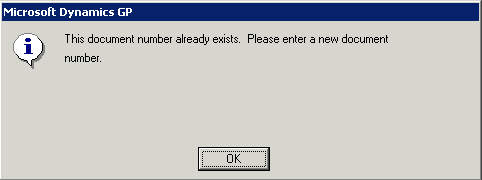
I have an error I have not yet encountered. SOP invoices are integrated using eConnect into a batch. All post except one. The error message is stating the document number already exists, but the document number is unique. It is also saved to the open SOP docs table. However, GP will not allow this document to be opened in the SOP Transaction Entry window. The batch will not post of course, and the edit list does not show this posting error.

I have run check links on the appropriate sales tables, and everything comes back with no errors. I have no batches in batch recovery, and SQL looks normal.

Anyone come across this before?
*This post is locked for comments

I have the same question (0)
  • Richard Wheeler Profile Picture
    75,848 Moderator on at

    I would start by looking in the SOP3020 table to see if that SOPNUMBE exist in there. Perhaps somehow there is an SOP document in history.

  • Josh P Profile Picture
    2,895 on at

    Hi Richard,

    That is a good thought. Check links would have caught this error. I do have the invoice in the SOP10100 table, and everything looks normal. This is why the problem is so weird. Any other ideas?

  • Suggested answer
    Victoria Yudin Profile Picture
    22,769 on at

    Joshua,

    I agree with Richard, my first reaction when I saw that error was to check to see if the SOP number is also in SOP30200. I have seen this exact error before when there was an issue with the posting and the SOP doc was posted and moved to the history tables, but it was not cleared out of the unposted tables.

    I am not 100% certain, but I am not sure if check links would catch this, and if it did, I am not sure what it would do about it.

  • Josh P Profile Picture
    2,895 on at

    Hi Victoria,

    Unfortunately, it's not in the history table. That would be an easy fix. It is however in the open table SOP10100 in an unposted status.

    I would simply void this transaction from the batch, re-enter, and move on, but I cannot do this from the batch delete option since it has a print flag on it. I cannot get into the transaction entry window to void it.

    I wonder if I orphan the header / detail in SQL and run check links on it - will GP correct all the related problems?

    Thoughts?

  • Verified answer
    Victoria Yudin Profile Picture
    22,769 on at

    Joshua,

    Yes, you can delete it from SOP10100 and SOP10200 and run check links, it will clear it from all the other SOP tables.

  • Verified answer
    Richard Wheeler Profile Picture
    75,848 Moderator on at

    I would go into SSMS and change the field for number of times printed to zero and then return to GP and delete it. This way all allocations will be removed properly.

  • Josh P Profile Picture
    2,895 on at

    Thanks to you both for good suggestions. I was more wondering how this happened more than how to fix, but I suppose it will be a mystery for now.

Under review

Thank you for your reply! To ensure a great experience for everyone, your content is awaiting approval by our Community Managers. Please check back later.

Helpful resources

Quick Links

Responsible AI policies

As AI tools become more common, we’re introducing a Responsible AI Use…

Neeraj Kumar – Community Spotlight

We are honored to recognize Neeraj Kumar as our Community Spotlight honoree for…

Leaderboard > 🔒一 Microsoft Dynamics GP (Archived)

#1
mtabor Profile Picture

mtabor 1

Last 30 days Overall leaderboard

Featured topics

Product updates

Dynamics 365 release plans
