web
You’re offline. This is a read only version of the page.
close
Skip to main content

Notifications

Announcements

No record found.

Community site session details

Community site session details

Session Id :
Service | Customer Service, Contact Center, Fie...
Suggested Answer

Dynamics 365 Customer Workspace App: Omnichannel Productivity Pane

(0) ShareShare
ReportReport
Posted on by 306

Hello Community,

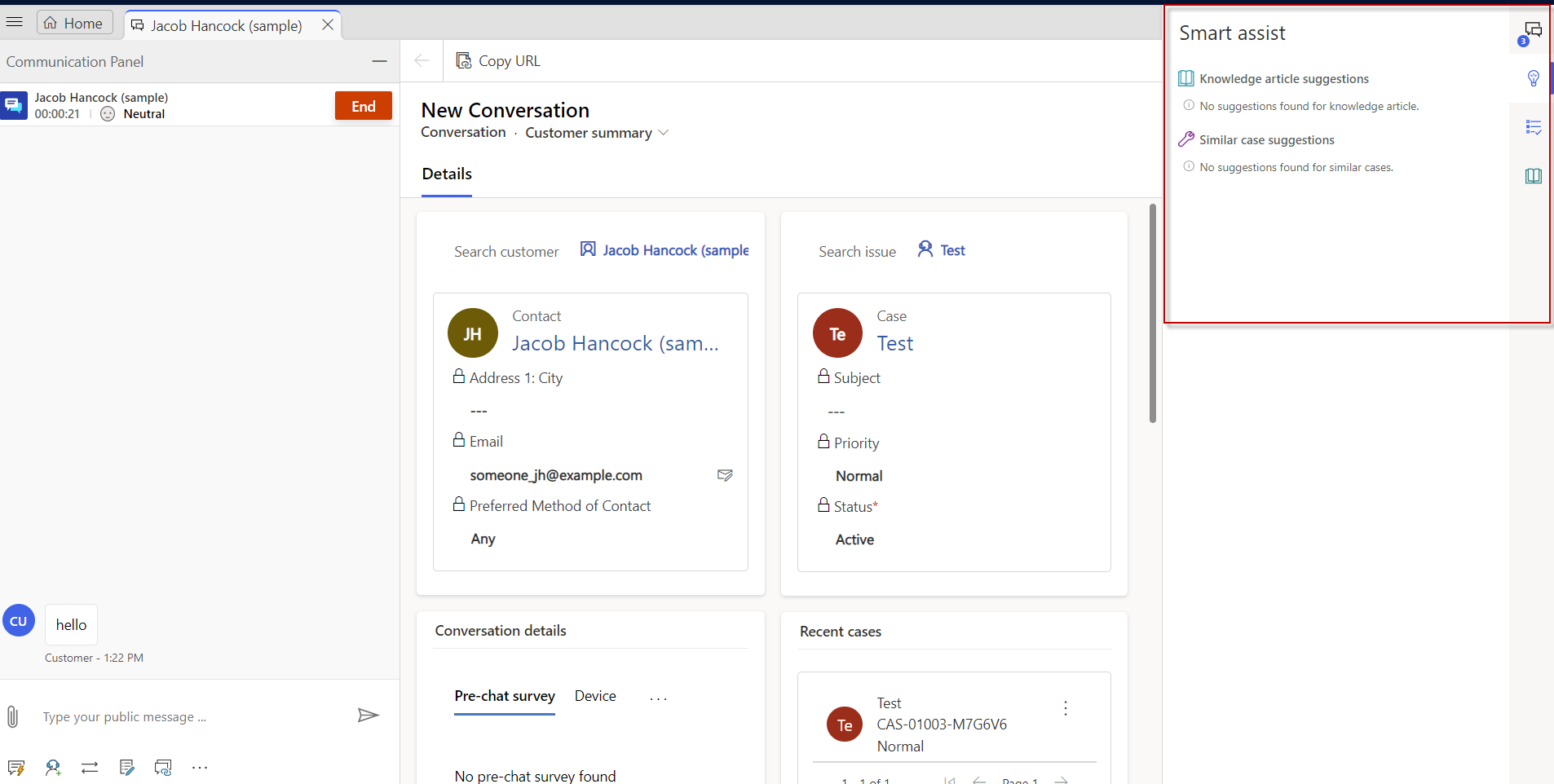
When working with Omnichannel in the D365 Customer Service Workspace App, is the productivity pane window (circle below where we can see the Smart Assist, Agent Script, etc.) on the right side “responsive” and will dynamically adjust based on browser and device? I believe the answer is yes, but would like to confirm.
pastedimage1680637959039v1.png

Also, does anyone know the “width size dimension” of this productivity pane window?

Any insights would be appreciated, thank you!

I have the same question (0)
  • Suggested answer
    PerezAguiar Profile Picture
    Microsoft Employee on at

    Hey!

    Yes.  ON learn.microsoft.com/.../oc-view-ai-suggested-cases-articles, you can see that the screenshot is pretty similar.

    Regards,

  • D365EL Profile Picture
    306 on at

    Hi PerezAguiar ,

    Thank you for your reply! However, my questions are:

    1. Is the productivity pane window “responsive” - meaning, it will dynamically adjust in size based on browser and device? I believe the answer is yes, but would like to confirm.

    2. What's the “width size dimension” of this productivity pane window? Is this information something I could find out?

    Thank you!

  • Suggested answer
    PerezAguiar Profile Picture
    Microsoft Employee on at

    Hey!

    I've used the Developer tools to check, and from what I see, the SmartAssist is being called within SidePanes.  Documentation is on https://learn.microsoft.com/en-us/power-apps/developer/model-driven-apps/clientapi/create-app-side-panes and https://learn.microsoft.com/en-us/power-apps/developer/model-driven-apps/clientapi/reference/xrm-app-appsidepane 

    Regards,

Under review

Thank you for your reply! To ensure a great experience for everyone, your content is awaiting approval by our Community Managers. Please check back later.

Helpful resources

Quick Links

Responsible AI policies

As AI tools become more common, we’re introducing a Responsible AI Use…

Neeraj Kumar – Community Spotlight

We are honored to recognize Neeraj Kumar as our Community Spotlight honoree for…

Leaderboard > Service | Customer Service, Contact Center, Field Service, Guides

#1
Tom_Gioielli Profile Picture

Tom_Gioielli 45 Super User 2025 Season 2

#2
Daniyal Khaleel Profile Picture

Daniyal Khaleel 27 Most Valuable Professional

#3
Soundari Profile Picture

Soundari 15

Last 30 days Overall leaderboard

Featured topics

Product updates

Dynamics 365 release plans
