web
You’re offline. This is a read only version of the page.
close
Skip to main content

Announcements

No record found.

News and Announcements icon
Community site session details

Community site session details

Session Id :
Microsoft Dynamics AX (Archived)

Account and Offset Account Financial Dimensions Issue

(0) ShareShare
ReportReport
Posted on by 12

Hi, 

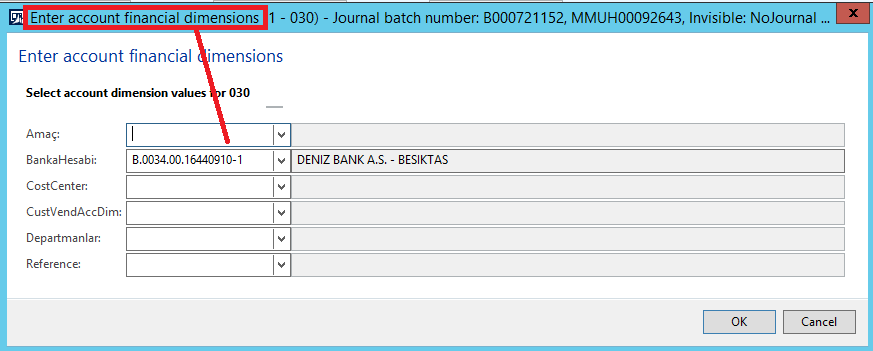
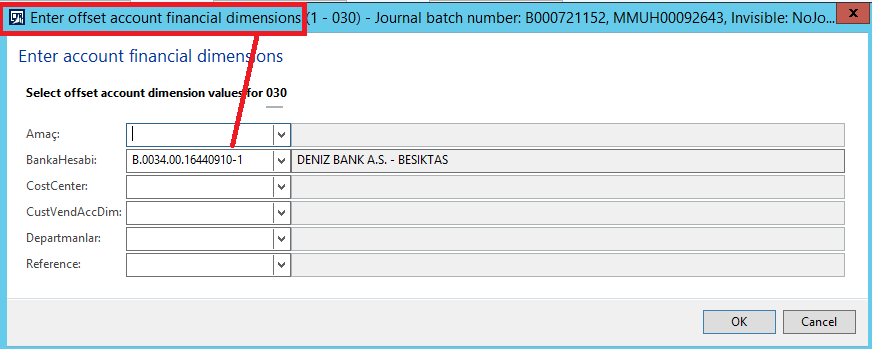
When we look at the financial dimensions during the interbank transfer, the financial dimension of the Account and the financial dimension of the Offset Account are the same filling.

Screenshots:
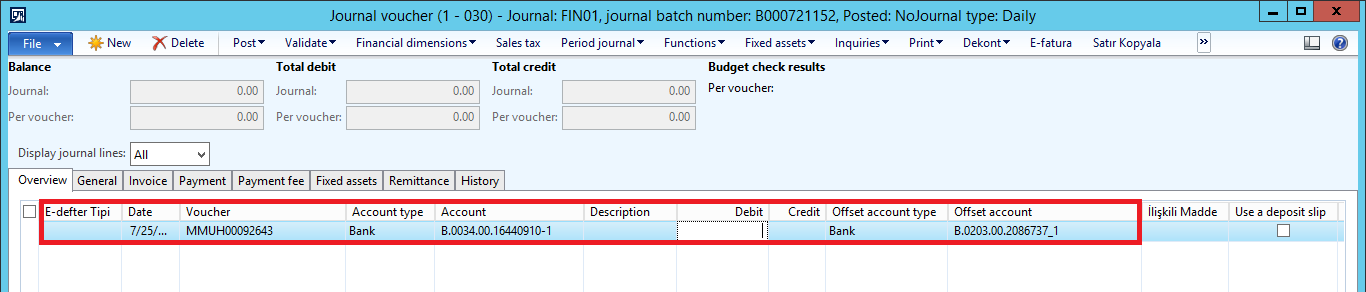
1754.png

4478.png6303.png

It filling automatically like the screenshots. What can we do? Thanks.

Best regards.

*This post is locked for comments

I have the same question (0)
  • Ehtasham Rahman Profile Picture
    672 on at

    Hi Mert!

    Can you please explain what you are trying to achieve?

  • Suggested answer
    Ludwig Reinhard Profile Picture
    Microsoft Employee on at

    Hello Mert,

    This is the standard behavior of Dynamics.

    If you want to have other findims for the offset account then you can manually overwrite them or specify a fixed financial dimension value that will be used when you post the transaction.

    All depends of course on your requirement.

    Best regards,

    Ludwig

  • Mert Demir Profile Picture
    12 on at

    Hi Ehtasham,

    In the financial dimension screen, which should normally be, the "BankaHesabi" a.k.a Bank Account dimension of the Offset Account must be the number in the Offset Account.

    But the Axapta brings the financial dimension of bank account to the financial dimension of the offsetting account.

    I want to make the Offset Account automatically filling to the financial dimension of Offset Account.

    Sorry for the weak English.

    Best regards.

  • Mert Demir Profile Picture
    12 on at

    Hi Ludwig,

    Thank you very much for answer.

    We are starting to make the necessary coding improvements in Axapta.

    Best regards.

  • Suggested answer
    Ehtasham Rahman Profile Picture
    672 on at

    Hi Mert!

    As mentioned by Mr. Ludwing too, you need to modify some code to achieve it.

  • Suggested answer
    Ludwig Reinhard Profile Picture
    Microsoft Employee on at

    Hi Mert Demir,

    I did not mention anything about code adjustments and to be honest, I would never touch the standard posting routine of AX.

    If this is not done very careful things can go terribly wrong and mess up your complete system.

    I would rather recommend searching for workarounds rather than trying to modify the code.

    Best regards,

    Ludwig

Under review

Thank you for your reply! To ensure a great experience for everyone, your content is awaiting approval by our Community Managers. Please check back later.

Helpful resources

Quick Links

Introducing the 2026 Season 1 community Super Users

Congratulations to our 2026 Super Stars!

Meet the Microsoft Dynamics 365 Contact Center Champions

We are thrilled to have these Champions in our Community!

Congratulations to the March Top 10 Community Leaders

These are the community rock stars!

Leaderboard > 🔒一 Microsoft Dynamics AX (Archived)

#1
CP04-islander Profile Picture

CP04-islander 16

#2
GiacomoRovai Profile Picture

GiacomoRovai 4

#3
Douglas Noel Profile Picture

Douglas Noel 2

Last 30 days Overall leaderboard

Featured topics

Product updates

Dynamics 365 release plans