web
You’re offline. This is a read only version of the page.
close
Skip to main content
Community site session details

Community site session details

Session Id :
Small and medium business | Business Central, N...
Suggested Answer

"Purchase Order Workflow Error"

(0) ShareShare
ReportReport
Posted on by

Hi,

I'm facing the issue regarding to the purchase order approval. In my scenario I have 3 approvers hierarchy by sequence 1,2 and 3 so first two users can approve the limited amount while 3rd one is my final authority who can approve it finally, after the approval of the first 2 users i am not able to access the approve button on the header of the document so plz help me out of this problem why I am facing this error.

"ERROR"

You cannot use Purchase Header: Order,106046 for this action.

The restriction was imposed by the MS-POAPW-01 workflow, Purchase Order Approval Workflow.

Thanks & Regards

Saqib Hassan

I have the same question (0)
  • Suggested answer
    Vanessa Garcia Profile Picture
    on at
    RE: "Purchase Order Workflow Error"

    Hello Saqib,

    could you share the workflow setup with us? Is it the standard one?

    Some ideas so far:

    a) If the 3 approvers needs to really approve, I guess you are playing with 2 "An approval request is approved" Events, one filtering by "Pending Approvals: 0" an the other "Pending Approvals: >0>, right?

    b) Inside the "Pending Approvals: 0" you should have a Response to "Remove Record Restriction", and this should happen only when "Pending Approvals: 0" which means that the 3 approvers already approved the request.

    pastedimage1621590209228v1.png

    If this does not help, please also check in the "Pending Approvals: >0" event, the response "Send approval request for the record and create a notification."
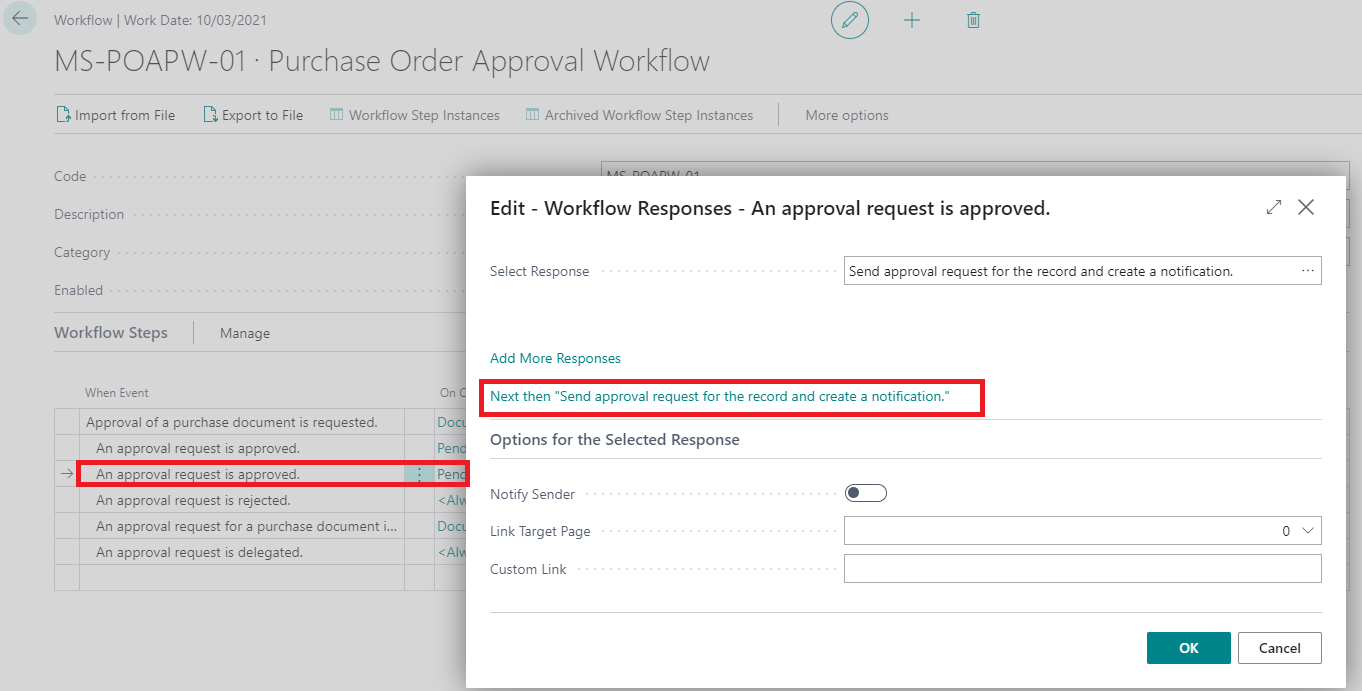
    pastedimage1621590360653v2.png

    This should point out to the initial "Send approval request for the record and create a notification." in the Next Then:
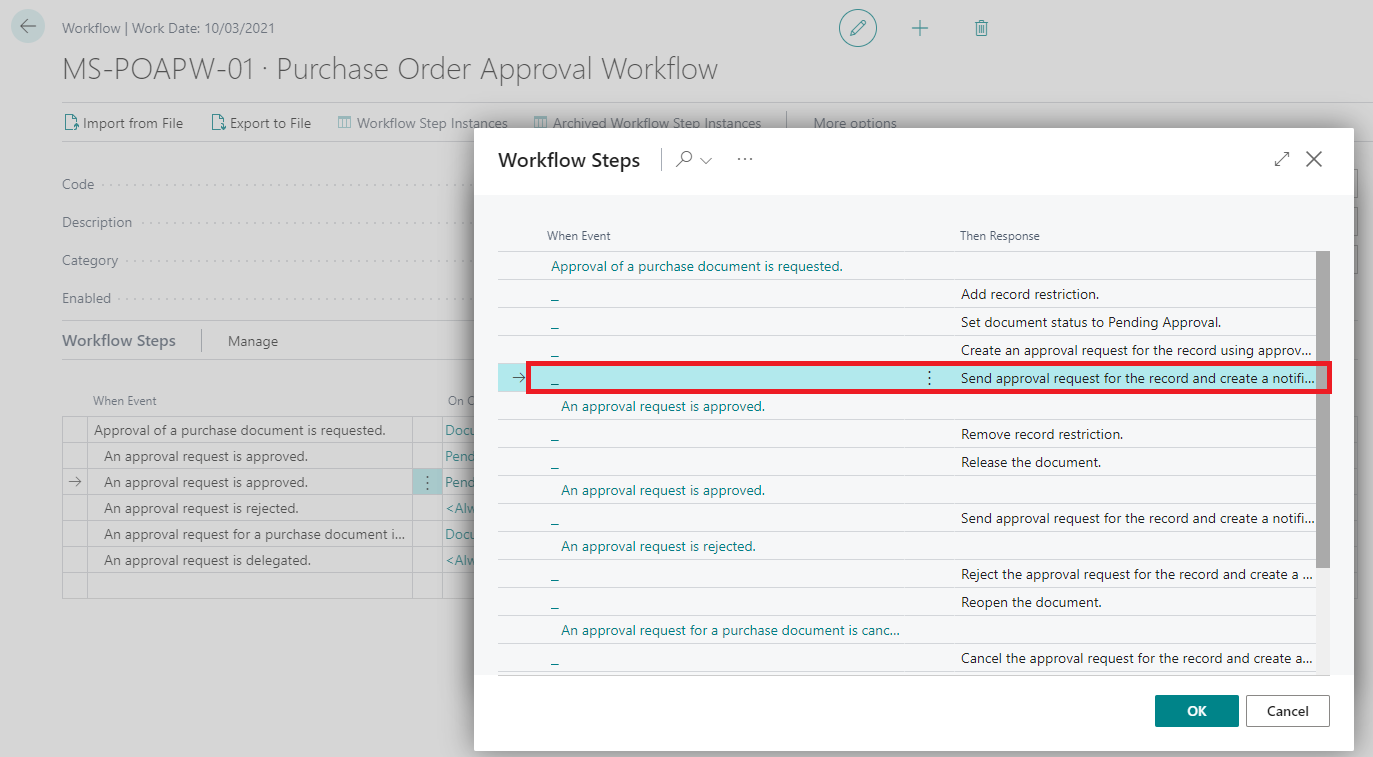
    pastedimage1621590440466v3.png

    With this, it should work as expected, otherwise please provide us with more details so we can try to understand your problem better and help you out.

    I hope it helps

  • Suggested answer
    Community Member Profile Picture
    on at
    RE: "Purchase Order Workflow Error"

    Hi Vanessa

    Thank you for your answer regarding my question that I have raised.

    However, to expand on it a bit more, I am trying to set it such that my 1st user can authorise PO up to (500 $) by himself, but that anything above that needs to go for a second approval from the management team in which the second person has the right to approve the order up to (25000 $) and so on 50k dollar for 3rd approval but in my scanario the 2nd person will only be approved the purchase order not to Release if amount increases to 25k dollar so i want to do approve from the 3rd approver then go for releasing authority to the 4th Approver which is my Finance Manager or CFO or Administrator what ever you can say but if amount under the 25k dollar so i want to release the purchase order directly to the 4th approver.

    The attached images show what my workflow currently looks like.

    User Approval Setup:

    User-Approval-Setup.JPG

    Workflows Lines

    1st-Approval-workflow-IMG.JPG

    2

    1st-Approval-Workflow-Line-2.JPG

    3

    1st-Approval-Workflow-Line-3.JPG

    4

    1st-Approval-Workflow-Line-4.JPG

    5

    1st-Approval-Workflow-Line-5.JPG

    I hope it will help you to understand my issue that I am facing.

    Thanks

  • Suggested answer
    Vaishnavi J Profile Picture
    3,062 on at
    RE: "Purchase Order Workflow Error"

    Hi Saqib,

    1. Just simple created a purchase order workflow using templates refer the below screenshot

    pastedimage1621868946296v1.png
    pastedimage1621869167665v3.png
    2. Go to Approval User Setup and then assign the Request to approve and Purchase amount to approve like the below screenshot.
    pastedimage1621869083239v2.png
    So if my purchase order is 2000 dollar then first the request will go to ManagerA as he is allowed to approve 500 dollars once it is approved . The request will go to second approver that is Manager1 once he approves it  and  he is allowed to approve 1000 dollars. The approval request will go to Third approver that is Manager2 and he can approve order of  unlimited amount.
    please verify the answer if your issue is resolved.

Under review

Thank you for your reply! To ensure a great experience for everyone, your content is awaiting approval by our Community Managers. Please check back later.

Helpful resources

Quick Links

Responsible AI policies

As AI tools become more common, we’re introducing a Responsible AI Use…

Neeraj Kumar – Community Spotlight

We are honored to recognize Neeraj Kumar as our Community Spotlight honoree for…

Leaderboard > Small and medium business | Business Central, NAV, RMS

#1
OussamaSabbouh Profile Picture

OussamaSabbouh 3,377

#2
Jainam M. Kothari Profile Picture

Jainam M. Kothari 2,696 Super User 2025 Season 2

#3
YUN ZHU Profile Picture

YUN ZHU 1,512 Super User 2025 Season 2

Last 30 days Overall leaderboard

Featured topics

Product updates

Dynamics 365 release plans
