web
You’re offline. This is a read only version of the page.
close
Skip to main content

Notifications

Announcements

No record found.

Community site session details

Community site session details

Session Id :
Microsoft Dynamics AX (Archived)

Filter Form Datasource on init

(0) ShareShare
ReportReport
Posted on by

Hi All,

i customized the table "DimensionAttribute" with a new field (Enum: NoYes).

Now i have a form where i want to display all rows of the table "DimensionAttribute" where the new field has "yes"/1 in a dropdown (referencegroup).

For better understanding here a screenshot:
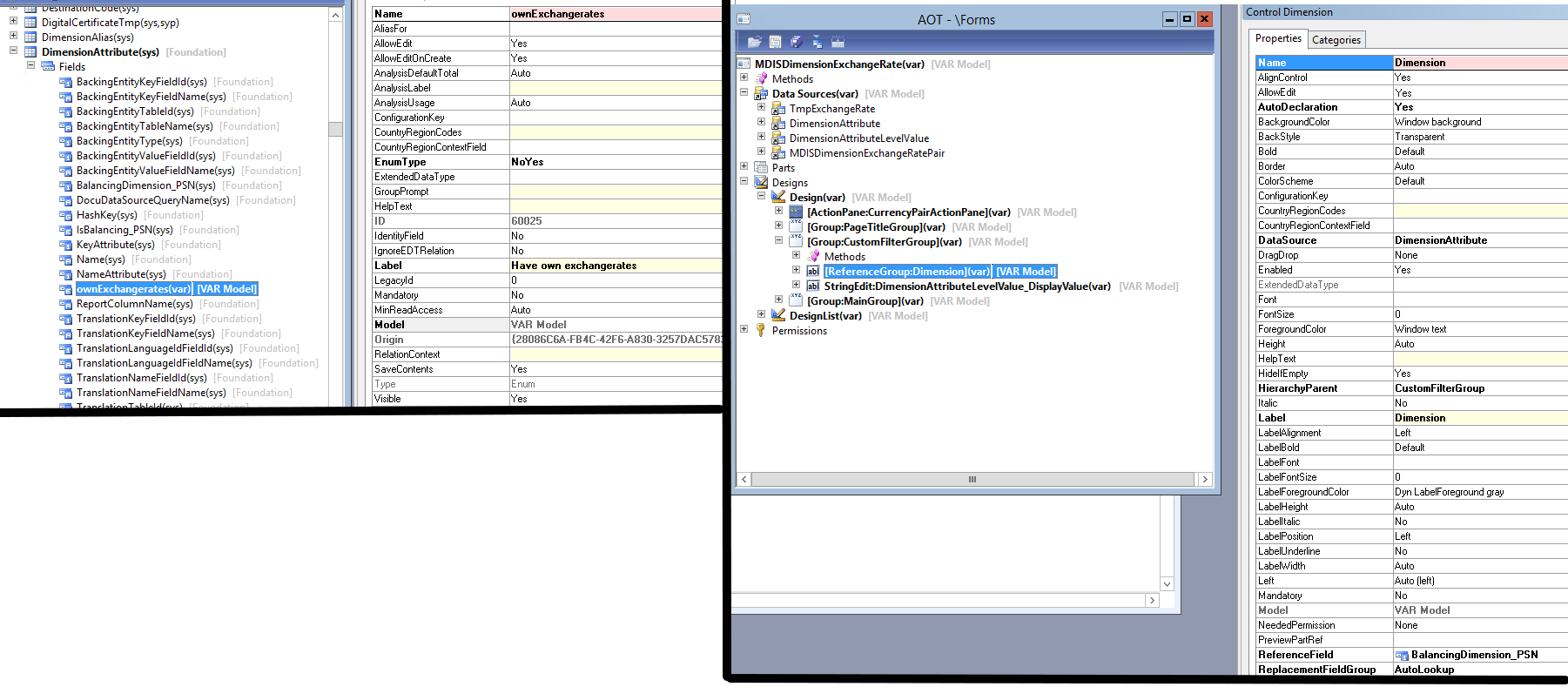
Image-36.png

Then i overwrite the init method on my form, have a look at the left side of the second screenshot.
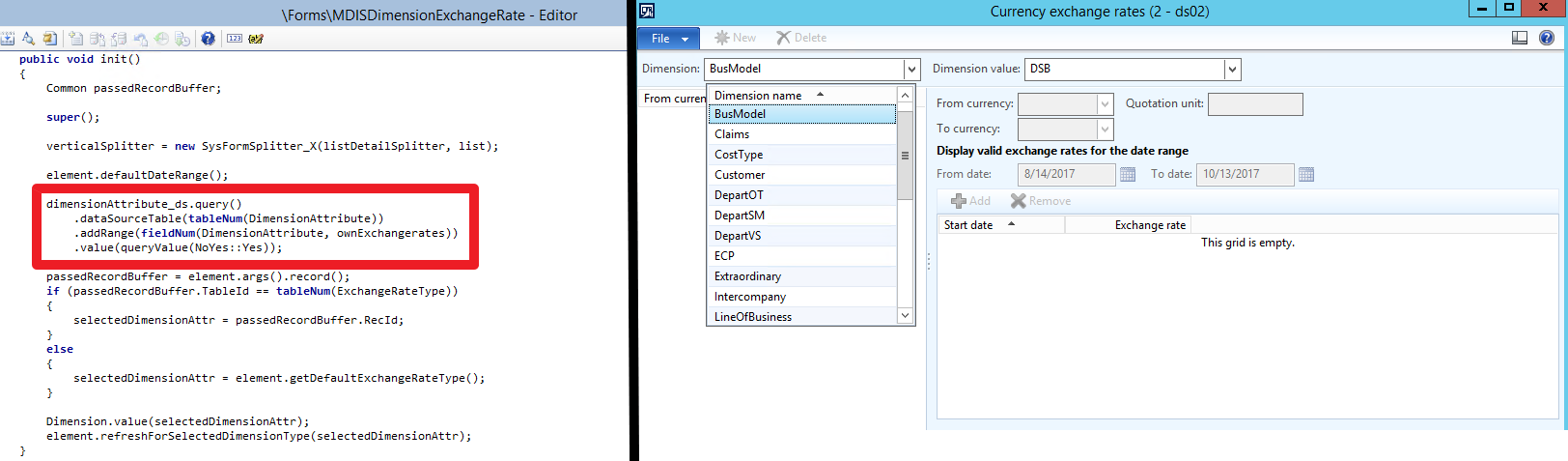
Image-41.png

On the Table "DimensionAttribute" only one row has the value on true, but i get all available DimensionAttributes without any range.

I tried also to filter in the executeQuery method on the datasource, but the same here.

Thanks in advance

James

*This post is locked for comments

I have the same question (0)
  • Suggested answer
    Israel Gonzalez Profile Picture
    733 on at

    Hi James, 

    The problem is that you have using the FormDataSource.executeQuery() method instead of init() method. Something like this:

    public void executeQuery()
    {
        QueryBuildDataSource qbds;
        ;

       qbds = dimensionAttribute_ds.queryBuildDataSource();

       qbds.clearRanges();
       qbds.addRange(fieldNum(DimensionAttribute, ownExchangerates)).value(enum2str(NoYes::Yes));

        super();
    }

  • Community Member Profile Picture
    on at

    Hi Isreal,

    thank you for your answer.

    As i mentioned above i also tried in executeQuery method.

    To be sure i tried your code, but no success.

    Here a screenshot:
    Image-42.png

  • Verified answer
    Israel Gonzalez Profile Picture
    733 on at

    Oh, I see, in that case you should using a lookup() method, in the field called dimension, try this:

    public void lookup()
    {
    QueryBuildDataSource queryBuildDataSource;
    QueryBuildRange queryBuildRange;
    Query query;
    SysTableLookup sysTableLookup;
    ;

    query = new Query();
    sysTableLookup = SysTableLookup::newParameters(tableNum(DimensionAttribute), this);

    sysTableLookup.addLookupField(fieldNum(DimensionAttribute, FieldYouWantShow));
    queryBuildDataSource = query.addDataSource(tableNum(DimensionAttribute));

    queryBuildRange = queryBuildDataSource.addRange(fieldNum(DimensionAttribute, ownExchangerates));
    queryBuildRange.value(enum2str(NoYes::Yes));

    sysTableLookup.parmQuery(query);
    sysTableLookup.performFormLookup();

    //super();
    }

    Note, don't forget coment the super()

  • Community Member Profile Picture
    on at

    Hi Isreal,

    tried your code and on the first look i thought it is the solution. 

    I open the form and only one dimension, where i set the enum to yes was displayed ("ProjVS").

    Now i set the enum to yes by another dimension ("BusModel").

    My expectation was, that i have two values to select now.

    But the dropdown won't appear any more. I click on the arrow to the bottom, but no dropdown is opening..

    Image-43.png

    Best regards

    james

  • Israel Gonzalez Profile Picture
    733 on at

    James, check the field properties. Is it a StringEdit control?

  • Chaitanya Golla Profile Picture
    17,225 on at

    Hi,

    I am bit confused with your requirement. My understanding is that MDISDimensionExchangeRate is a lookup form and this form is supposed to show only the dimensions with value Yes for the new field ownExchangeRates.

  • Community Member Profile Picture
    on at

    Hi Israel,

    no i used a ReferenceGroup. I changed it to StringEdit control and copy/paste the code for the lookup method. Now it works fine! Thank you very much :)

  • Israel Gonzalez Profile Picture
    733 on at

    Ok James, don't forget verify the answer :)

Under review

Thank you for your reply! To ensure a great experience for everyone, your content is awaiting approval by our Community Managers. Please check back later.

Helpful resources

Quick Links

Responsible AI policies

As AI tools become more common, we’re introducing a Responsible AI Use…

Neeraj Kumar – Community Spotlight

We are honored to recognize Neeraj Kumar as our Community Spotlight honoree for…

Leaderboard > 🔒一 Microsoft Dynamics AX (Archived)

#1
Martin Dráb Profile Picture

Martin Dráb 4 Most Valuable Professional

#1
Priya_K Profile Picture

Priya_K 4

#3
MyDynamicsNAV Profile Picture

MyDynamicsNAV 2

Last 30 days Overall leaderboard

Featured topics

Product updates

Dynamics 365 release plans
