web
You’re offline. This is a read only version of the page.
close
Skip to main content

Announcements

No record found.

News and Announcements icon
Community site session details

Community site session details

Session Id :
Microsoft Dynamics AX (Archived)

Making a form field mandatory

(0) ShareShare
ReportReport
Posted on by

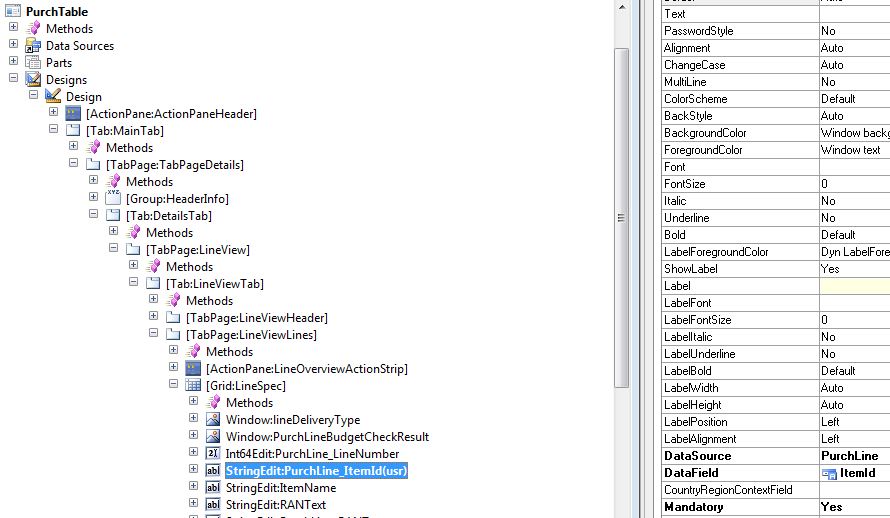
I have set the Mandatory property for a form field to Yes and the field is underlined in red accordingly to indicate that it must be filled in but on record creation I am able to Close/Esc and the record will save without prompting for the mandatory fields:
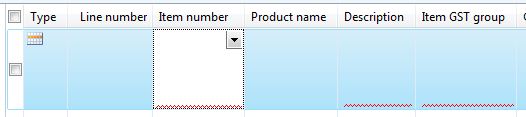
mandatory1.JPG

mandatory2.JPG

What have I missed?

*This post is locked for comments

I have the same question (0)
  • Suggested answer
    Brandon Wiese Profile Picture
    17,788 on at

    This has been an issue for a long time.  It's more common in dialog forms where the field is set mandatory in code.  Ultimately, if your field must contain data, you should check for that in validateWrite() to be certain.

  • Community Member Profile Picture
    on at

    Thanks, and correct me if I am wrong, but is validateWrite called on record creation when no fields are changed?

  • Verified answer
    Brandon Wiese Profile Picture
    17,788 on at

    The validateWrite() method is called just prior to saving a record from the UX.  If it returns false, the write is aborted.  You can use validateField() and validateFieldValue() also to validate individual fields, but those are only called in response to a field actually changing in the UX, so in your scenario they might not be called at all.

    Since validateWrite() is only called by the UX, a more drastic approach is to check in the write() method itself, and throw an error there on invalid data, since that method does not return a value.  You can also validate data in the .update() and .insert() methods, which would work even outside of the UX, which means it could catch attempts to insert/update invalid data even from X++ code.

  • Community Member Profile Picture
    on at

    I will work on those useful suggestions.

    It is annoying that just setting the Mandatory property does not work consistently. It works elsewhere.

Under review

Thank you for your reply! To ensure a great experience for everyone, your content is awaiting approval by our Community Managers. Please check back later.

Helpful resources

Quick Links

Introducing the 2026 Season 1 community Super Users

Congratulations to our 2026 Super Stars!

Congratulations to our 2025 Community Spotlights

Thanks to all of our 2025 Community Spotlight stars!

Leaderboard > 🔒一 Microsoft Dynamics AX (Archived)

#1
Joris dG Profile Picture

Joris dG 5

#2
Alexey Lekanov Profile Picture

Alexey Lekanov 2

#2
Henrik Nordlöf Profile Picture

Henrik Nordlöf 2 User Group Leader

Last 30 days Overall leaderboard

Featured topics

Product updates

Dynamics 365 release plans
