web
You’re offline. This is a read only version of the page.
close
Skip to main content

Notifications

Announcements

No record found.

Community site session details

Community site session details

Session Id :
Small and medium business | Business Central, N...
Suggested Answer

Aged Accounts Payable - historical

(0) ShareShare
ReportReport
Posted on by 5

Aged Accounts Payable report cannot be run for a prior month if the invoice is now paid. You used to be able to run the report based on transaction date and it would provide the results based on that date. Now the report removes anything that has been paid even after the transaction date.

I have the same question (0)
  • Suggested answer
    Bilal Haider Profile Picture
    414 on at

    Hi,

    Yes, you are right. It provide the results based on date. But once the entries are closed they will not appear in this report.

    e.g. suppose Vendor A has balance 379$ on 23-11-2020 and you post a payment on 24-11-2020. Vendor A has balance 0 now (But you have not applied payment entry IMPORTANT) .

    If you run this report with date 23-11-2020 you'll see the entries that make this 379$. Now if you run this report on 24-11-2020 you'll see entries before that make 379$ and also the payment entry of 379$.

    Now comes the main part. If you close Vendor A entries by Apply entries and Post Application from Vendor Ledger Entry page. When you run this report now you'll not see even a single entry for this vendor.

    So we can say that this report shows transactions for vendors based on date but only those that are Open.

    I hope you'll understand. Please mark as verified if this answers your query.

    Regards,

    Bilal Haider

  • Suggested answer
    Dirk Profile Picture
    on at

    Is the "Vendor - Balance to Date" report an option for you in this case?

  • Suggested answer
    Cynthia Priebe, MCT, MCP Profile Picture
    203 on at

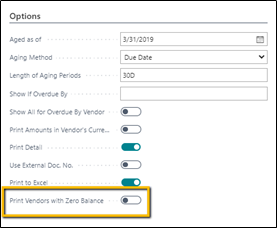
    Actually, you can get it to work the way it has in the past. Enable Print Vendors with Zero Balance to get the results expected. I think a recent update changed the report.

    I just spent hours trying to figure out why a customer's Aged Payables Report did not tie to the GL for the first time this year. She never ran it with Print Vendors with Zero Balance but this is the only way we can get the consistent and correct results as in the past. The report is now significantly longer but correct.
    pastedimage1607036591166v1.png

    We found is that unless you select to Print Vendors with Zero Balance, the report excludes open entries as of our report date when the vendor balance is zero today. It appears to now use the system date to determine a vendor’s zero balance and whether that vendor should be included on the report, not the Aged as of date selected.  

    Without Print Vendors with Zero Balance

    pastedimage1607036646630v2.png

    With Print Vendors with Zero Balance

    pastedimage1607036728685v3.png

    I don’t know when this changed however, in Version: US Business Central 17.1 (Platform 17.0.18204.19326 + Application 17.1.18256.18732) the Aged Accounts Payable report will not include open entries as of the reporting date if the current vendor balance is zero unless you select to Print Vendors with Zero Balance.

    The Vendor - Balance at Date does not have this issue and is an alternative depending on what information you need in your report.

  • Cynthia Priebe, MCT, MCP Profile Picture
    203 on at

    I have learned that this has been confirmed as a bug by Microsoft. I hope we see a fix soon!

Under review

Thank you for your reply! To ensure a great experience for everyone, your content is awaiting approval by our Community Managers. Please check back later.

Helpful resources

Quick Links

Responsible AI policies

As AI tools become more common, we’re introducing a Responsible AI Use…

Neeraj Kumar – Community Spotlight

We are honored to recognize Neeraj Kumar as our Community Spotlight honoree for…

Leaderboard > Small and medium business | Business Central, NAV, RMS

#1
OussamaSabbouh Profile Picture

OussamaSabbouh 2,577

#2
YUN ZHU Profile Picture

YUN ZHU 888 Super User 2025 Season 2

#3
Jainam M. Kothari Profile Picture

Jainam M. Kothari 778 Super User 2025 Season 2

Last 30 days Overall leaderboard

Featured topics

Product updates

Dynamics 365 release plans
