web
You’re offline. This is a read only version of the page.
close
Skip to main content

Notifications

Announcements

No record found.

Community site session details

Community site session details

Session Id :
Microsoft Dynamics CRM (Archived)

Outlook Addin: Set refernce button is out of function

(0) ShareShare
ReportReport
Posted on by 202

Dear Forum

We've many employees working with the CRM Outlook Addin.. but in the last weeks I get more and more requests about the Outlook Addin, that is not working properly.

The button, to set a reference of an appointment to any Account is out of function. The Addin is installed properly and also connected to our organization. I also reinstalled Office and the CRM Addin, which did not help.

Here is an example how it looks in Outlook:
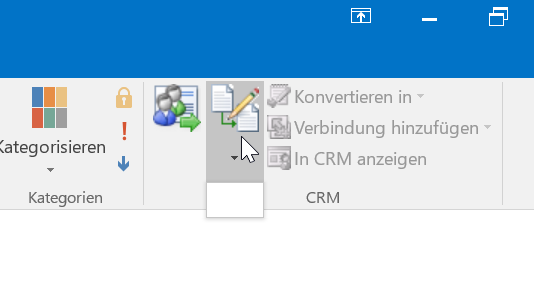
CRM_5F00_Addin_5F00_Error.png

Do you have any ideas or tips how to solve this?

Thank you very much in advance!

Best regards,

Maurice Renz

*This post is locked for comments

I have the same question (0)
  • maurice.renz Profile Picture
    202 on at

    No one has an idea for that?

    Best regards,

    Maurice

  • Suggested answer
    Community Member Profile Picture
    on at

    Hi Maurice,

    Please accept the apologies for all the delay.

    I would like to collect some information to in order to assist you in the best possible way.

    1)Can you please check if the version of the Outlook Plugin is the same as the version of the Dynamics 365 organization.

    2)Is the issue occurring with all users?

    3)Are there any users who are not facing the issue.

    Outlook primarily relies on IE to render data .

    As you said the problem occurred sometime ago. I would request you to check if there are any pending windows updates.

    If so I would like to suggest you to please have your machine updated with the latest windows updates.

    Please let me know if you have any questions around the same .

    Thank you.

    Regards

    Bhartendu Pandey

  • maurice.renz Profile Picture
    202 on at

    Hello Bhartendu,

    of course you don't need to apologize for that! :-)

    1) The Outlook Plugin is exactly the same version that we have to use fpr Dynamics 2016 on-premise. I already checked this.

    2) The issue is occuring for a little number of users.

    I've found out that the plugin works, when I change the security role of the user, to a role with higher priviliges. Then I change it back and the plugin is still working - quite confusing. When I uninstall the Plugin with the new/old assigned role an reinstall it, the button doesn't work again.

    Do you have an explanation for that? I think it's not the way it is supposed to, to change the security role after every installation of the plugin to get it working. :/

    Thanks for your help - I really appreciate it!

    Kind regards,

    Maurice

Under review

Thank you for your reply! To ensure a great experience for everyone, your content is awaiting approval by our Community Managers. Please check back later.

Helpful resources

Quick Links

Responsible AI policies

As AI tools become more common, we’re introducing a Responsible AI Use…

Neeraj Kumar – Community Spotlight

We are honored to recognize Neeraj Kumar as our Community Spotlight honoree for…

Leaderboard > 🔒一 Microsoft Dynamics CRM (Archived)

#1
SA-08121319-0 Profile Picture

SA-08121319-0 4

#1
Calum MacFarlane Profile Picture

Calum MacFarlane 4

#3
Alex Fun Wei Jie Profile Picture

Alex Fun Wei Jie 2

Last 30 days Overall leaderboard

Featured topics

Product updates

Dynamics 365 release plans



