web
You’re offline. This is a read only version of the page.
close
Skip to main content

Announcements

No record found.

News and Announcements icon
Community site session details

Community site session details

Session Id :
Small and medium business | Business Central, N...
Suggested Answer

Error in create warehouse movemenet

(0) ShareShare
ReportReport
Posted on by 12

Hi everyone,

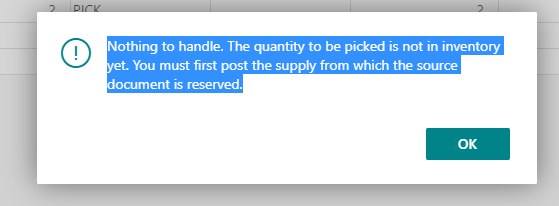
i seem to be getting this error after getting bin content and trying to execute a create warehouse movement.

Not too sure why this is happening.

I did the standard stuff of creating warehouse item journal, post the item journal adjustment and then allowing the user to transact.

But then, i will get this error, the always create PICK LINE option is disabled.

if enabled, it will allow me to go through and create the warehouse movement.

However, this isn't the setting that we wish to setup for the customer.

Appreciate any feedback on this error message.

Have tried checking the reservation entry etc, but cannot find an answer for this.
pastedimage1633849502542v1.png

I have the same question (0)
  • Suggested answer
    JAngle Profile Picture
    157 on at

    If it is directed pick and put-away then you don’t get to have the choice. You may have to look at a modification here

  • Suggested answer
    Community Member Profile Picture
    on at

    Hello,

    Adding to Josh's reply... I saw this issue in a Update hotfix on Warehouse Pick. Maybe Warehouse Movement is also effected. Not sure your version. If you are up-to-date maybe connect with your Partner to see if this is still a bug.

    292483 "Nothing to Handle. The quantity to be picked is not in Inventory yet. You must first post the supply from which the source document" error message is displayed when you create a warehouse pick from a warehouse shipment that has the Qty. to Ship field filled in. Warehouse COD 5775

    Thanks,

    Steve

Under review

Thank you for your reply! To ensure a great experience for everyone, your content is awaiting approval by our Community Managers. Please check back later.

Helpful resources

Quick Links

Introducing the 2026 Season 1 community Super Users

Congratulations to our 2026 Super Stars!

Meet the Microsoft Dynamics 365 Contact Center Champions

We are thrilled to have these Champions in our Community!

Congratulations to the April Top 10 Community Leaders

These are the community rock stars!

Leaderboard > Small and medium business | Business Central, NAV, RMS

#1
OussamaSabbouh Profile Picture

OussamaSabbouh 2,086 Super User 2026 Season 1

#2
YUN ZHU Profile Picture

YUN ZHU 1,290 Super User 2026 Season 1

#3
AndrewThomas81 Profile Picture

AndrewThomas81 1,218

Last 30 days Overall leaderboard

Featured topics

Product updates

Dynamics 365 release plans
