web
You’re offline. This is a read only version of the page.
close
Skip to main content

Announcements

News and Announcements icon
Community site session details

Community site session details

Session Id :
Microsoft Dynamics CRM (Archived)

Importing Solution from one CRM instance into another CRM Instance

(0) ShareShare
ReportReport
Posted on by 225

Hi All,

I am trying to import a solution into another CRM instance(Trial). But I am getting following error while doing it.

"

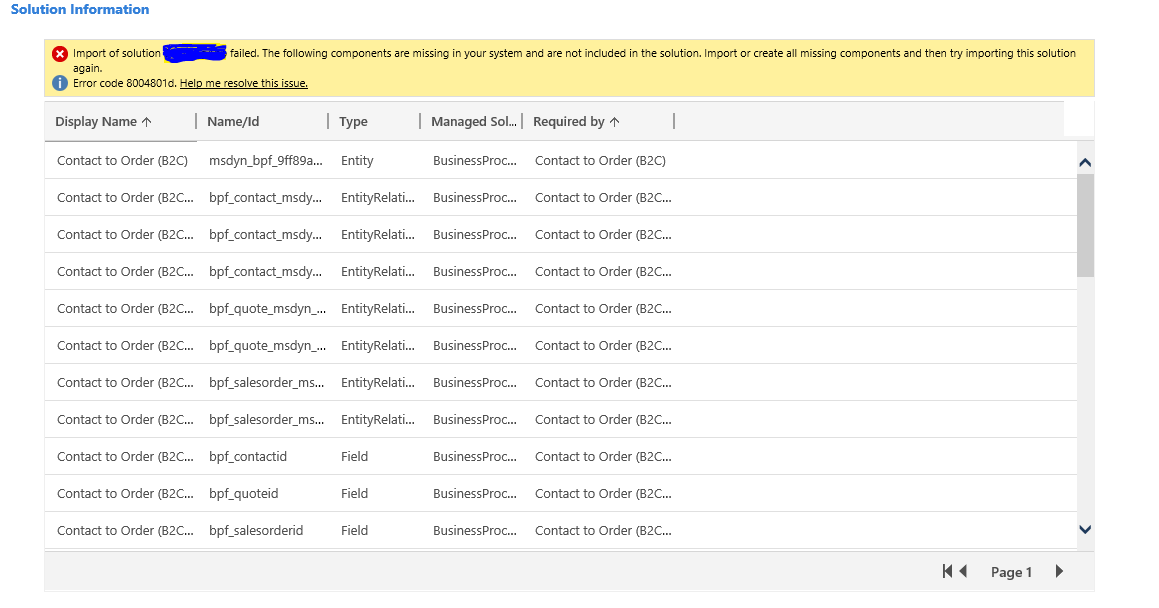
Import of solution Test failed. The following components are missing in your system and are not included in the solution. Import or create all missing components and then try importing this solution again.

Captureimage.PNG

but the elements it is showing as missing I have added those entities and elements already into my Solution but it is still showing them as missing components.

Also there are some components from another solution which is also showing as missing. what can be the reaon behind the error if the solution has all the components already in it.

*This post is locked for comments

I have the same question (0)
  • gdas Profile Picture
    50,091 Moderator on at

    Hi Varsha,

    In the list you can find the exact error with the error  message , could you please find and share complete error message from the list.

  • Varsha Naithani Profile Picture
    225 on at

    The import of the solution Test Solution failed. The following components are missing in your system and are not included in the solution. Import the managed solutions that contain these components (BusinessProcesses (1.0.0.0),InsideView (3.4)) and then try importing this solution again.

    Help me resolve this issue.

    Error code 8004801d. Help me resolve this issue.

    This is the error message  I am getting except the entities and components names.

  • naZir Profile Picture
    850 on at

    Add all the missing components in the list. It's all related to one business process flow "Contact to order". So the some relevant components is missing in solution

  • Suggested answer
    Pawar Pravin Profile Picture
    5,237 on at

    Hi Varsha,

    It seems like in your another instance (trial) you are missing any particular module. Can you please check all modules of both instance are in sync.

    If both instance having same modules then open solution.xml file and replace missing dependencies as follows:

    <MissingDependencies>

    <replace all sub missing dependencies  >

         </MissingDependencies>

Under review

Thank you for your reply! To ensure a great experience for everyone, your content is awaiting approval by our Community Managers. Please check back later.

Helpful resources

Quick Links

Season of Sharing Community Challenge Winners!

Congratulations to our community stars!

Women in Power Builds Momentum

Expanding mentorship, skilling, and AI innovation

Congratulations to the June Top 10 Community Leaders

These are the community rock stars!

Leaderboard > 🔒一 Microsoft Dynamics CRM (Archived)

#1
RichardM Profile Picture

RichardM 1

Last 30 days Overall leaderboard

Featured topics

Product updates

Dynamics 365 release plans