web
You’re offline. This is a read only version of the page.
close
Skip to main content

Notifications

Announcements

No record found.

Community site session details

Community site session details

Session Id :
Small and medium business | Business Central, N...
Suggested Answer

Extended Texts and Extended Lines (problem in the rdlc layout)

(0) ShareShare
ReportReport
Posted on by 10

Hi, I need to do a development related with Extended Texts. 

  • I've created a new Table Name for Extended Texts called Company Info. 
  • I've created a boolean at Sales Setup that needs to be enabled to print the extended texts related to Company
  • I've created a button in Company Info page that directs you to the Extended Texts with the Table Name filtered by the new value of the enum.
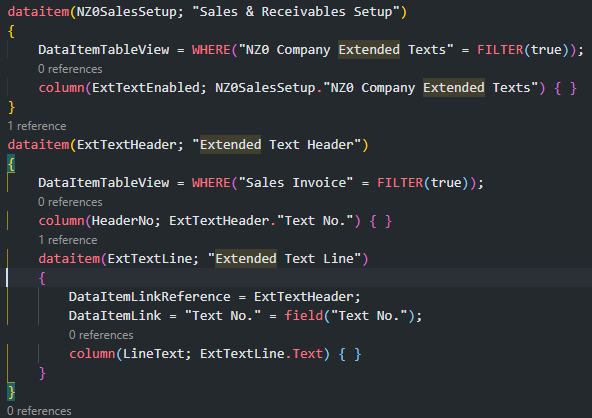
  • I have created two extended headers and 2 lines for header. In the layout i have created a row group for Text No. Header. But only prints the firts of each Text No, not the second line.
pastedimage1613039773153v1.png

I put this inside the Standard Sales Invoice Report code.

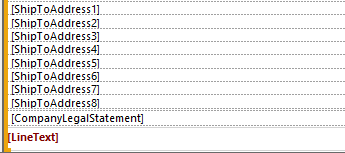
Layout: 
pastedimage1613039831173v2.png

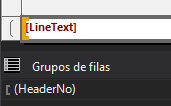
I put my column at the end of the report with this grouping
pastedimage1613039868625v3.png

Grupos de filas = Row groups.

Why don't appear the other lines of each header?

I have the same question (0)
  • Suggested answer
    Guillem Padilla Profile Picture
    427 on at

    Hi Albert,

    I think this is because you are printing the "LineText" value every time HeaderNo changes, so if you have 2 headers it only prints 1 time per header (the first line of each header), in this case you need to add the child group "details" to loop through all lines

    Could you try it?

  • Suggested answer
    AliHamza Profile Picture
    175 on at

    Hi Albert,

    you have 2 headers it only prints 1 time per header.

    You need to add the child group "details" to loop through all lines.

    Also, w
    hen you go to respective tablix properties then you can see that there will be a visibility expression as shown in picture below and it is the reason that rest of the lines are not visible to you.

    pastedimage1613041836434v1.png

    Please Verify the answer if your question has been answered. This helps other forum users.

Under review

Thank you for your reply! To ensure a great experience for everyone, your content is awaiting approval by our Community Managers. Please check back later.

Helpful resources

Quick Links

Responsible AI policies

As AI tools become more common, we’re introducing a Responsible AI Use…

Neeraj Kumar – Community Spotlight

We are honored to recognize Neeraj Kumar as our Community Spotlight honoree for…

Leaderboard > Small and medium business | Business Central, NAV, RMS

#1
OussamaSabbouh Profile Picture

OussamaSabbouh 2,092

#2
YUN ZHU Profile Picture

YUN ZHU 663 Super User 2025 Season 2

#3
Sumit Singh Profile Picture

Sumit Singh 515

Last 30 days Overall leaderboard

Featured topics

Product updates

Dynamics 365 release plans



