web
You’re offline. This is a read only version of the page.
close
Skip to main content

Notifications

Announcements

Community site session details

Community site session details

Session Id :
Microsoft Dynamics AX (Archived)

how to bound display method to the form values

(0) ShareShare
ReportReport
Posted on by 942

Hello,

I need on the form RouteInventProd to add a display method to the "Overview" tab of the lower grid that will take values from the tab "Resource Requirements" and depending on the value display different values.

I write something like this:

display ProdUnitId prodUnitId1()
{
    RouteOpr                        routeOpr1;
    WrkCtrRouteOprActivity          wrkCtrRouteOprActivity;
    WrkCtrActivityRequirementSet    wrkCtrActivityRequitementSet;
    WrkCtrActivityRequirement       wrkCtrActivityRequirement;
    WrkCtrResourceGroup             wrkCtrResourceGroup;
    WrkCtrResourceGroupResource     wrkCtrResourceGroupResource;

select * from wrkCtrActivityRequirement
        join wrkCtrActivityRequitementSet
            where wrkCtrActivityRequitementSet.RecId == wrkCtrActivityRequirement.ActivityRequirementSet
        join wrkCtrRouteOprActivity
            where wrkCtrRouteOprActivity.Activity == wrkCtrActivityRequitementSet.Activity
        join routeOpr1
            where routeOpr1.RecId == wrkCtrRouteOprActivity.RouteOpr;              
    
    
if (wrkCtrActivityRequirement.RelationshipType == WrkCtrActivityRequirementType::ResourceGroup)
    {
        select * from wrkCtrResourceGroup
            where wrkCtrResourceGroup.WrkCtrId == wrkCtrActivityRequirement.requirementEdit();
        return wrkCtrResourceGroup.ProdUnitId;
    }
    
else if (wrkCtrActivityRequirement.RelationshipType == WrkCtrActivityRequirementType::Resource)
    {
        select * from wrkCtrResourceGroupResource
            where wrkCtrResourceGroupResource.WrkCtrId == wrkCtrActivityRequirement.requirementEdit();
        select * from wrkCtrResourceGroup
            where wrkCtrResourceGroup.RecId == wrkCtrResourceGroupResource.ResourceGroup;
        return wrkCtrResourceGroup.ProdUnitId;
    }
    
    return " ";
            
}

I add this display method to the table "RouteOpr" and then add this table as data source to the form. Then as JoinSource I point out "ProdRoute" table and type is OuterJoin.
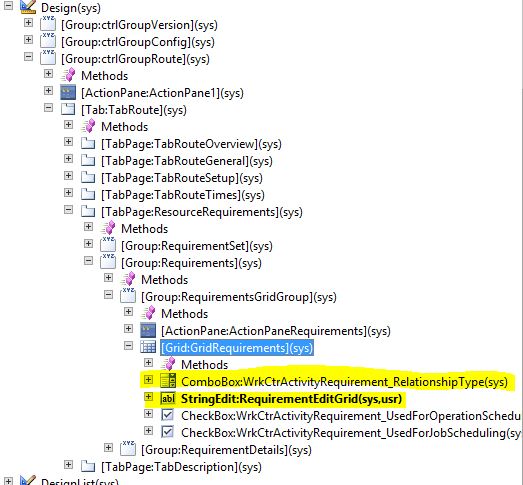
But my query from above always returns the same value and doesn't bound anyhow to the values on the form. Tell me please how can I bound to the form values? It's Tab "Resource Requirements"
115.JPG

The values I need:

2480.114.JPG

In case of additional questions please feel free to ask. Thanks you.

*This post is locked for comments

I have the same question (0)
  • nmaenpaa Profile Picture
    101,166 Moderator on at

    Also, why did you now put this method in RouteOpr table? Why did you not put it in ProdRoute table? You say that you "need to check out all records from "WrkCtrActivityRequirement" grid connected with the record from the grid "ProdRoute"". So the only logical place for this method is the ProdRoute table!

  • Suggested answer
    nmaenpaa Profile Picture
    101,166 Moderator on at

    I'm not sure if I understand, but are you saying that you expect your select statement to return more than one record but it returns only one record?

    Meaning: do you see multiple records in the "WrkCtrActivityRequirement" grid, but your select statement finds only one WrkCtrActivityRequirement? Please clarify.

    If that is the case I recommend you examine the criteria that you have in the select statement and make sure it corresponds to the table relations.

    Also please notice that your while loop is terminated if either of the conditions inside it are satisfied (you use return command there). So if you find a record that matches either one of the if statements, you will return wrkCtrResourceGroup.ProdUnitId. Is this intentional? Anyway your display method can return only one ProdUnitId.

  • dark_knight Profile Picture
    942 on at

    I have put my display method to the "RouteOpr" table eventually. I've put DataSource for it - "ProdRoute" and LinkType: OuterJoin

    The code is:

    display ProdUnitId prodUnitId1()
    {
    
        WrkCtrRouteOprActivity          wrkCtrRouteOprActivity1;
        WrkCtrActivityRequirementSet    wrkCtrActivityRequitementSet;
        WrkCtrActivityRequirement       wrkCtrActivityRequirement1;
        WrkCtrResourceGroup             wrkCtrResourceGroup;
        WrkCtrResourceGroupResource     wrkCtrResourceGroupResource;
        WrkCtrActivity                  wrkCtrActivity1;


    while select * from wrkCtrActivityRequirement1
            join wrkCtrActivityRequitementSet
                where wrkCtrActivityRequitementSet.RecId == wrkCtrActivityRequirement1.ActivityRequirementSet
            join wrkCtrActivity1
                where wrkCtrActivity1.RecId == wrkCtrActivityRequitementSet.Activity
            join wrkCtrRouteOprActivity1
                where wrkCtrRouteOprActivity1.Activity == wrkCtrActivity1.RecId
                      && wrkCtrRouteOprActivity1.RouteOpr == this.RecId
        {
            if (wrkCtrActivityRequirement1.RelationshipType == WrkCtrActivityRequirementType::ResourceGroup)
            {
                select * from wrkCtrResourceGroup
                    where wrkCtrResourceGroup.WrkCtrId == wrkCtrActivityRequirement1.requirementEdit();
                return wrkCtrResourceGroup.ProdUnitId;
            }
            else if (wrkCtrActivityRequirement1.RelationshipType == WrkCtrActivityRequirementType::Resource)
            {
                select * from wrkCtrResourceGroupResource
                    where wrkCtrResourceGroupResource.WrkCtrId == wrkCtrActivityRequirement1.requirementEdit();
                select * from wrkCtrResourceGroup
                    where wrkCtrResourceGroup.RecId == wrkCtrResourceGroupResource.ResourceGroup;
                return wrkCtrResourceGroup.ProdUnitId;
            }
        }
    
        return " ";
    
    }


    Seems like it works but original task is to go through all records in the "WrkCtrActivityRequirement" grid and check for RelationShipType field value "ResourceGroup". Is there any means to do this? Currently it only sees one record on the grid "WrkCtrActivityRequirement" connected with record from grid "ProdRoute" and that's expected behavior but I need to check out all records from "WrkCtrActivityRequirement" grid connected with the record from the grid "ProdRoute"

    Thank you in advance.

  • Rustem Galiamov Profile Picture
    8,072 on at

    В итоге RouteOpr и не нужно было добавлять. Если использовать displayMethod() который зависит от тех таблиц, которые уже есть в DS, то достаточно на основной  DS повесить метод и там уже написать запрос.

  • Verified answer
    nmaenpaa Profile Picture
    101,166 Moderator on at

    Ah, you are right. You just had the ProdRoute variable defined in the method but you were not using it.

    Then I suggest you to step back one more time.

    Make this method only return something from "this" (for example int642str(this.RecId). That way you will see if you will see same value on all grid lines, or different value based on the active buffer on the grid.

    Could you do that and let us know the result?

    And please check these one more time:

    1) Is your grid's data source ProdRoute?

    2) Is your display method in ProdRoute table?

    3) Did you set following properties in your display field: DataSource: ProdRoute, DataMethod: prodUnitId1

  • dark_knight Profile Picture
    942 on at

    I'm sorry but I join in the end the current table

      join this

               where this.RouteOprRefRecId == routeOpr1.RecId

    Doesn't that mean I look into the current record on my form datasource?

  • Suggested answer
    nmaenpaa Profile Picture
    101,166 Moderator on at

    I think we already discussed this one.

    You have introduced a local ProdRoute buffer, and it has nothing to do with the active record of your form data source.

    Please read the earlier messages in this discussion to understand how to access the current active record when you are in a display method.

  • dark_knight Profile Picture
    942 on at
    display ProdUnitId prodUnitId1()
    {
    
        WrkCtrRouteOprActivity          wrkCtrRouteOprActivity;
        WrkCtrActivityRequirementSet    wrkCtrActivityRequitementSet;
        WrkCtrActivityRequirement       wrkCtrActivityRequirement;
        WrkCtrResourceGroup             wrkCtrResourceGroup;
        WrkCtrResourceGroupResource     wrkCtrResourceGroupResource;
        WrkCtrActivity                  wrkCtrActivity;
        RouteOpr                        routeOpr1;
        ProdRoute                       prodRoute;
        
    
    while select * from wrkCtrActivityRequirement
            join wrkCtrActivityRequitementSet
                where wrkCtrActivityRequitementSet.RecId == wrkCtrActivityRequirement.ActivityRequirementSet
            join wrkCtrActivity 
                where wrkCtrActivity.RecId == wrkCtrActivityRequitementSet.Activity
            join wrkCtrRouteOprActivity
                where wrkCtrRouteOprActivity.Activity == wrkCtrActivity.RecId
            join routeOpr1
                where routeOpr1.Recid == wrkCtrRouteOprActivity.RouteOpr
            join this
                where this.RouteOprRefRecId == routeOpr1.RecId
        {
            if (wrkCtrActivityRequirement.RelationshipType == WrkCtrActivityRequirementType::ResourceGroup)
            {
                select * from wrkCtrResourceGroup
                    where wrkCtrResourceGroup.WrkCtrId == wrkCtrActivityRequirement.requirementEdit();
                return wrkCtrResourceGroup.ProdUnitId;
            }
            else if (wrkCtrActivityRequirement.RelationshipType == WrkCtrActivityRequirementType::Resource)
            {
                select * from wrkCtrResourceGroupResource
                    where wrkCtrResourceGroupResource.WrkCtrId == wrkCtrActivityRequirement.requirementEdit();
                select * from wrkCtrResourceGroup
                    where wrkCtrResourceGroup.RecId == wrkCtrResourceGroupResource.ResourceGroup;
                return wrkCtrResourceGroup.ProdUnitId;
            }
        }
    
        return " ";
    
    }

    wrote something like this but anyway doesn't work. Put it as a display method to the "ProdRoute" Table. It always retrieves the same record with the same recId. Seems like it doesn't refer to the current record in the "ProdRoute" grid on the form

  • Verified answer
    nmaenpaa Profile Picture
    101,166 Moderator on at

    You can switch your AX language to English, it will definetely help others understand your screenshots better.

    Anyway, I suggest you try now to implement the display method in ProdRoute table.

    I think you should next concentrate on developing code that will fetch you the required data based on a ProdRoute record.

    Then put this code in your display method and see what happens.

    I also suggest you try to make your select statements more effective: avoid nested loops, use firstonly keyword when you know you will need only one record, use field list to get only the fields you need and so on. Complex display methods on grids can be real performance killers.

  • dark_knight Profile Picture
    942 on at

    OK. Thank you for you answers. really appreciate this.

    Yes. I see that for one "ProdRoute" table record there can be multiple resource requirement records. I must take a look into resource requirement from the "gridRequirements" which data source is "WrkCtrActivityRequirement" and it's the 5th tab on the lower form. The difficulty is I have Russian interface and it's hard to explain. Then I must take the first value (field "RelationShipType")among resource requirements which relationship type is "ResourceGroup"  (if it's presented there) take a value of the next field "RequirementEditGrid" and then using the value of "RequirementEditGrid" display a value of WrkCtrResourceGroup.ProdUnitId in the display method. I hope it's understandable a bit.

Under review

Thank you for your reply! To ensure a great experience for everyone, your content is awaiting approval by our Community Managers. Please check back later.

Helpful resources

News and Announcements

Season of Giving Solutions is Here!

Quick Links

Responsible AI policies

As AI tools become more common, we’re introducing a Responsible AI Use…

Neeraj Kumar – Community Spotlight

We are honored to recognize Neeraj Kumar as our Community Spotlight honoree for…

Leaderboard > 🔒一 Microsoft Dynamics AX (Archived)

#1
TAHER Mehdi Profile Picture

TAHER Mehdi 3

#2
Martin Dráb Profile Picture

Martin Dráb 2 Most Valuable Professional

#2
Nakul Profile Picture

Nakul 2

Last 30 days Overall leaderboard

Featured topics

Product updates

Dynamics 365 release plans