web
You’re offline. This is a read only version of the page.
close
Skip to main content

Announcements

No record found.

News and Announcements icon
Community site session details

Community site session details

Session Id :
Microsoft Dynamics AX (Archived)

Voucher Transactions missing Branch number. How can i update Voucher Trans

(0) ShareShare
ReportReport
Posted on by 333

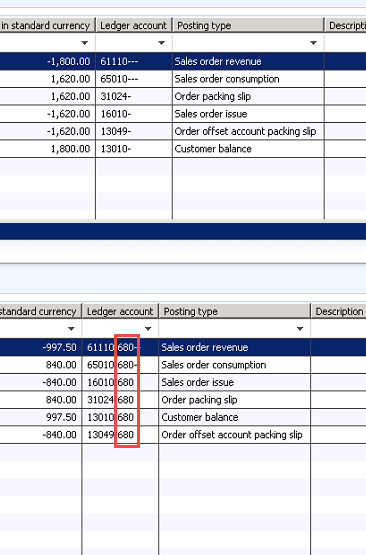
There were some transactions that have been processed but the branch was not put through on the voucher trans.  How can i update these transaction to include the branch data.  Or should i just reverse them and reprocess the transactions?
2018_2D00_06_2D00_04_5F00_7_2D00_09_2D00_05.jpg

*This post is locked for comments

I have the same question (0)
  • Suggested answer
    nmaenpaa Profile Picture
    101,166 Moderator on at

    In general, if you post something wrong, you should post a reverse transaction that cancels the original posting, and then post again with correct values.

  • ScorpioDax Profile Picture
    333 on at

    So best practice would be to reverse the entries and create new ones with the branch detail as shown below...

    2018_2D00_06_2D00_04_5F00_7_2D00_32_2D00_13.jpg

  • Suggested answer
    nmaenpaa Profile Picture
    101,166 Moderator on at

    Yes.

  • ScorpioDax Profile Picture
    333 on at

    Hi Nikolaos,

    Although your method will work , our accounting dept  wants us to be able to update the current transactions with the correct ledger account.  Any guidance on this?

  • Verified answer
    nmaenpaa Profile Picture
    101,166 Moderator on at

    You can't change what has been posted - you can't change the past. You can only post new transactions to correct the situation. (In theory it might be possible to change the records in the database but you should not do it. It's very easy to make things worse, and your accounting dept will not like it. Neither does your boss when days are spent trying to fix the mess that was caused by not doing things the right way.)

    Think of it as a cash register at a store. If they make a mistake and the receipt is not right, they can't change the receipt that was already posted and printed. They can just create a corrective transaction to fix it. The ERP works the same way.

    The accounting should be happy if each account shows correct balance at the end of the month. And you have a "receipt" (voucher) for all transactions.

  • ScorpioDax Profile Picture
    333 on at

    I see your point.  Unfortunately some of the transactions are for prior months.  I will select your answer for the question since it does help fix the issue but since my account dept wants something different i will need to figure that out.

  • nmaenpaa Profile Picture
    101,166 Moderator on at

    I still strongly suggest that you don't attempt to change the posted transactions. If something goes wrong, you might notice it only later when some year end reports don't match and you will be in bigger trouble. I think that posting corrective transactions is a normal procedure in accounting. Changing vouchers of past months is not.

Under review

Thank you for your reply! To ensure a great experience for everyone, your content is awaiting approval by our Community Managers. Please check back later.

Helpful resources

Quick Links

Introducing the 2026 Season 1 community Super Users

Congratulations to our 2026 Super Stars!

Meet the Microsoft Dynamics 365 Contact Center Champions

We are thrilled to have these Champions in our Community!

Congratulations to the March Top 10 Community Leaders

These are the community rock stars!

Leaderboard > 🔒一 Microsoft Dynamics AX (Archived)

#1
Joris dG Profile Picture

Joris dG 5

#2
Andrew Jones a1x Profile Picture

Andrew Jones a1x 2

#3
GL-01081504-0 Profile Picture

GL-01081504-0 1

Last 30 days Overall leaderboard

Featured topics

Product updates

Dynamics 365 release plans
