web
You’re offline. This is a read only version of the page.
close
Skip to main content

Notifications

Announcements

No record found.

Community site session details

Community site session details

Session Id :
Small and medium business | Business Central, N...
Suggested Answer

How do I change the language of a report in preview

(0) ShareShare
ReportReport
Posted on by 10

Hello everyone!

Hope you can help me with this problem.

The problem is: In NAV as language i'm using Romanian language. For a report when i want to preview it, it shows the information in Romanian (Picture above).
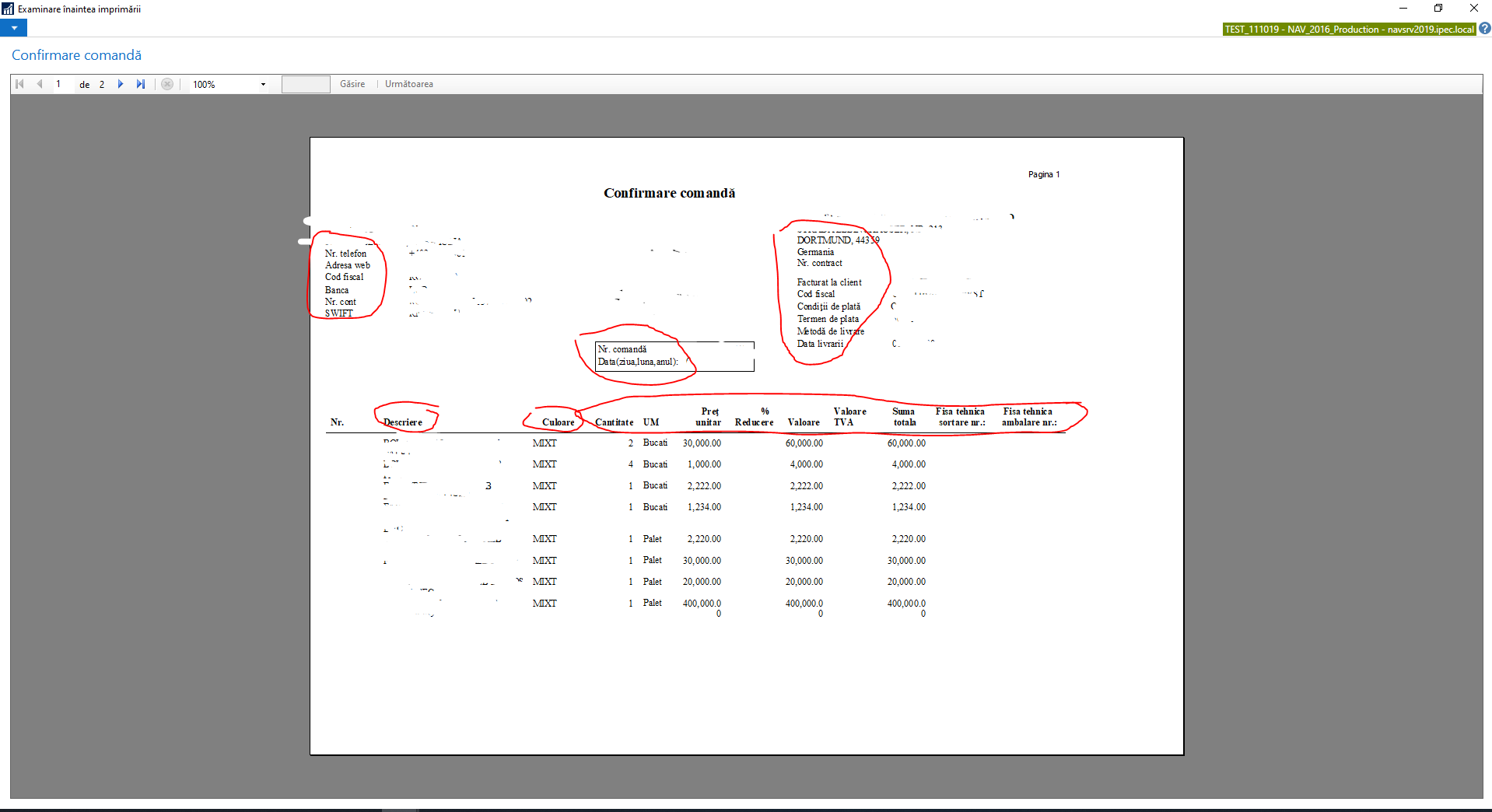
7573.Capture.PNG

I want to show the information, that I circled with red, in english without changing the language in NAV. I want the Romanian language to remain set. How do i do this? It is possible?

I have the same question (0)
  • Community Member Profile Picture
    on at

    Hello,

    Does your report have been modified by a partner or yourself ?

    The standard Microsoft Sales report get out with customer language if any set or elsewere the company language.

    If some fields appears in different language it must be a translation missing in the report designer, the translation is not automatic.

  • Alex95 Profile Picture
    10 on at

    Hello

    Sorry for answering so late.

    Yes, it was modified by our partners, so that if your NAV is setted in english, the report will show the information in english, and if you switch in romanian, the information, from the report will translate. But now the company wants the report to show the information only in english. How do i do that? I'm kind a new to NAV.

  • Suggested answer
    DynamicMax Profile Picture
    10 on at

    Oh ok to force the whole report language without affecting user interface please use CurrReport.Language code function, comment out or modify the function if already uses and take advantage of it.

    Follow this Ms post for more details :

    docs.microsoft.com/.../multiple-document-languages

  • Alex95 Profile Picture
    10 on at

    Hello , i comment the line CurrReport.LANGUAGE := Language.GetLanguageID("Language Code"); and it gives the same. Nothing happens.

  • Suggested answer
    Community Member Profile Picture
    on at

    I think you misunderstand this function, did you read the ms post correctly ? If you comment it out and let the standard apply the company language will be used.

    If you want to force the whole report language to english please use

    CurrReport.LANGUAGE := Language.GetLanguageID("ENU");

    If this is not changing anything it's the multi language caption that have not been set in the report.

  • Alex95 Profile Picture
    10 on at

    Sorry, my mistake. When i want to save the code, it says that ENU is an unknown variable. What do i do ? If i go to c/al variables and declare ENU as a variable => Record => Language it says that type conversion is not possible because one contains an invalid type Code:= Record

  • Community Member Profile Picture
    on at

    Use simple quote instead: 'ENU'

  • Alex95 Profile Picture
    10 on at

    And how do i do that? I'm terribly sorry for asking this dumb question, but i'm new to NAV , i don't know so much and is very complex.

  • Alex95 Profile Picture
    10 on at

    I got it, no error: CurrReport.LANGUAGE := Language.GetLanguageID('ENU'); , but the report is the same in romanian. What was the other option?

Under review

Thank you for your reply! To ensure a great experience for everyone, your content is awaiting approval by our Community Managers. Please check back later.

Helpful resources

Quick Links

Responsible AI policies

As AI tools become more common, we’re introducing a Responsible AI Use…

Neeraj Kumar – Community Spotlight

We are honored to recognize Neeraj Kumar as our Community Spotlight honoree for…

Leaderboard > Small and medium business | Business Central, NAV, RMS

#1
OussamaSabbouh Profile Picture

OussamaSabbouh 3,229

#2
Jainam M. Kothari Profile Picture

Jainam M. Kothari 1,867 Super User 2025 Season 2

#3
YUN ZHU Profile Picture

YUN ZHU 1,153 Super User 2025 Season 2

Last 30 days Overall leaderboard

Featured topics

Product updates

Dynamics 365 release plans



