web
You’re offline. This is a read only version of the page.
close
Skip to main content

Notifications

Announcements

No record found.

Community site session details

Community site session details

Session Id :
Microsoft Dynamics 365 | Integration, Dataverse...
Answered

How to know if opened form is quick create form from JavaScript?

(0) ShareShare
ReportReport
Posted on by 10

I used Xrm.Utility.getGlobalContext().getQueryStringParameters().pageType to check form type, but getQueryStringParameters() looks like deprecated. I don't see the needed in formContext.data.attributes. I've seen ways with additional boolean entity field, checking if there is confirm button that is on quick create form or if there is no some field. Are there any other ways that more like using build-in function?

I have the same question (0)
  • Suggested answer
    Community Member Profile Picture
    on at

    Hi,

    You can use this code to get it: formContext.context.getQueryStringParameters().pageType .

    Result:

    6765.pastedimage1629946853475v1.png

  • Ram Prakash Duraisamy Profile Picture
    2,287 on at

    Hello,

    You can use formContext.context.getQueryStringParameters().pageType

    Link for your reference :

    docs.microsoft.com/.../gg334511(v=crm.7)

  • Verified answer
    Pradeep Rai Profile Picture
    5,489 Moderator on at

    Hi,

    I would suggest two ways.

    1. CRM Function - In our script we can write below code to get formType:

    Code:

    function onLoad(executionContext)

    {

      var contextObj=executionContext.getContext();

     var pageType=contextObj.getQueryStringParameters().pageType

    }

    7840.pastedimage1629957745404v1.png

    This is best way to achieve this.

    2. Add one more parameter in script function and while registering the script pass the formName as:

    function onLoad(executionContext,formType){

    }
    5657.pastedimage1629958095473v2.png

  • Verified answer
    meelamri Profile Picture
    13,216 User Group Leader on at

    Hi,

    you can get this information by performing a retrieve on the systemForm table using the GUID of the current form.

    To get the GUID of the current form, you can use the following code:

    formItem = formContext.ui.formSelector.getCurrentItem();

    formItemId = formItem.getId();

    You can retrieve the form details by using the following code:

    Xrm.WebApi.retrieveRecord('systemform', "f7d3b417-6220-42ac-9aec-228621129f3b", "?$select=type").then(
        function success(result) {
            console.log(result)
            
        },
        function (error) {
            console.log(error.message);
            // handle error conditions
        }
    );
    

    Result: 
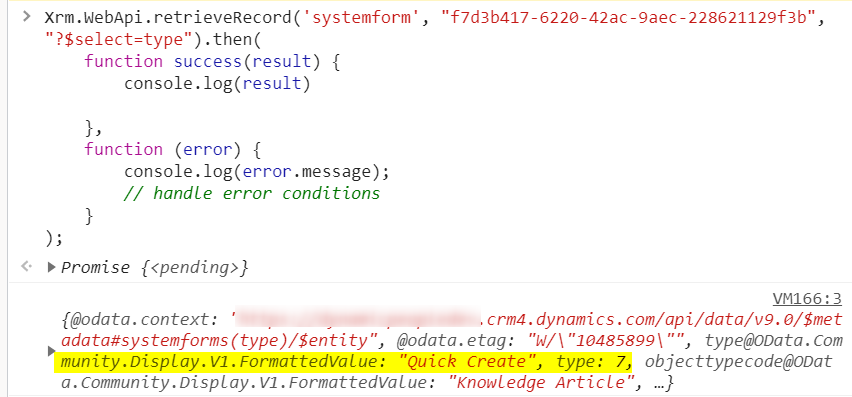
    7713.pastedimage1629971471641v1.png

    Good luck !

Under review

Thank you for your reply! To ensure a great experience for everyone, your content is awaiting approval by our Community Managers. Please check back later.

Helpful resources

Quick Links

Responsible AI policies

As AI tools become more common, we’re introducing a Responsible AI Use…

Neeraj Kumar – Community Spotlight

We are honored to recognize Neeraj Kumar as our Community Spotlight honoree for…

Leaderboard > Microsoft Dynamics 365 | Integration, Dataverse, and general topics

#1
Siv Sagar Profile Picture

Siv Sagar 93 Super User 2025 Season 2

#2
#ManoVerse Profile Picture

#ManoVerse 74

#3
Martin Dráb Profile Picture

Martin Dráb 64 Most Valuable Professional

Last 30 days Overall leaderboard

Product updates

Dynamics 365 release plans
